47
Chapter 1 Creating a Patch
Chapter 1
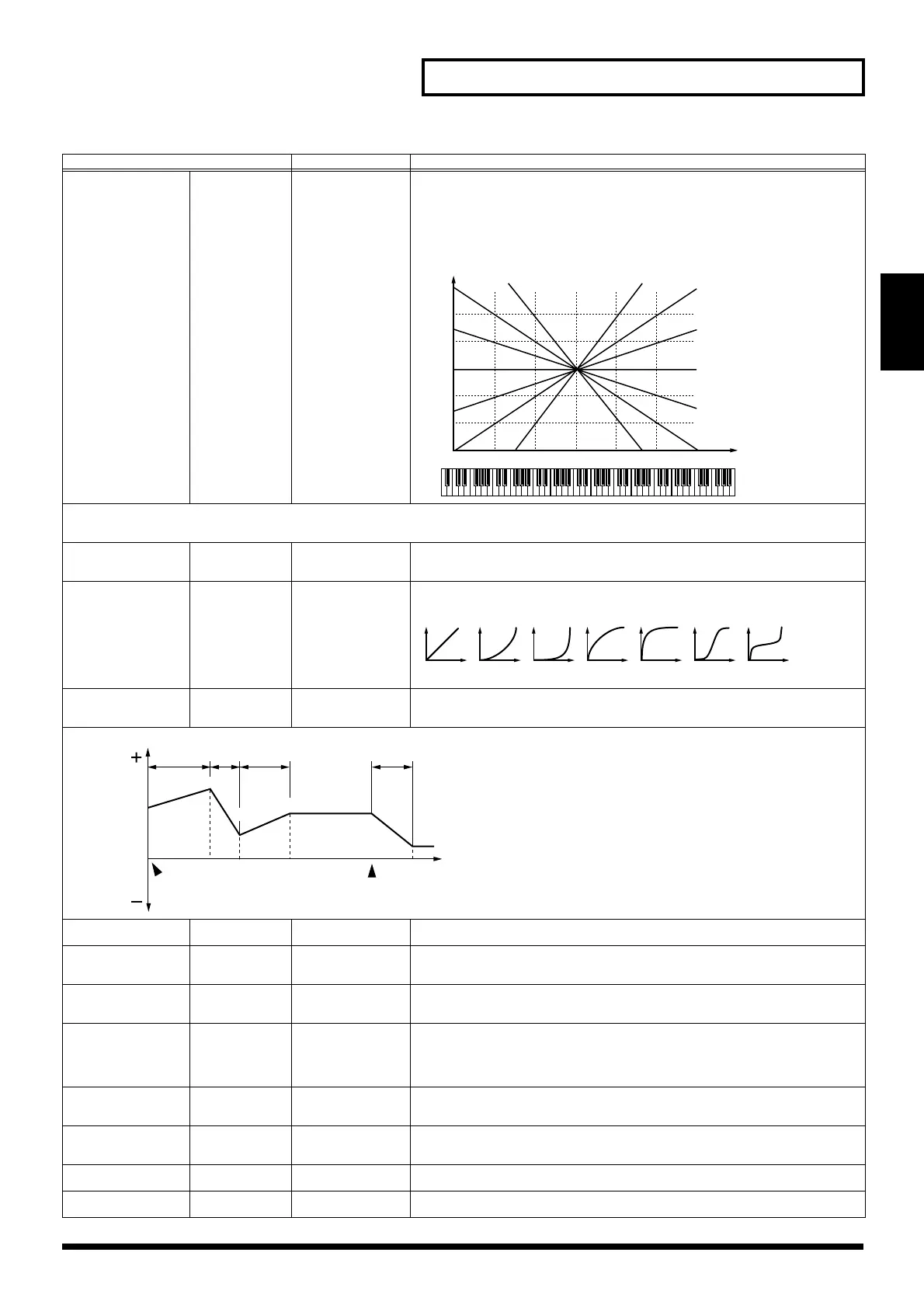
Cutof Keyfollow
Cutoff Keyfol-
low
-200–+200 Use this parameter if you want the cutoff frequency to change according to the key that’s
pressed. At Middle C (C4), the original Cutoff value is used. Positive (+) settings cause the
cutoff frequency to rise for notes higher than Middle C, and negative (-) settings cause the
cutoff frequency to fall for notes higher than Middle C. Higher settings produce greater
amounts of change to the original Cutoff setting.
TVF VELOCITY
This sets the amount of change to the original cutoff frequency produced in response to differences in velocity, as well as the velocity response curve and velocity’s
effect on Resonance.
Cutoff V-Sens Cutoff Frequen-
cy Velocity Sen-
sitivity
-63–+63 Sets the amount of change to the Cutoff setting to be applied as a result of changes in playing
velocity. With higher settings, there is a greater amount of change between softly and
strongly played notes. Negative (-) settings reverse the direction of change.
Cutoff V-Curve Cutoff Frequen-
cy Velocity
Curve
FIXED, 1–7 Chooses one of seven curves that determine how keyboard playing dynamics (velocity) in-
fluence the Tone’s cutoff frequency. When V-Curve is set to “FIXED,” the cutoff frequency
remains unchanged regardless of how hard or soft the keys are played.
Resonance V-Sens TVF resonance
velocity sensitiv-
ity
-63– +63 Use this parameter when you want velocity to affect the amount of Resonance. With higher
settings, there is a greater difference in the amount of Resonance between softly and strongly
played notes. Negative (-) values reverse the direction of the change.
TVF ENVELOPE
Envelope Depth TVF envelope
depth
-63– +63 This adjusts the amount of filter enveloping. Higher settings produce more change. Nega-
tive (-) values invert the effect of the TVF envelope.
Envelope V-Sens TVF envelope
velocity sensitiv-
ity
-63– +63 Use this parameter when you want keyboard playing dynamics (velocity) to affect the depth
of the TVF Envelope. With higher settings, there is a greater difference in the TVF envelope
depth when you play softly or hard. Negative (-) settings reverse the direction of change.
Envelope V-Crv TVF envelope
velocity curve
FIXED, 1–7 This selects one of seven velocity curves that determine how velocity will affect the depth of
the TVF Envelope. When set to “FIXED,” the TVF envelope depth remains unchanged, re-
gardless of how hard or soft you play.
Env Time Keyfl TVF Envelope
Time Keyfollow
-100–+100 Use this parameter when you want a note’s keyboard position to affect times T2–T4 of the
TVF envelope. Higher settings change the times by a greater amount as you move away
from Middle C (C4) - at Middle C, the original T1-T4 settings are in effect. Positive (+) set-
tings cause the times to shorten as you play above Middle C. Negative (-) settings cause the
times to lengthen as you play above Middle C.
Envelope V-T1 TVF Envelope
Time 1 Velocity
Sensitivity
-63–+63 Use this parameter when you want keyboard playing dynamics to affect T1 (Time 1) of the
TVF envelope. If you want T1 to be sped up for strongly played notes, set this parameter to
a positive (+) value. If you want it to be slowed down, set this to a negative (-) value.
Envelope V-T4 TVF Envelope
Time 4 Velocity
Sensitivity
-63–+63 Use this parameter when you want key release speed to affect T4 (Time 4) of the TVF enve-
lope. If you want T4 to be sped up for quickly released notes, set this parameter to a positive
(+) value. If you want it to be slowed down, set this to a negative (-) value.
Envelope L0–L4 TVF Envelope
Level 0–4
0–127 Specify the TVF envelope levels. These settings specify how the cutoff frequency changes at
each point, relative to the standard cutoff frequency.
Envelope T1–T4 TVF Envelope
Time 1–4
0–127 Specify the TVF envelope times. Higher settings lengthen the time until the next cutoff fre-
quency level is reached. (For example, T2 is the time over which L1 changes to L2.)
Parameter
Value Description
C4C3C2C1 C5 C6 C7
0
+50
+100
+200
-50
-100-200
o
-1
-2
+1
+2
Cutoff frequency
(Octave)
Key
T1 T2 T3 T4
L3
L1
L2
L4
L0
Cutoff
Frequency
Time
key is
pressed
key is
released
XV-5050_e.book 47 ページ 2003年6月27日 金曜日 午後3時14分


 To Next Page
 Loading...