English _47
●
NETWORK CONNECTION AND SETUP
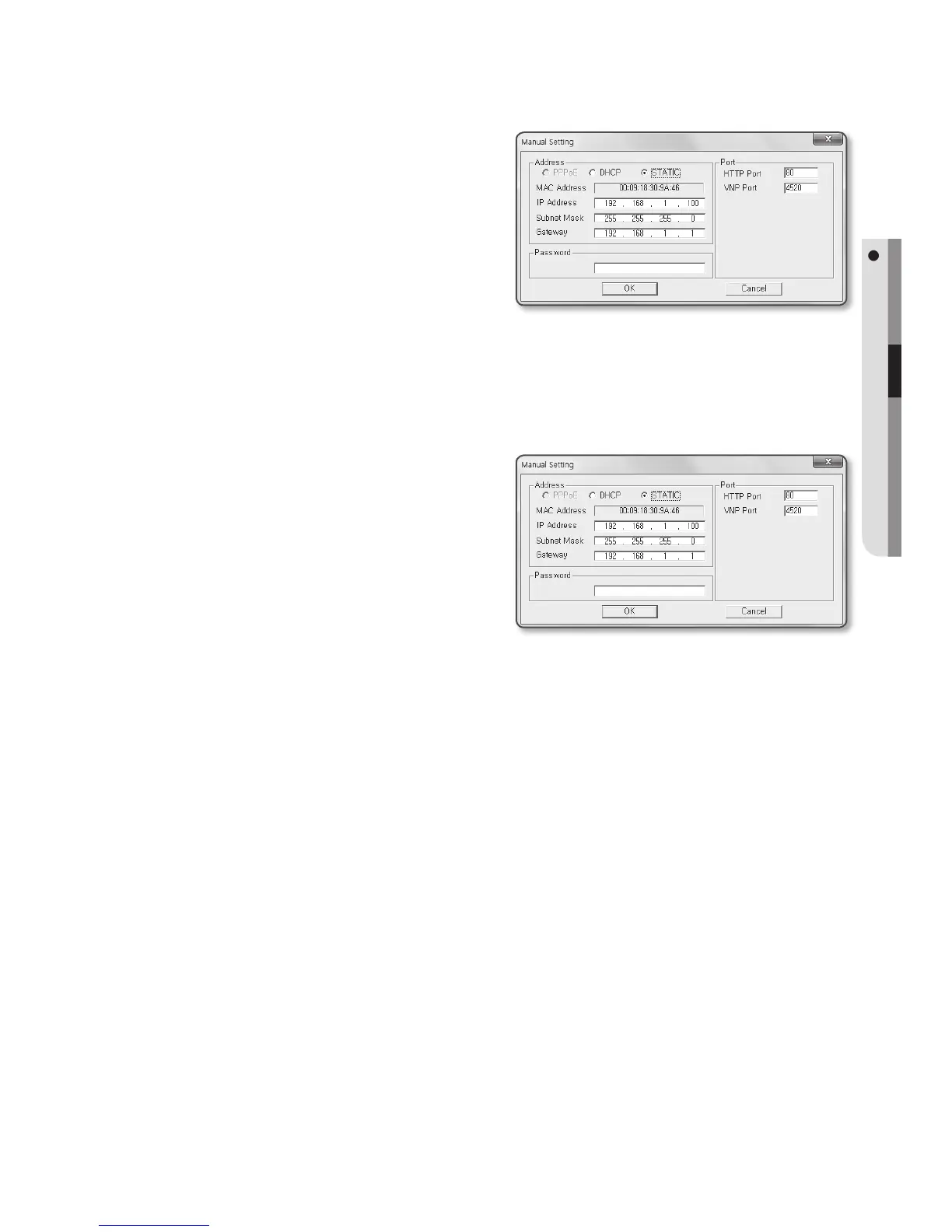
3. In the <Address> pane, provide the
necessary information.
• MAC (Ethernet) Address : The MAC
address imprinted on the camera
label is automatically displayed and
requires no user setting.
M
`
IP related parameters can be set only
when DHCP is not checked.
If not using a Broadband Router
For setting <IP Address>, <Subnet Mask>, and <Gateway>, contact your network
administrator.
4. In the <Port> pane, provide necessary
information.
• HTTP Port : Used to access the
camera using the Internet browser,
defaulted to 80.
• VNP Port : Used to control the video
signal transfer, defaulted to 4520.
5. Enter the password.
Enter the password of “admin” account, which was used to access the camera.
J
`
For the security purposes, you are recommended to use a combination of numbers, alphabets
uppercase and lowercase and special characters for your password.
`
If you want to change the password, refer to “Administrator password change” of the user
setup. (page 76)
6. Click [OK].
Manual network setup will be completed.


 To Next Page
 Loading...