Chapter 6 Editing 6-7 (E)
2
3
1
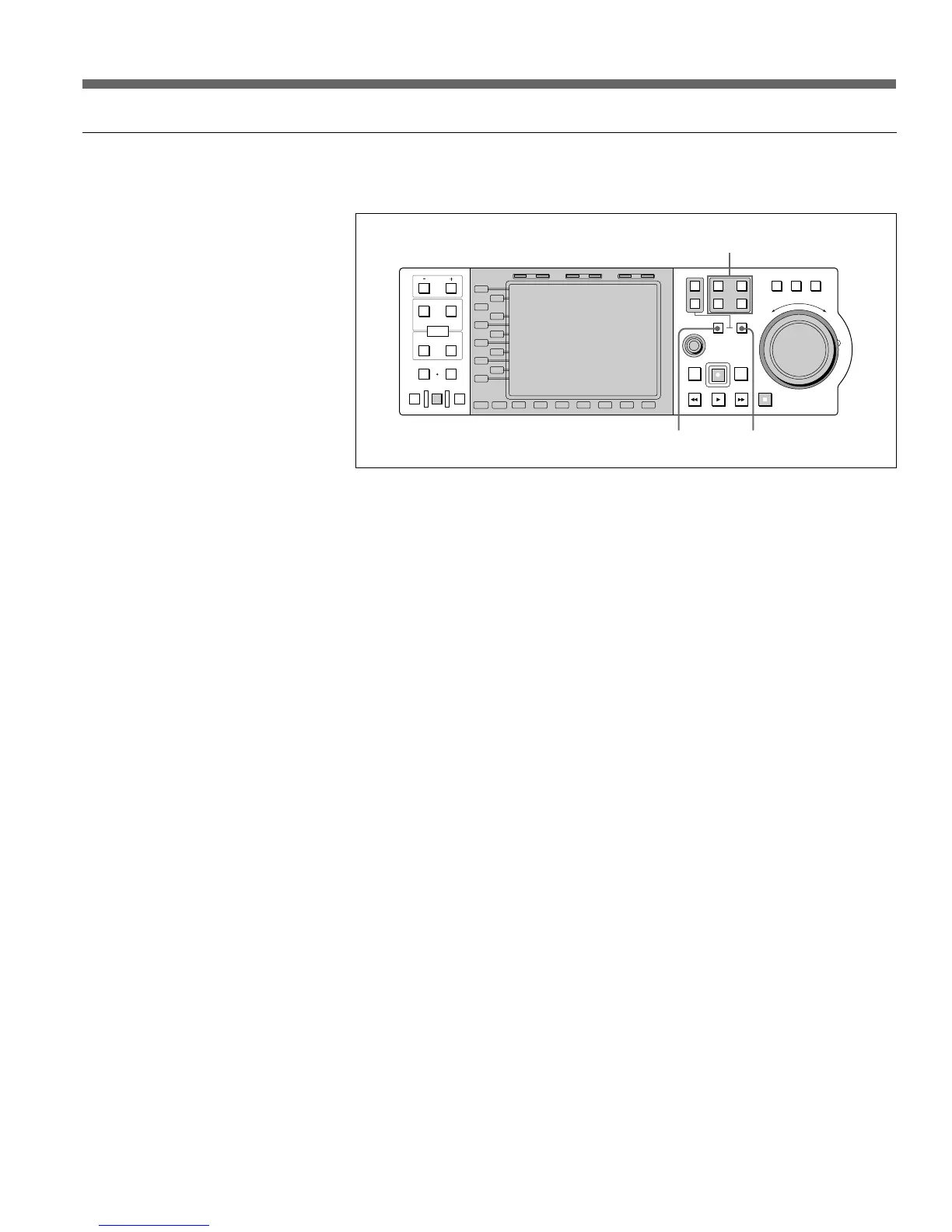
Specifying the device
Specify the device as follows.
IN OUT
PB EE PB
L1
L2
L3
L4
L5
L6
L7
L8
L9
L10
L11
B1 B2 B3 B4 B5 B6 B7
MODE SHIFT
IN
DMC EDIT
PREVIEW
AUTO EDIT
REVIEW
MEMORY
DELETE
OUT
TRIM
AUDI O
ENTRY
HOLD RESET TC/UB TIMER SEL
1
2
EXT
R1
R2/
P3
PORT SELECT
P1
SHUTTLE
MULTI
CONTROL
PLAYER
PREROLL EDIT
REW PLAY F. FWD STOP
REC
RECORDER
JOG VAR
R
E
V
E
R
S
E
F
O
R
W
A
R
D
R3/
P2
1 PORT SELECT buttons
2 RECORDER button
3 PLAYER button
• To specify the PLAYER device, press the PLAYER button (3) and one of
the PORT SELECT buttons (1) simultaneously (both the PLAYER button
and the pressed PORT SELECT button light). Once you specify the
PLAYER device, the port currently specified as the PLAYER port is
automatically selected by pressing the PLAYER button.
• The recorder device is fixed according to the application selected with the
MAV-777 Expansion menu item 317 PANEL MODE RECORDER.
• Editing cannot be performed when the BVE Editor is selected in Operation
mode.
• To specify the Recorder device, press the RECORDER button (2). The port
specified as the recorder device is automatically selected and the port and
RECORDER buttons light.
For details about the Expansion menu, see Section 3-4-3, “Contents of the Expansion
Menu” in Volume I of this operation manual.


 To Next Page
 Loading...