133
• • • • • • • • • • • • • • • • • • • • • • • • • • • • • • • • • • • • • • • • • • • • • • • • • • • • • • • • • • • • • • • • • • • • • • • • • • • • • • • • • • • • • • • • • • • • • • • • • • • • • • • • • • • • • • • • • • • • • • • • • • • • • • • • • • • •
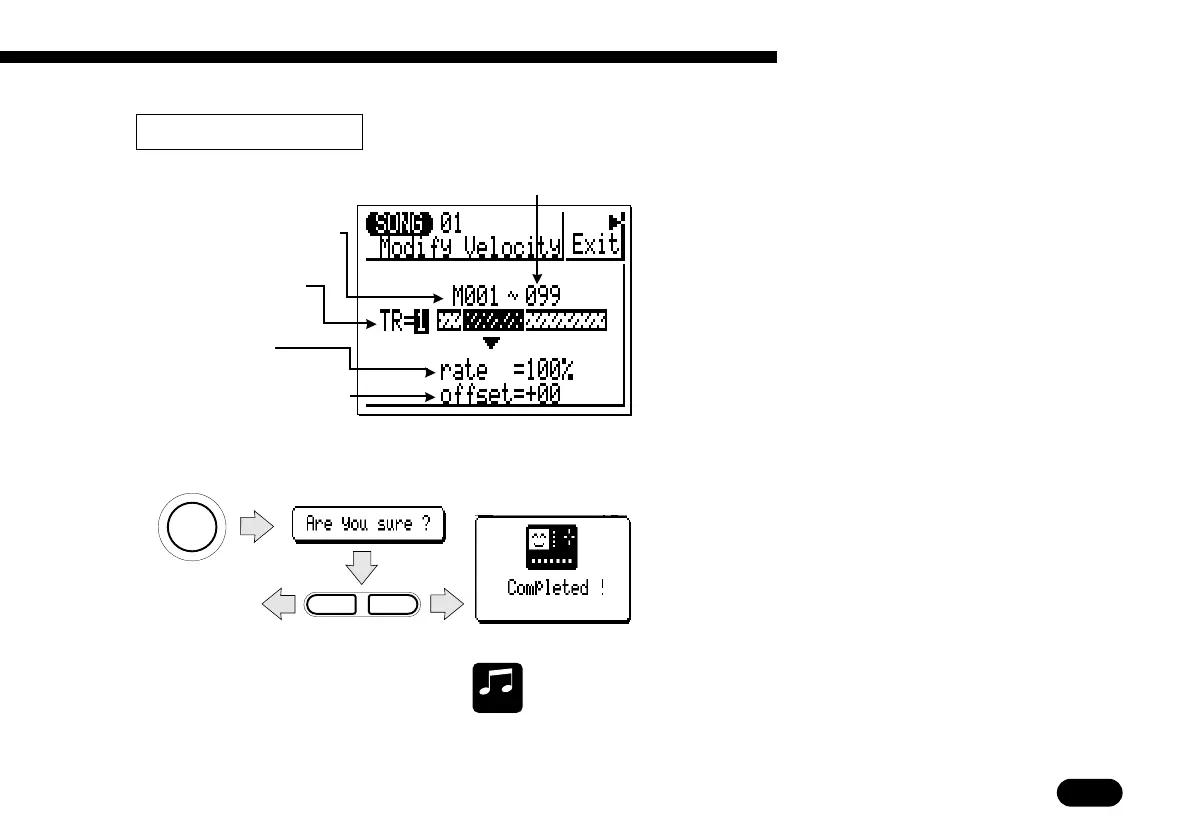
Increases or decreases the velocity values of
all notes in the specified track and range of
measures.
The “rate” parameter sets the ratio between
the lower and higher velocity values. A setting
of “100%” maintains the original relationship
between the notes, lower values produce a nar-
rower dynamic range, and higher values produce
a broader dynamic range.
The “offset” parameters determines the
amount of velocity change. “−” settings reduce
the velocity while “+” settings increase the ve-
locity.
After setting the parameters as required, press
[
ENTER
]
. “Are you sure?” will appear on the
display. Press
[
+1/YES
]
to confirm that you
want to go ahead with the modify velocity opera-
tion, or press
[
−1/NO
]
to cancel.
MUSICAL
NOTE
The Modify Velocity job is a great way to “soften” the sound of material
that has too great a variation between the softest and loudest notes, or,
conversely, to add extra punch to dull-sounding material. Experiment with
the parameters to get a feel for what they do.
Last measure in range to
be modified (001 … 999).
–
1
+
1
NO YES
ENTER
Press
[
−
1/NO
]
to cancel.
7 Creating a Complete Song
10: Modify Velocity
First measure in range to
be modified (001 … 999).
Track (TR1 … TR4).
Velocity ratio
(000% … 200%).
Amount of velocity change
(
−
99 … +00 … +99).


 To Next Page
 Loading...