PREPARATIONS ➤ Connecting other devices En 31
Connecting recording devices
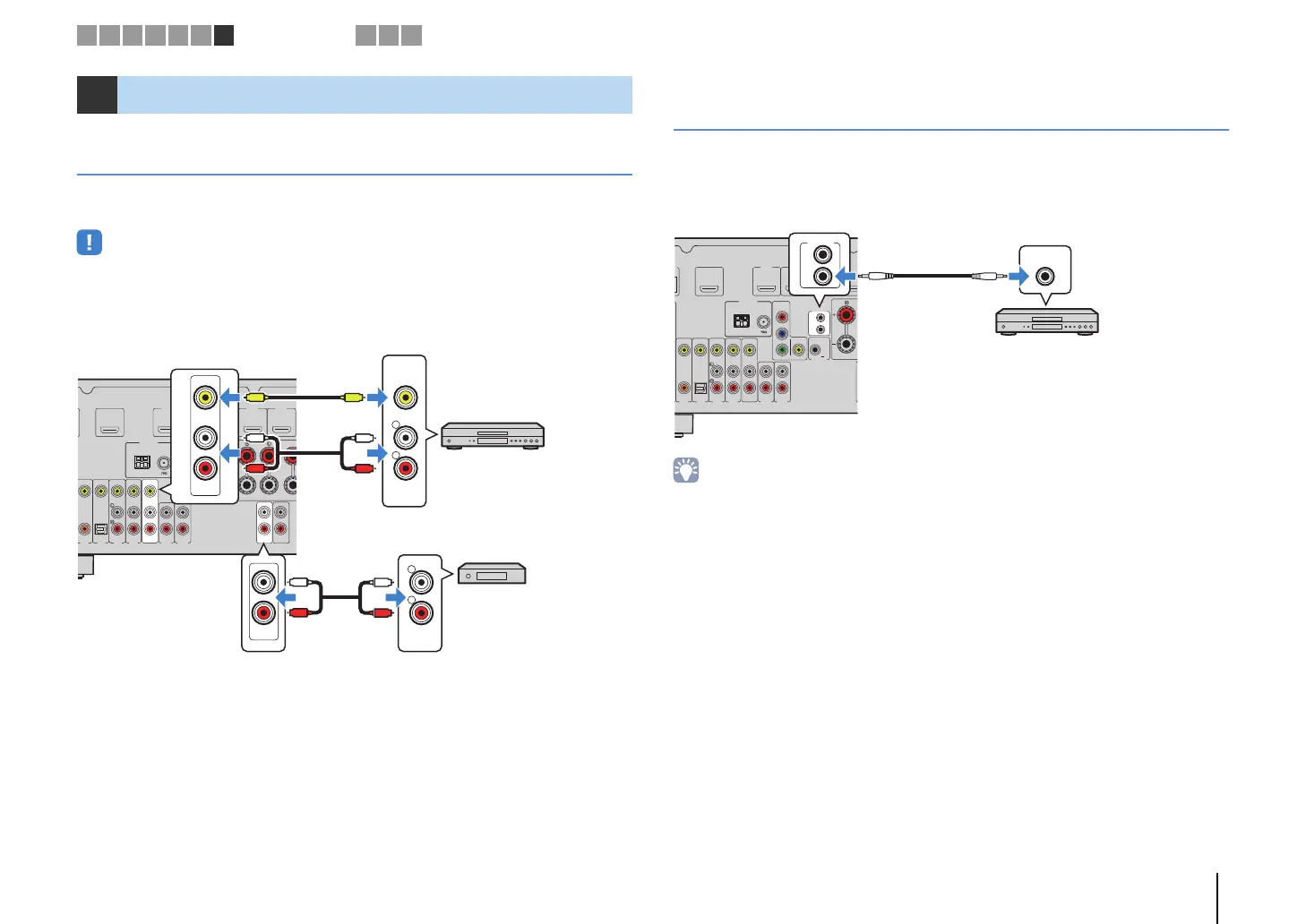
You can connect video/audio recording devices to the AV OUT and AUDIO OUT jacks.
These jacks output analog video/audio signals selected as the input.
• To copy video/audio from a video device, connect the video device to the AV 5–6 jacks of the unit.
• To copy audio from an audio device, connect the audio device to the AV 5–6 jacks or AUDIO 1–2 jacks of
the unit.
• Be sure to use the AV OUT and AUDIO OUT jacks only for connecting recording devices.
Connecting a device that supports
SCENE link playback (remote connection)
If you have a Yamaha product that supports SCENE control signal transmission, you
can operate it remotely by connecting it to the REMOTE OUT jack, using a monaural
mini-jack cable, and linking with the SCENE function (p.40).
• If you connect a Yamaha product that supports the SCENE link playback function, to the REMOTE OUT
jack, you can remotely start playback on it by linking with a scene selection (p.40). To enable the SCENE
link playback function, specify the device type in “Device Control” (p.75) in the “Scene” menu.
• You can also connect an infrared signal receiver/emitter to operate devices in the main zone from Zone2
(p.65).
7 Connecting other devices
FRONT CENT
AV 3 AV 4 AV 5
AUDIO 1 AUDIO 2
AV
OUT
AV 6
VIDEO
OPTICAL
(
TV
)
COAXIAL
COMPONENT
VIDEO
VIDEO
MONITOR OUT
OUT
IN
REMOTE
TRIGGER OUT
AUDIO
OUT
ZONE 2
OUT
P
B
Y
P
R
HDMI 1
(
BD/DVD
)
HDMI 4 HDMI 5HDMI 3HDMI 2
ANTENNA
(
RADIO
)
HDMI
OUT
ARC
FM
AM
12V
0.1A
R
L
AUDIO
R
L
AUDIO
AUDIO
OUT
AV
OUT
VIDEO
V
V
L
R
L
R
L
R
L
R
The unit (rear)
AV OUT jacks
Video/audio input
Video recording
device
Audio recording
device
Audio inputAUDIO OUT jacks
FR
AV 3 AV 4 AV 5
AUDIO 1 AUDIO 2
AV
OUT
AV 6
VIDEO
OPTICAL
(
TV
)
COAXIAL
COMPONENT
VIDEO
VIDEO
MONITOR OUT
OUT
IN
REMOTE
TRIGGER OUT
P
B
Y
P
R
HDMI 1
(
BD/DVD
)
HDMI 4HDMI 3HDMI 2
ANTENNA
(
RADIO
)
HDMI
OUT
ARC
FM
AM
12V
0.1A
IN
OUT
REMOTE
REMOTE
IN
The unit
(rear)
REMOTE OUT jack
Yamaha product
(such as a DVD player)
Remote input
1 2 3 4 5 6 7
Other connections
8 9 10



 To Next Page
 Loading...