78 en | Web Client Software Video Recorder 630/650 Series
F.01U.169.663 | v2.0 | 2012.02 Installation and Operation manual Bosch Security Systems
7.3 Introducing the browser window
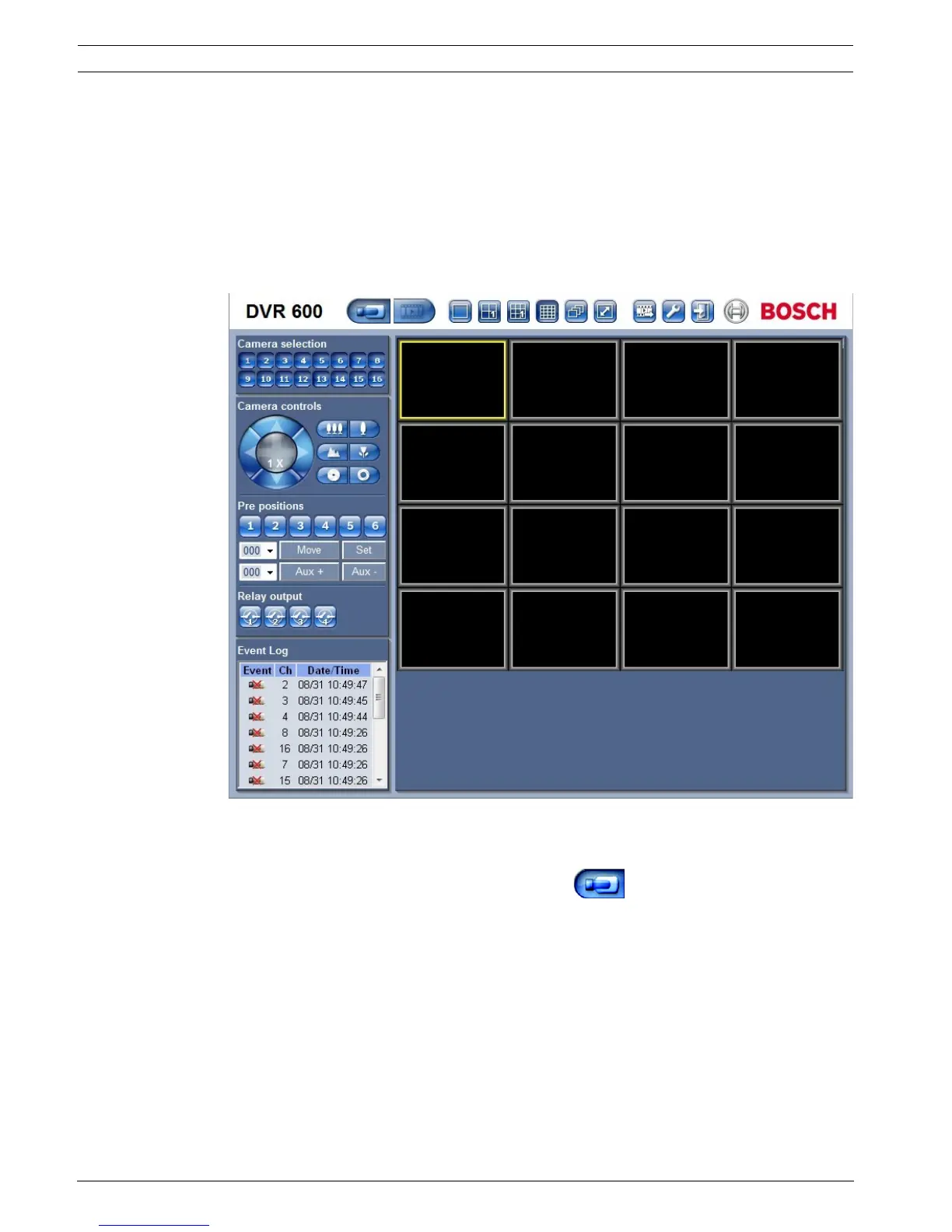
The browser window is built up of three main areas:
– A mode bar across the top, containing buttons for changing between live and playback,
export, system settings, and buttons to toggle video between full screen, quad, multi-
screen or sequence.
– A vertical side bar that changes based on the context of the Mode Bar.
– The work space, showing video in the Live or Playback context, the export menu in the
Export context, and system menus in the Configuration context.
Figure 7.2 Web Client - Live
7.3.1 Live mode
The live video window is shown by clicking the Live button. On this screen, the user
can:
– view live video
– select different multiscreen displays
– assign cameras to cameos
– control ptz cameras
– monitor unit status and alarm conditions


 To Next Page
 Loading...