Setting Up the Machine 11
1
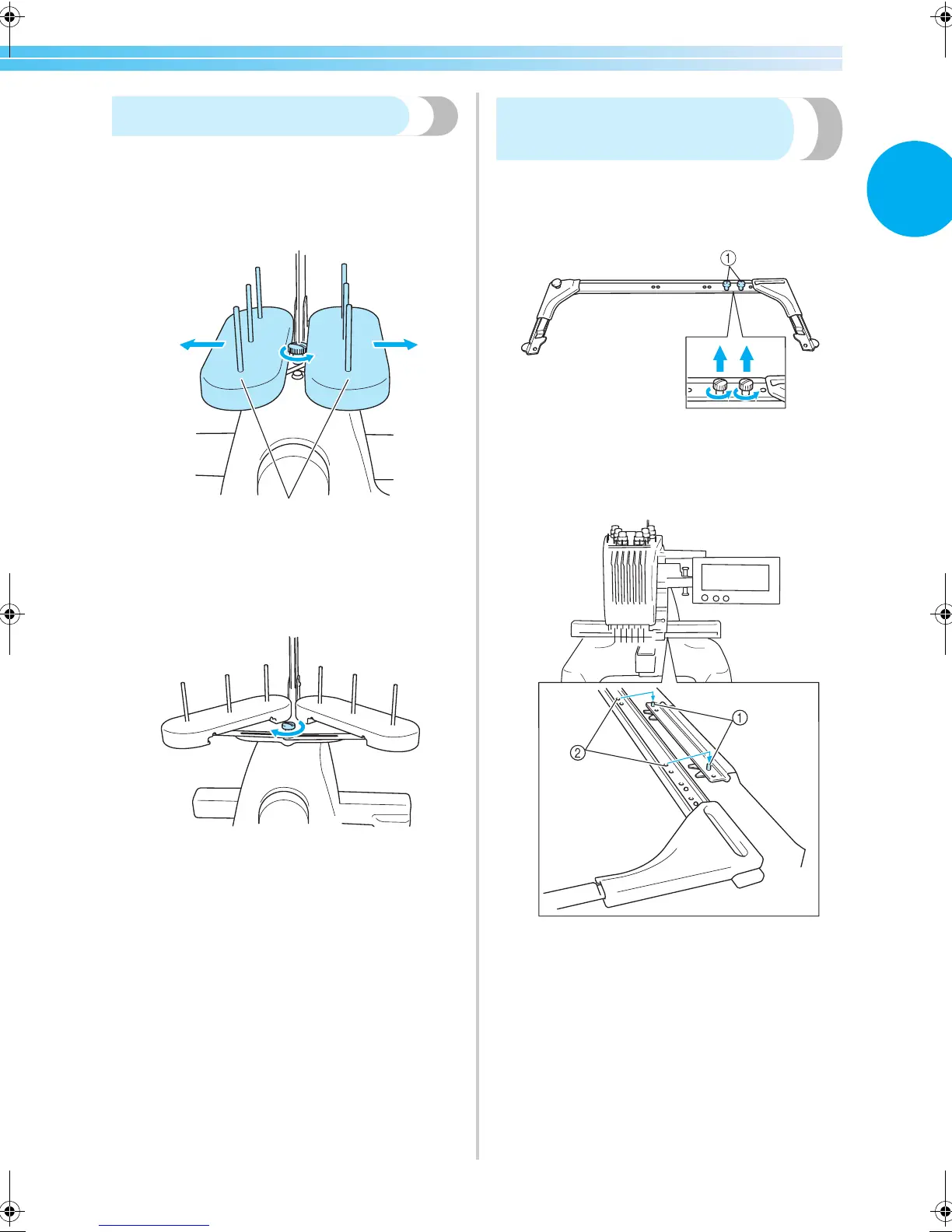
Positioning the spool stand
Secure the spool stand in the embroidering position.
1
Loosen the thumb screw, and then open up
the spool stand to the left and right.
1 Thumb screw
2 Spool stand
2
After the spool stand is fully opened up,
tighten the thumb screw.
X Secure the spool stand in the opened
position.
Attaching the embroidery
frame holder
Attach the embroidery frame holder to the carriage.
1
Remove the two thumb screws of the
embroidery frame holder.
1 Thumb screws
2
Align the holes in the embroidery frame
holder with the pins on the frame-mounting
plate of the carriage.
1 Pins on the frame-mounting plate
2 Holes in the embroidery frame holder
2
1
Sapphire_brother.book Page 11 Thursday, November 17, 2005 2:44 PM



 To Next Page
 Loading...












