EasyManua.ls Logo

Casio Privia PX-S5000 - Page 67

Casio Privia PX-S5000
72 pages
Print Icon
To Next Page IconTo Next Page
To Previous Page IconTo Previous Page
Loading...
EN-66
Reference
Changing Settings Such as the Sound Mode
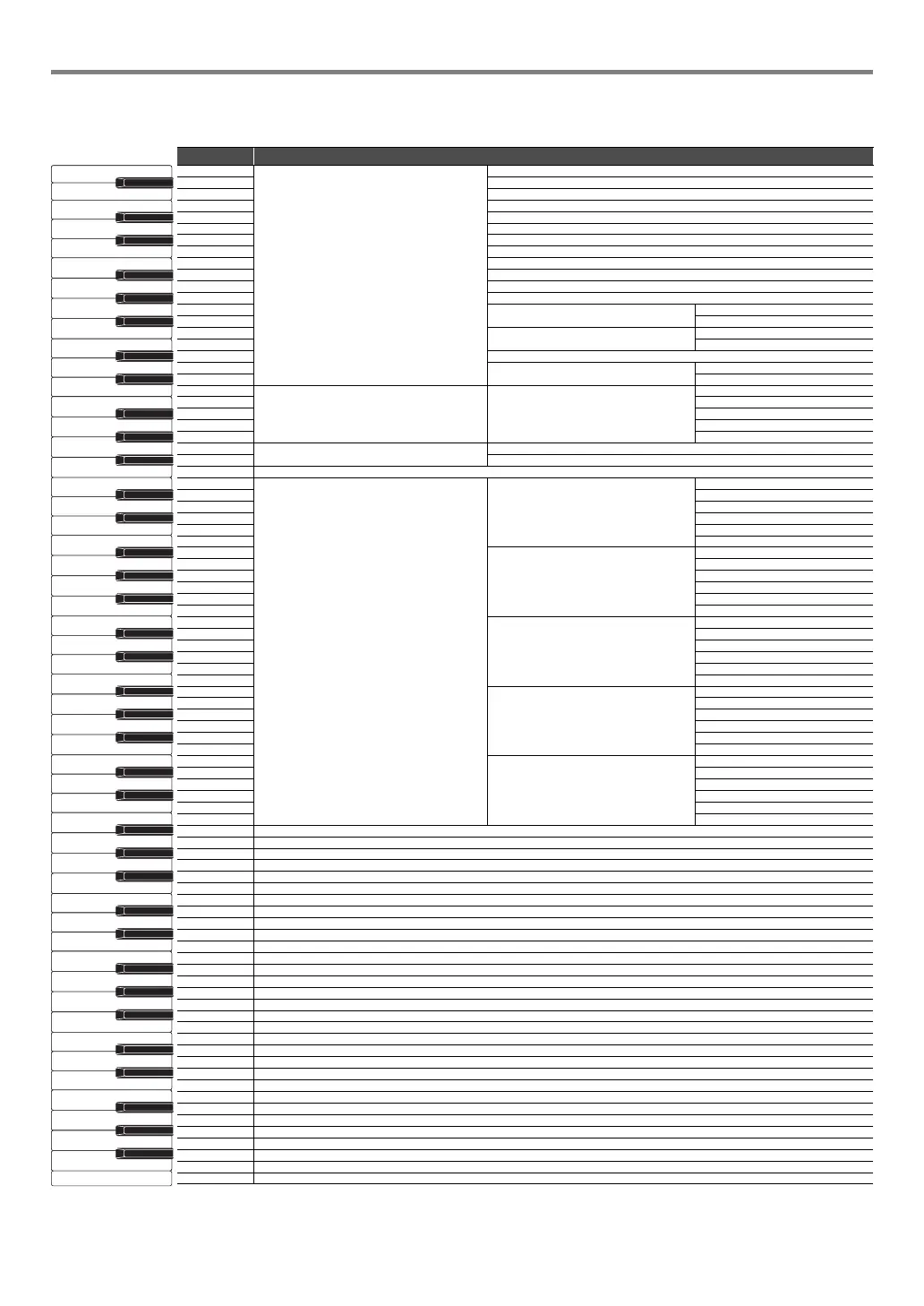
Select a key while holding down the 4 SOUND MODE.
Note name Assigned function
A0
Sound Mode Effects
N.Y.Club
B}0Opera Hall
B0 Berlin Hall
C1 British Stadium
C{1 Room 1
D1 Room 2
E}1 Room 3
E1 Large Room
F1 Hall 1
F{1Hall 2
G1 Hall 3
A}1 Stadium
A1
Hall Simulator/Reverb depth
B}1 +
B1
Wireless Hall Simulator/Reverb depth
C2 +
C{2
D2
Surround Type
1
E}2 2
E2
Chorus Chorus
Tone
F2 1
F{2 2
G2 3
A}2 4
A2
Brilliance
B}2+
B2
C3
Acoustic Simulator
String Resonance
Tone
C{3 off
D3 1
E}3 2
E3 3
F3 4
F{3
Damper Resonance
Tone
G3 off
A}3 1
A3 2
B}3 3
B3
4
C4
Damper Noise
Tone
C{4 off
D4 1
E}4 2
E4 3
F4 4
F{4
Key On Action Noise
Tone
G4 off
A}4 1
A4 2
B}4 3
B4 4
C5
Key Off Action Noise
Tone
C{5 off
D5 1
E}5 2
E5 3
F5 4
F{5
G5
A}5
A5
B}5
B5
C6
C{6
D6
E}6
E6
F6
F{6
G6
A}6
A6
B}6
B6
C7
C{7
D7
E}7
E7
F7
F{7
G7
A}7
A7
B}
7
B7
C8
A0
C1
C2
C3
C4
C5
C6
C7
C8

Table of Contents

Related product manuals