30
3
Setti g
Return Setting
Airflow Direction Range
Unit select
Air range
Standard
Unit No.
0
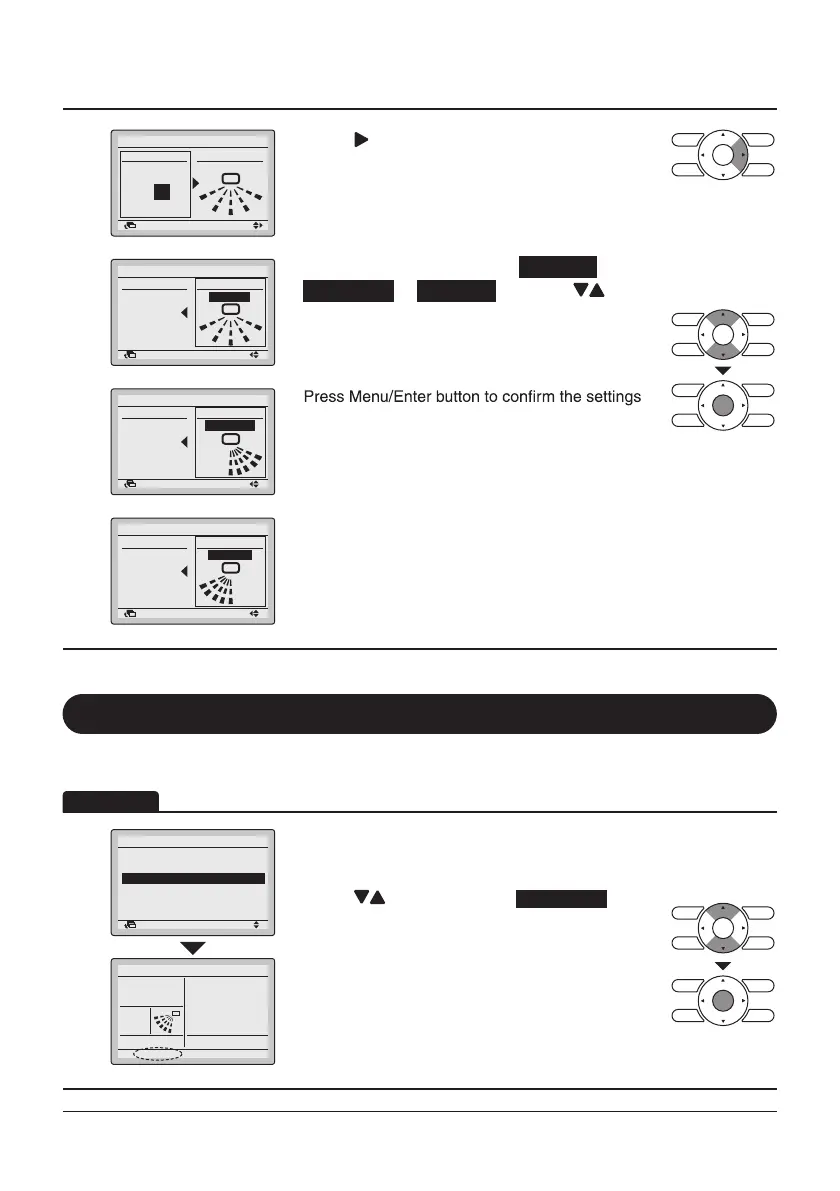
• Press “ ” button to select air range setting.
Setti g
Return Setting
Airflow Direction Range
Unit select Air range
Unit No.
Standard
0
• Set the desired air range from Standard ,
Right Blow or Left Blow by using “ ”
buttons.
Setti g
Return Setting
Airflow Direction Range
Unit select Air range
Right Blow
Unit No.
0
•
and return to the Basic screen.
Setti g
Return Setting
Airflow Direction Range
Unit select
Air range
Unit No.
Left Blow
0
Quick Start (SPLIT system only)
1
Return Setting
Main Menu
Circulation Airflow
Individual Air Direction
Quick Start
1/2
Cool
Quick Star t
• While operating in Cooling, Heating, or Auto mode,
display the Main Menu screen (Refer to
page25).
• Press “
” buttons to select
Quick Start
on the
Main Menu screen.
Press Menu/Enter button to return to the Basic
screen.
• “Quick Start” will appear on the Basic screen.
• Quick Start is now on.
Operation
Quick Start On
Set to
28°C
Ventilation
Energy Saving Options
Schedule


 To Next Page
 Loading...










