38
1
Return Setting
Energy Saving Options
Sensing Sensor (Stop)
Setpoint Auto Reset
1/2
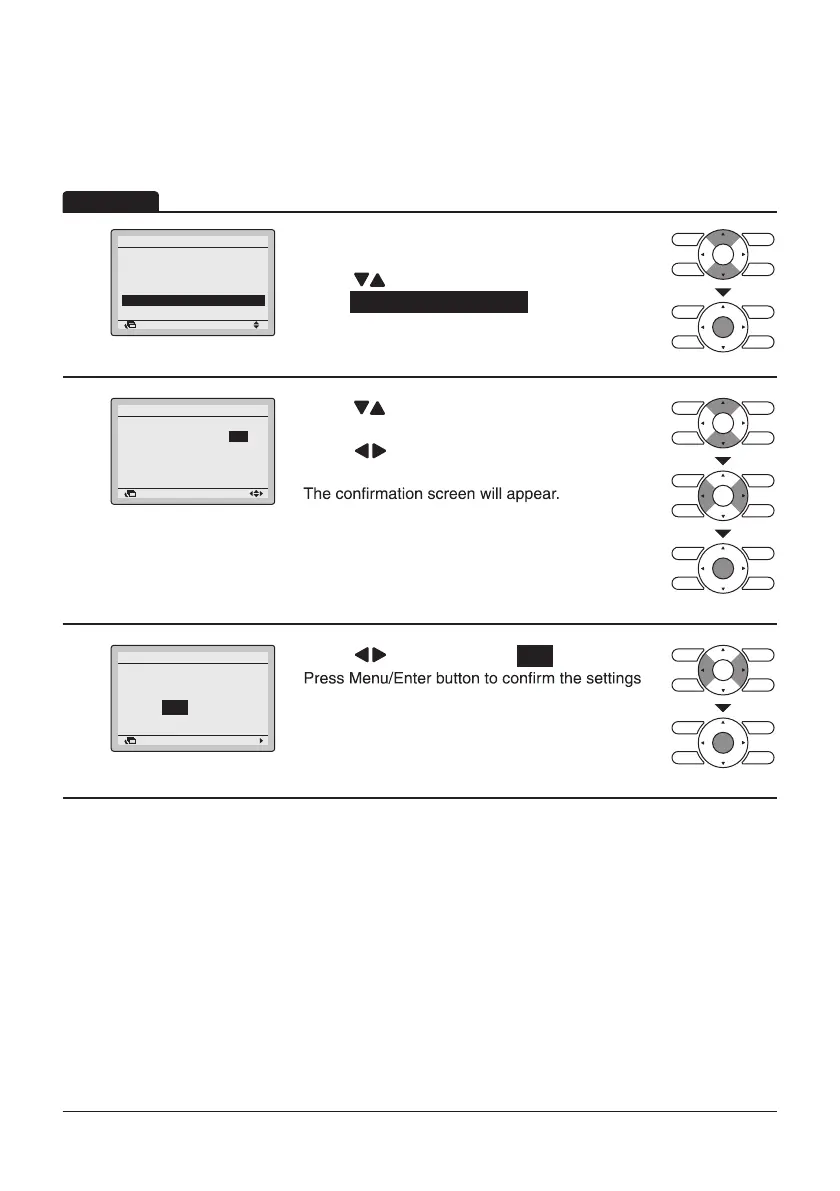
• Display the Energy Saving Options screen (Refer
to page34).
• Press “
” buttons to
select Sensing Sensor (Stop) .
Press Menu/Enter button to display the Sensing
Sensor (Stop) screen.
2
Return Setting
Sensing Sensor (Stop)
Unocc Stop On/Off:
Unocc Stop Time: 1 hours
OFF
• Press “ ” buttons to set the saving energy
operation when the sensor detects the absence.
• Press “
” buttons to move the cursor.
Press Menu/Enter button after selecting the item.
3
Setting
Save the settings?
Sensing Sensor (Stop)
Yes No
Return
• Press “ ” buttons to select Yes .
and return to the Basic screen.
Operation
This function cannot be used at the time of group control.
In case of the simultaneous operation system, the system is controlled by the sensing sensor
mounted in the master indoor unit.
Sensing Sensor (Stop)
Energy Saving List
Setpoint Range
Setback Condition
Sensing Sensor (Low)


 To Next Page
 Loading...










