26
To “Conguring the settings” (P.8)
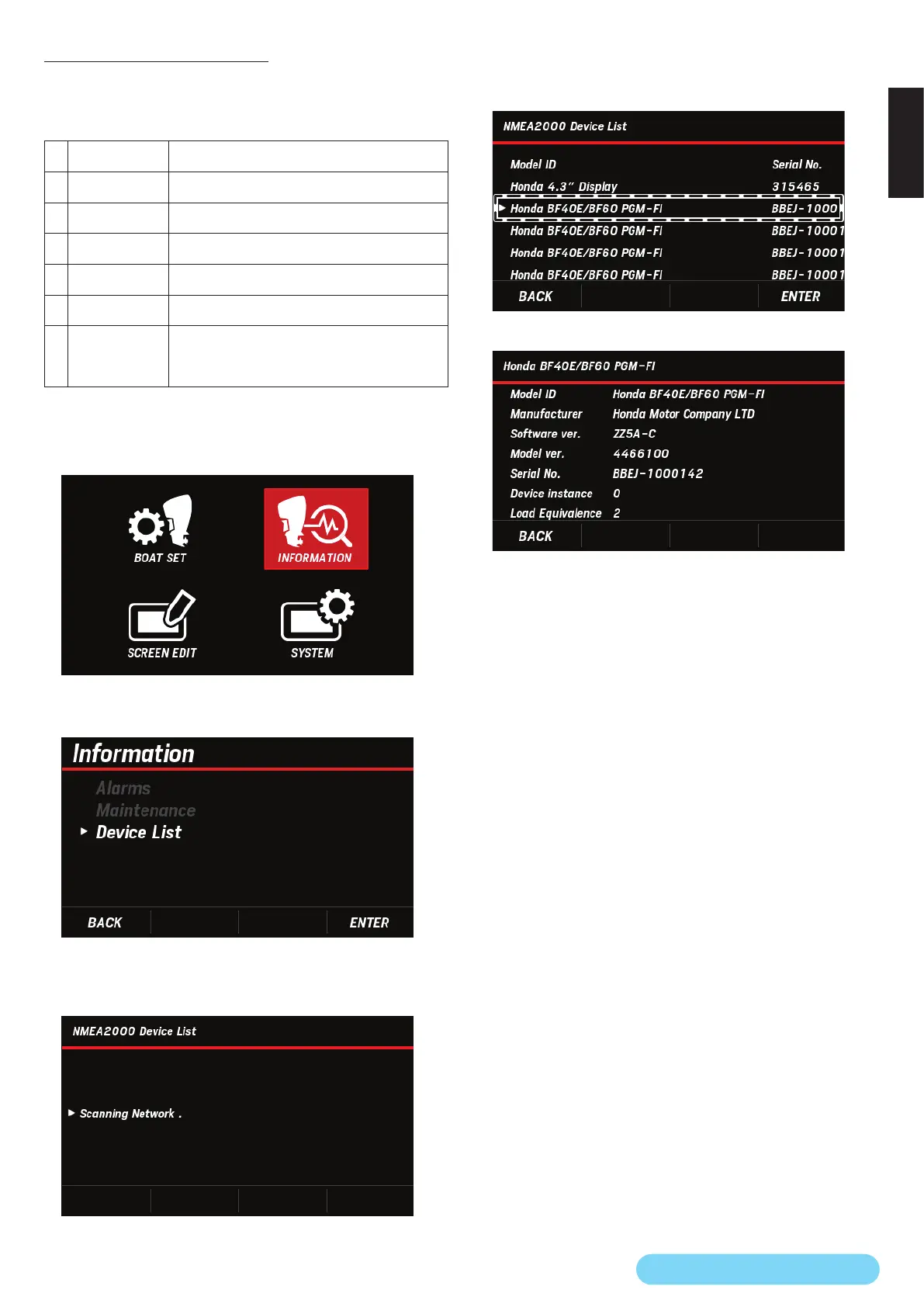
(13) NMEA2000 Device List
You can check the following information about the devices
connected to NMEA2000, including the Multi-Function Display
currently used.
1
Model ID Product name
2
Manufacturer Manufacturer name
3
Software ver. Software version
4
Model ver. Model version
5
Serial No. Serial number
6
Device ins. Setting instance
7
Load
Equivalence
Integer value (LEN) that represents the current
consumed from the NMEA2000 network
1LEN = 50 mA
1. Use the [
∧
] or [
∨
] button to select INFORMATION and
press the [ENTER] button.
2. Use the [
∧
] or [
∨
] button to select Device List and press
the [ENTER] button.
• After you perform the above operation, the following
screen appears, and the connected device information is
retrieved.
3. Use the [
∧
] or [
∨
] button to select the device on which
you want to check the information and press the [ENTER]
button.
4. Check the selected NMEA2000 device information.


 To Next Page
 Loading...