37
To “Conguring the settings” (P.8)
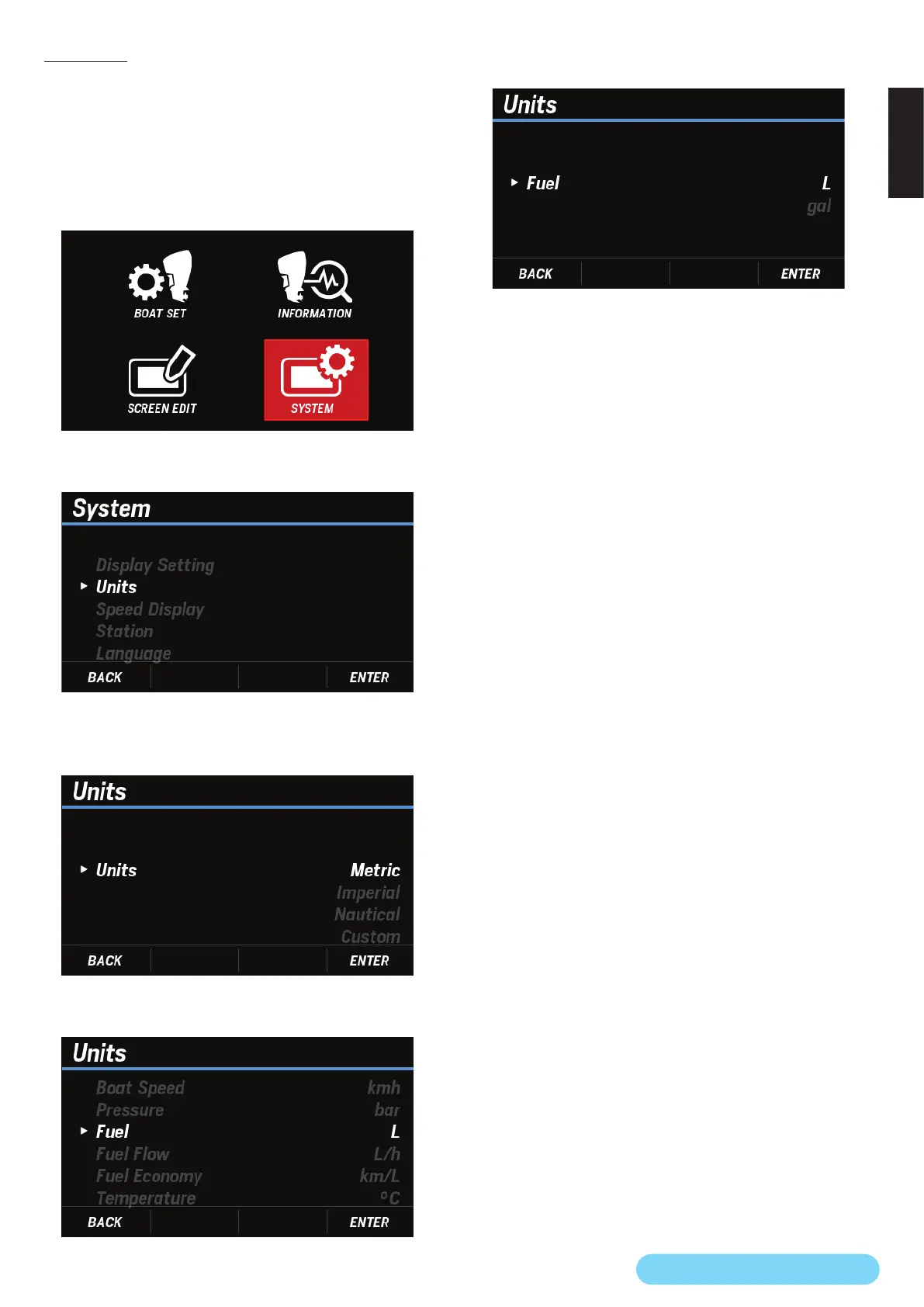
(21) Units
You can change the display units for each item.
The following options are available: Metric, Imperial,
Nautical, and Custom.
If Custom is selected, you can select the units for each item.
1. Use the [
∧
] or [
∨
] button to select SYSTEM and press the
[ENTER] button.
2. Use the [
∧
] or [
∨
] button to select Units and press the
[ENTER] button.
3. Use the [
∧
] or [
∨
] button to select any display units and
press the [ENTER] button.
• If Custom is selected, continue with step 4.
4. Use the [
∧
] or [
∨
] button to select the item for which you
want to change the units and press the [ENTER] button.
5. Use the [
∧
] or [
∨
] button to select any display units and
press the [ENTER] button.


 To Next Page
 Loading...