Part No. 960-100941R_Rev. A © 2016 JCM American Corporation
October, 2016 JCM® Training Overview TBV Transaction Based Validator
CLEANING PROCEDURES
To clean the TBV Unit, gently wipe the Sensors, Rollers and Belts using a
clean, dry (or slightly damped with soap solution) lint-free Microfiber cloth.
Sensor and Roller Cleaning Procedure
1. Turn the TBV Unit power OFF.
2. Remove the TBV Unit from the Host Machine.
3. Open the TBV Unit, BNF, Transport, and Validation sections.
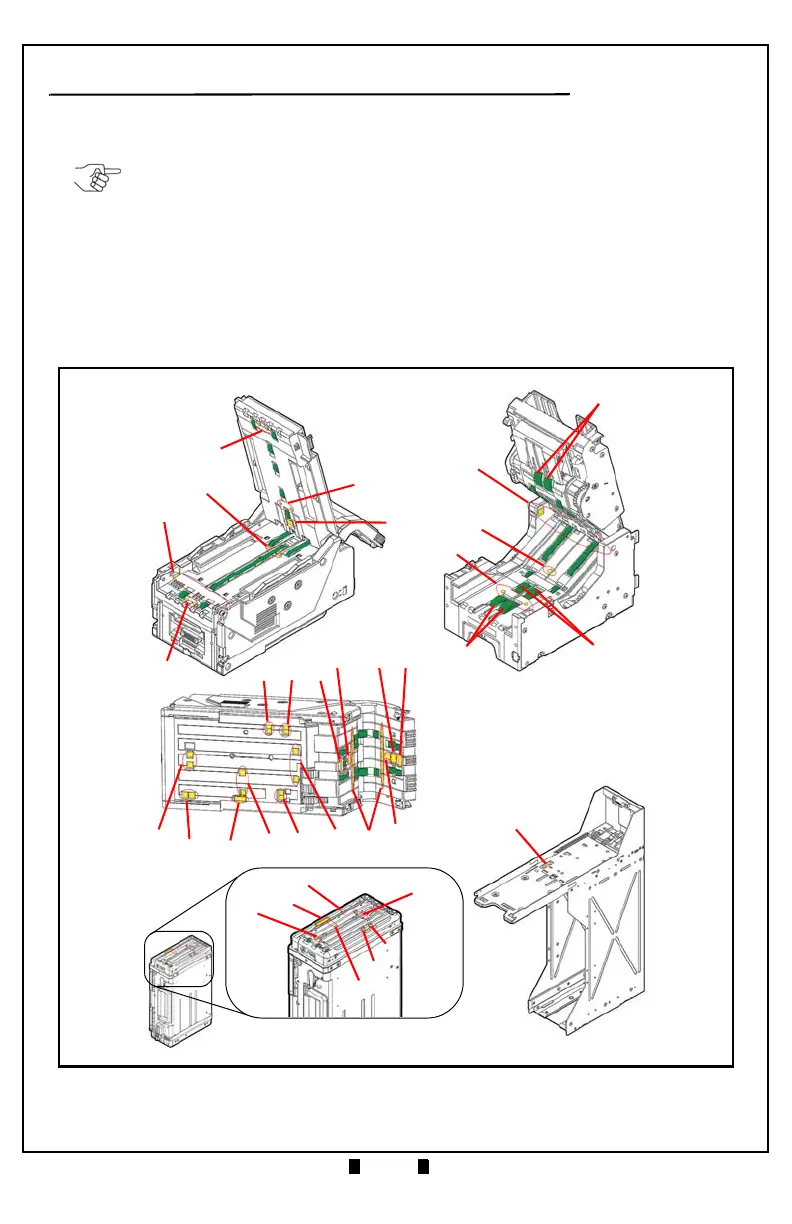
4. Clean the Lens of each Sensor. Refer to Figure 3 for the TBV Sensor Locations
and Table 8 for each Sensor’s cleaning method.
NOTE: When cleaning the TBV Unit, DO NOT use alcohol, solvents, citrus-based
cleaners or scouring agents. These items may cause damage to the Sensors or
Rollers. Use only a mild, non-abrasive detergent or cleaning solution.
1
2
3
4
8
10
11
9
6
5
7
12
13
18
17
14
16
15
20
19
21
22
Validation Section
Transport Section
(Upper Door Open)
BNF Section
(Upper Portion Open)
(Lower End Open)
23
31
32
33
34
Cash Box
Frame Section
24
Figure 3 TBV Sensor and Roller Cleaning Locations


 To Next Page
 Loading...






