4
ENGLISH
ABOUT LG PROJECTOR
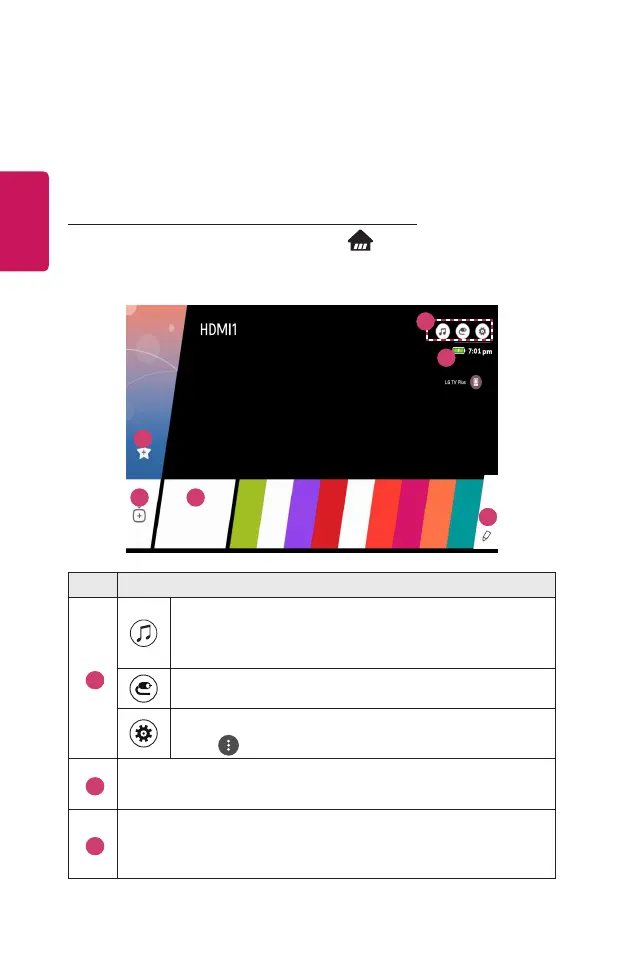
Home Tutorial
Using the Home feature of the LG Projector
You can open the Home screen by pressing the button on your remote
control. You can combine frequently used apps on a single screen and use
whichever you want at any time.
2
3
4 5
6
1
Description
1
You can use your projector’s other features while listening to
music.
• This feature is available on certain models only.
You can switch to another input or change your settings.
You can easily change the settings of your projector.
Select for advanced setup.
2
Displays the remaining battery life.
• This feature is available on certain models only.
3
Add content you like to use, easily and quickly. (This feature is not
supported in some countries. When you select the feature, you will be
directed to the LG Content Store.)



 To Next Page
 Loading...










