25
Step 1 Turn the Camera On and Select A (Auto) Mode
Basic Photography and Playback: Auto Mode
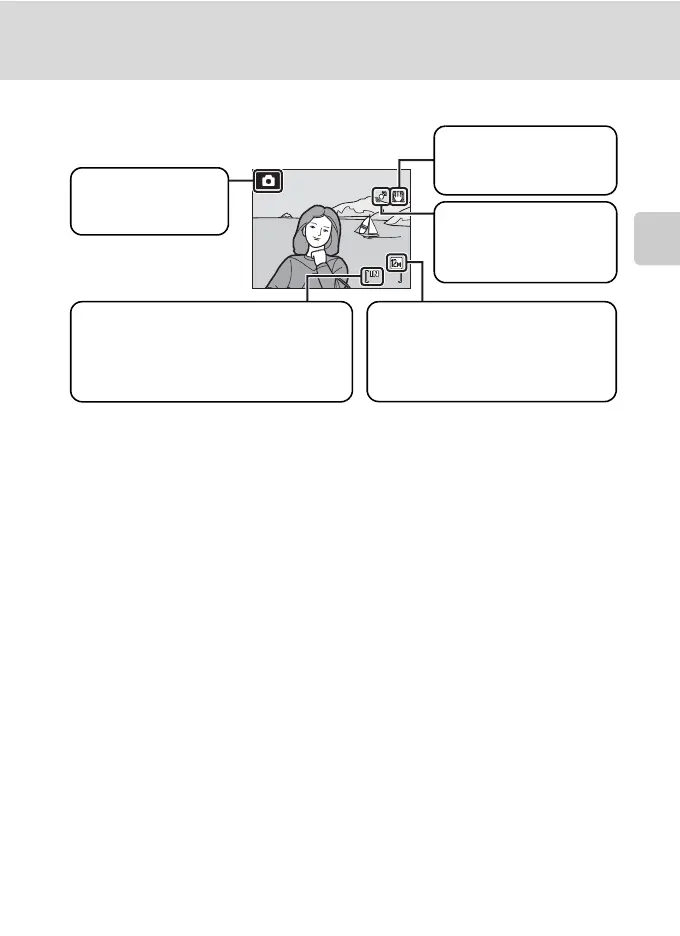
Indicators Displayed in A (Auto) Mode
The indicators and photo info displayed during shooting and playback will turn off
after a few seconds (A 123).
If the monitor is turned off in standby mode to save power, press the power switch
or the shutter-release button to reactivate it (A 128).
D Functions Available in A (Auto) Mode
In A (auto) mode, macro mode (A 35) and exposure compensation (A 36) can be applied and
pictures can be taken using the flash mode (A 32) and self-timer (A 34). Pressing the d button
in A (auto) mode allows you to specify settings for all shooting menu options (A 95).
D Vibration Reduction and Motion Detection
• See Vibration reduction (A 125) or Motion detection (A 126) in the setup menu (A 116)
for more information.
• Set vibration reduction to Off when using a tripod to stabilize the camera during shooting.
13
13
Shooting mode
A displayed in A
(auto) mode.
Image mode
The combination of image size and
image quality (compression) is
displayed. The default setting is L
Normal (4,000×3,000).
Motion detection icon
Reduces the effects of
subject movement and
camera shake.
Internal memory indicator
Pictures will be recorded to internal memory
(approx. 45 MB). When a memory card is
inserted,
C
is not displayed and pictures will
be recorded to the memory card.
Vibration reduction icon
Reduces the effects of
camera shake.


 To Next Page
 Loading...












