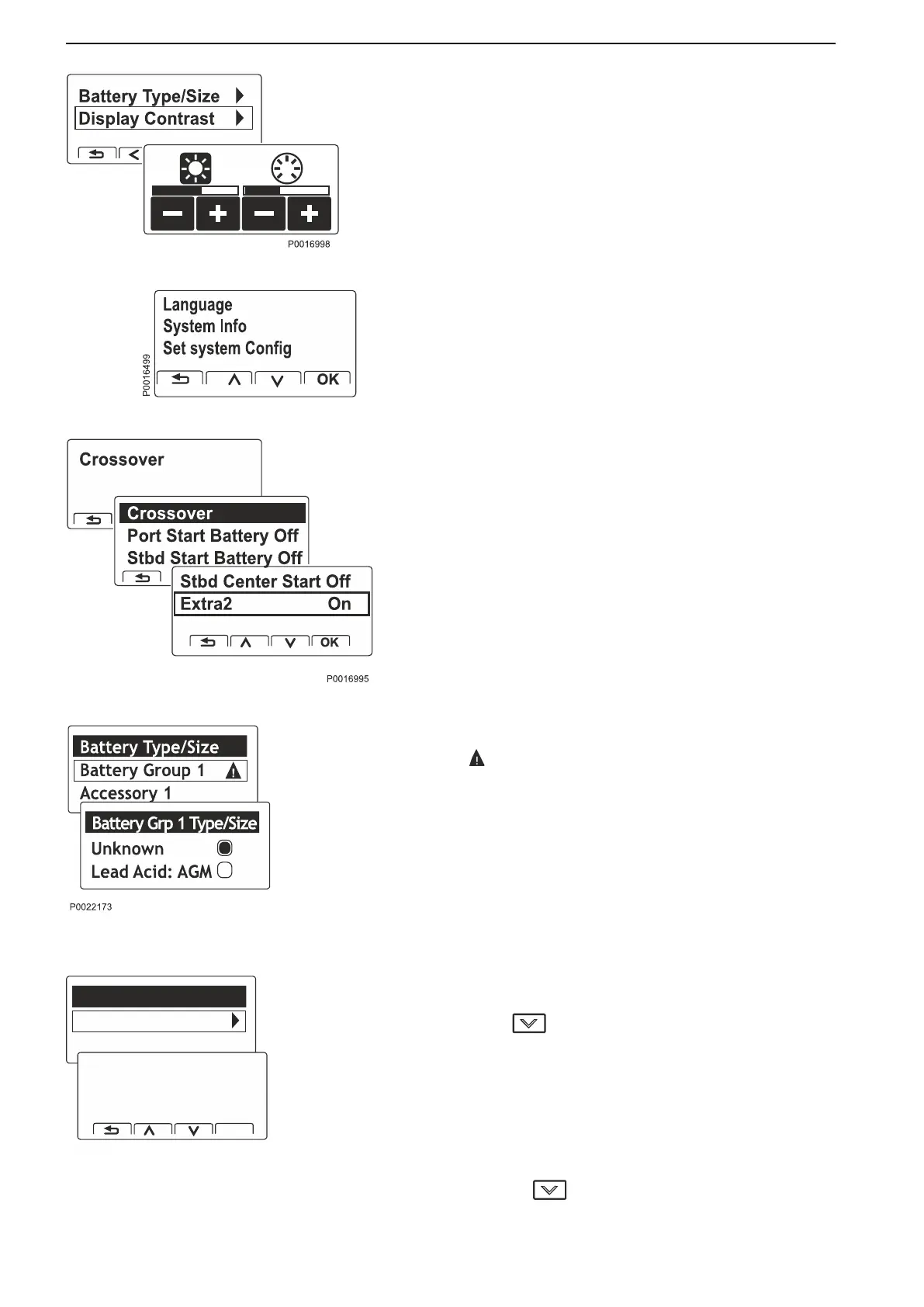
Display Contrast. Adjustment of contrast and
backlighting.
Stand-alone system, non EVC-integrated
installations also have the menus Language, System
Information and Set System Configuration.
Crossover Activate/deactivate the function for each
individual BCM.
Settings for Battery Sensor
The symbol indicates that settings are required.
Battery type/size. State the values stated on the
manufacturer’s battery. These form the basis for the
information shown in the display.
If a new battery or a battery sensor has been
connected or removed, select Reset and set the
current values.
NOTICE! Battery type/size is important so that the
system is able to present accurate and correct
information.
View Voltage/current
Relevant voltage and current in the battery.
Press
to view:
Charging
Shows remaining capacity (%) (based on the battery's
capacity when it was new) and hours remaining until
battery is empty. During operations, the number of
hours are shown until the battery is empty, and when
the battery is charged, the number of hours are shown
until a fully-charged battery.
Pressing
again shows:
Lead Acid: AGM
Battery Group 1
Accessory 1
Set Capacity
100
Ah
OK
P0016997
Optional
80 47712786 11-2022 © AB VOLVO PENTA


 To Next Page
 Loading...