EasyManua.ls Logo

Watts Aerco ProtoNode FPC-N34 - Enabling Auto-Discovery (Not Used on BST, WHM or MFC)

Watts Aerco ProtoNode FPC-N34
140 pages
Print Icon
To Next Page IconTo Next Page
To Previous Page IconTo Previous Page
Loading...
ProtoNode FPC-N34 & FPC-N35 User Manual
CHAPTER 2 BACnet/LonWorks Setup
OMM-0150_B 5/20/2021 Technical Support (800) 526-0288 Mon-Fri, 8 am - 5 pm EST Page 13 of 140
ProtoNode FPC-N34
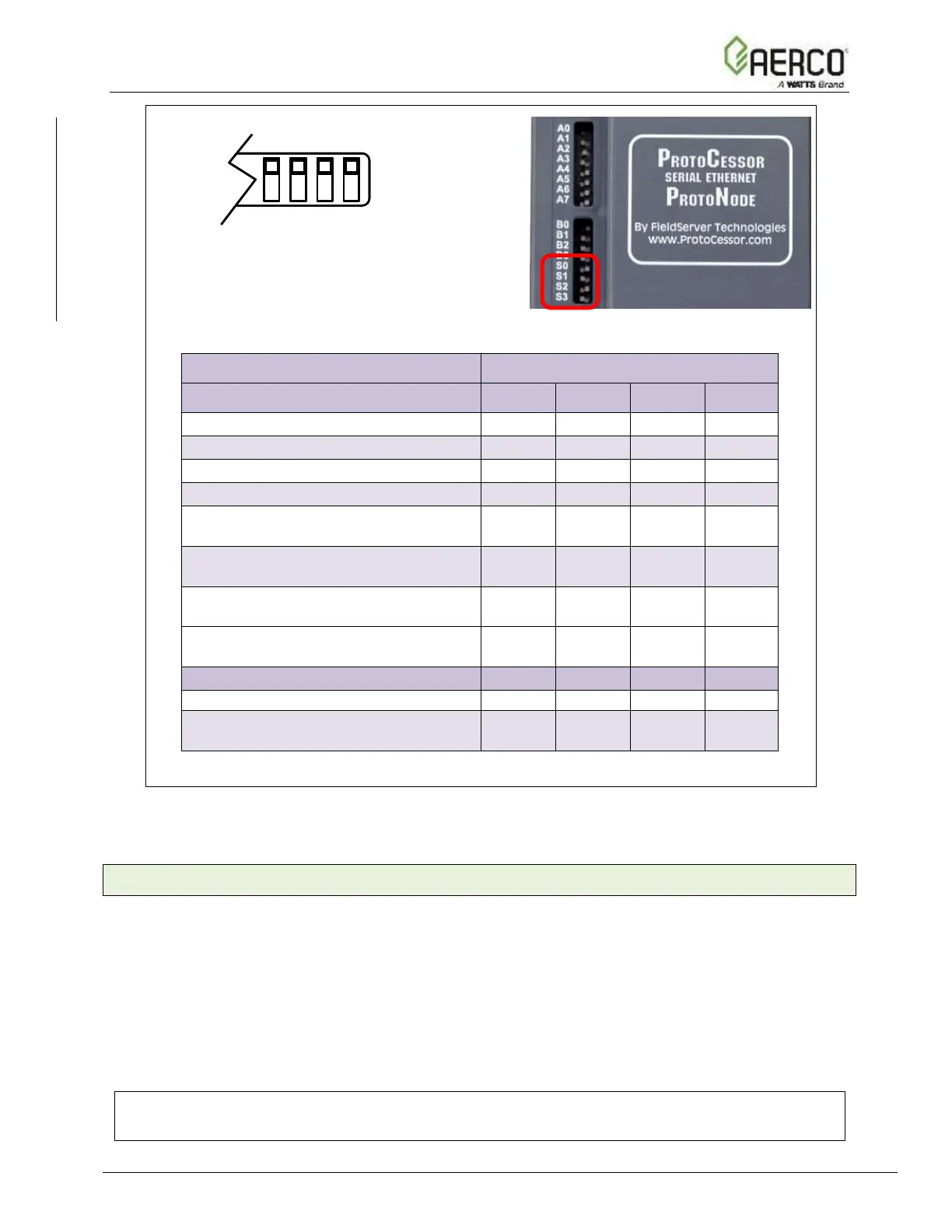
S Bank DIP Switches
Profile
S0
S1
S2
S3
BACnet/IP
Off
Off
Off
Off
BACnet MS/TP
ON
Off
Off
Off
Metasys N2
Off
ON
Off
Off
Modbus TCP/IP or Modbus RTU
ON
ON
Off
Off
*Modbus to 16 WHM/BST Units + 6
SP Units
Off
Off
ON
Off
*BACnet to 16 WHM/BST Units + 6
SP Units
ON
Off
ON
Off
*Metasys N2 to 16 WHM/BST Units
+ 6 SP Units
Off
ON
ON
Off
Single Node Option
BACnet MSTP or BACnet IP
ON
ON
ON
Off
ProtoNode FPC-N35
LonWorks
Off
Off
Off
Off
*Lon to 16 WHM/BST Units + 6 SP
Units
ON
Off
Off
Off
Figure 2-5: S Bank DIP Switches
*NOTE: For WHM or BST systems auto-discovery cannot be done. Be sure that the
S Bank DIP Switches are set properly.
2.4.2 Enabling Auto-Discovery (Not used on BST, WHM or MFC)
The S3 DIP switch is used to both enable Auto-Discovery of known devices attached to the
ProtoNode, and to save the recently discovered configuration.
See the table in Figure below for the switch setting to enable Auto-Discovery.
If the ProtoNode is being installed for the first time, set S3 to the ON position to enable
Auto-Discovery.
Cycle the power to the ProtoNode to start Auto-Discovery
The ON position is when the DIP switches are set closest to the inside of the box.
NOTE:
Allow 10 minutes for the Auto-Discovery process to complete.

S0 S1 S2 S3S0 S1 S2 S3
S0 S3 DIP
Switches
S Bank DIP Switch Location

Table of Contents