Page 38 FT-991 OperaTing Manual
convenience features
AMS
(
AutoMAtic Mode Select
)
operAtion
ThetransceiverhastheAMS(AutomaticModeSelect)functionwhichenablesthetransceivertoautomaticallyselect
the most appropriate option out of the three communication modes according to the received signal while operating in
C4FM mode.
BesidesC4FMdigitalsignals,analogsignals(FM)arealsoidentiedinordertoautomaticallymatchthecommunica-
tion mode of the partner station.
note:
TheAMSfunctionrecognizesthethreemodeslistedinthefollowingtable.Othercommunicationmodescannotberec-
ognized.
operAting Mode diSplAy explAnAtion oF ModeS
V/D mode
(simultaneous voice and data
communication mode)
DN
When AMS is “ON”: Red
When AMS is “OFF”: Light blue
As the audio signal error is detected and repaired at the
same time as the transmission of the digital audio signal,
it becomes more difcult for conversations to be cut off. A
basic digital mode of C4FM FDMA.
Voice FR mode
(Voice full-rate mode)
VW
When AMS is “ON”: Red
When AMS is “OFF”: Light blue
Digital voice data is transmitted using the entire 12.5 kHz
bandwidth. High quality voice communication is possible.
Analog FM mode
AN
Only when AMS is “ON”: Lights red
Analog communication mode using the FM mode.
This mode is effective for communication when the signal
strength is so weak that the voice is cut off midway in the
digital mode.
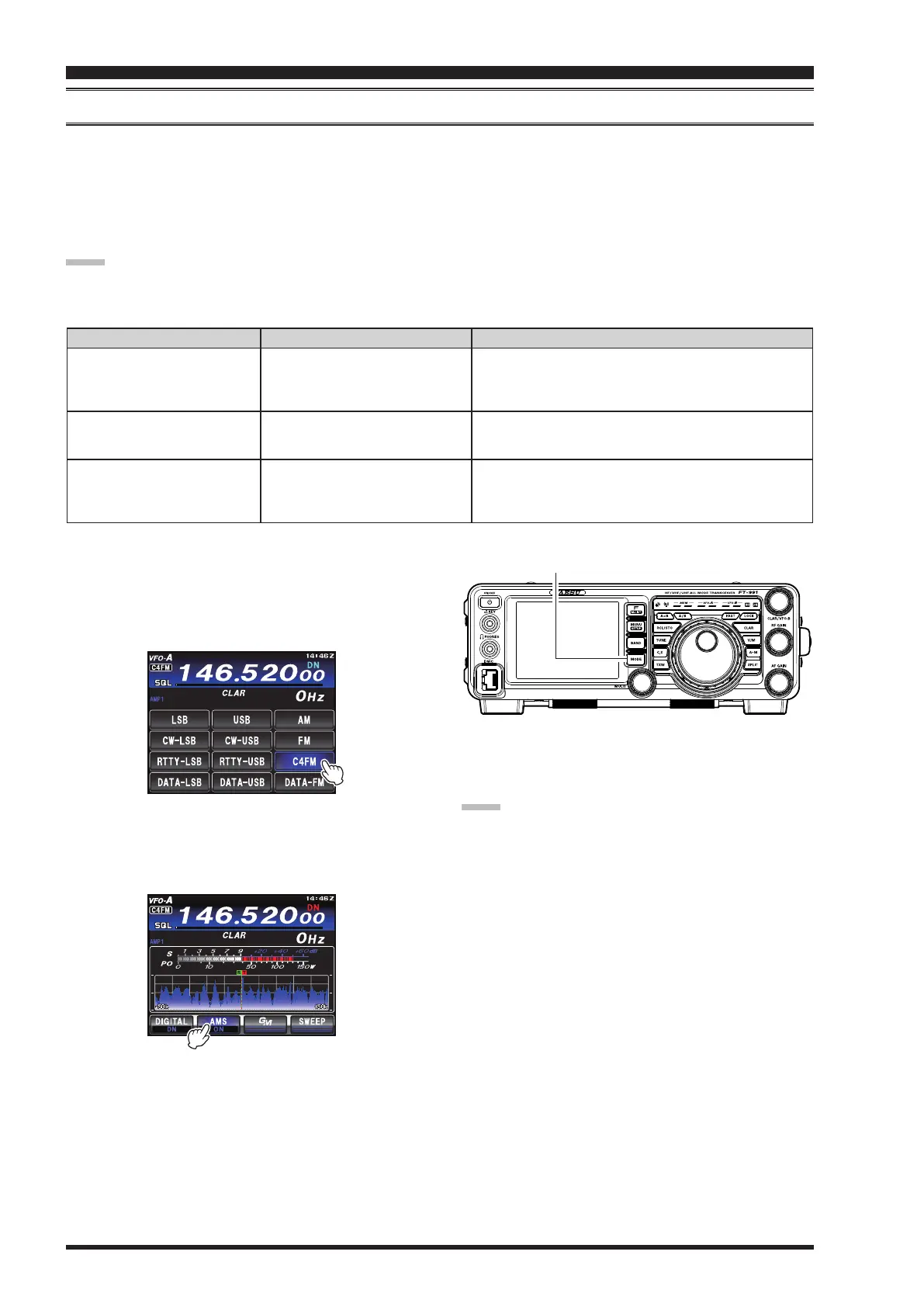
1. Press the
MODE
button,andthen touch thecorre-
spondingkeyontheLCDtoselecttheC4FMoperat-
ing mode. The “
C4FM
”iconappearsinthedisplay.
Press the
MODE
buttononcemore.
MODE Button
2. Touch
[
AMS
]
on the LCD.TheAMS functionwill
switchedto“ON”andthecommunicationmodewill
beswitchedtomatchthereceivedsignal.
note:
In theV/Dmode(“
DN
” displayed),the position infor-
mation is included in the transmitted signal during the
conversation,butintheVoiceFRmode(“
VW
”dis-
played), the position information is not included.


 To Next Page
 Loading...