Page 47FT-991 OperaTing Manual
iF noiSe blAnker
(
nb
)
operAtion
The
FT-991
includesaneffectiveIFNoiseBlanker,whichcansignicantlyreducenoisecausedbyautomotiveignition
systems.
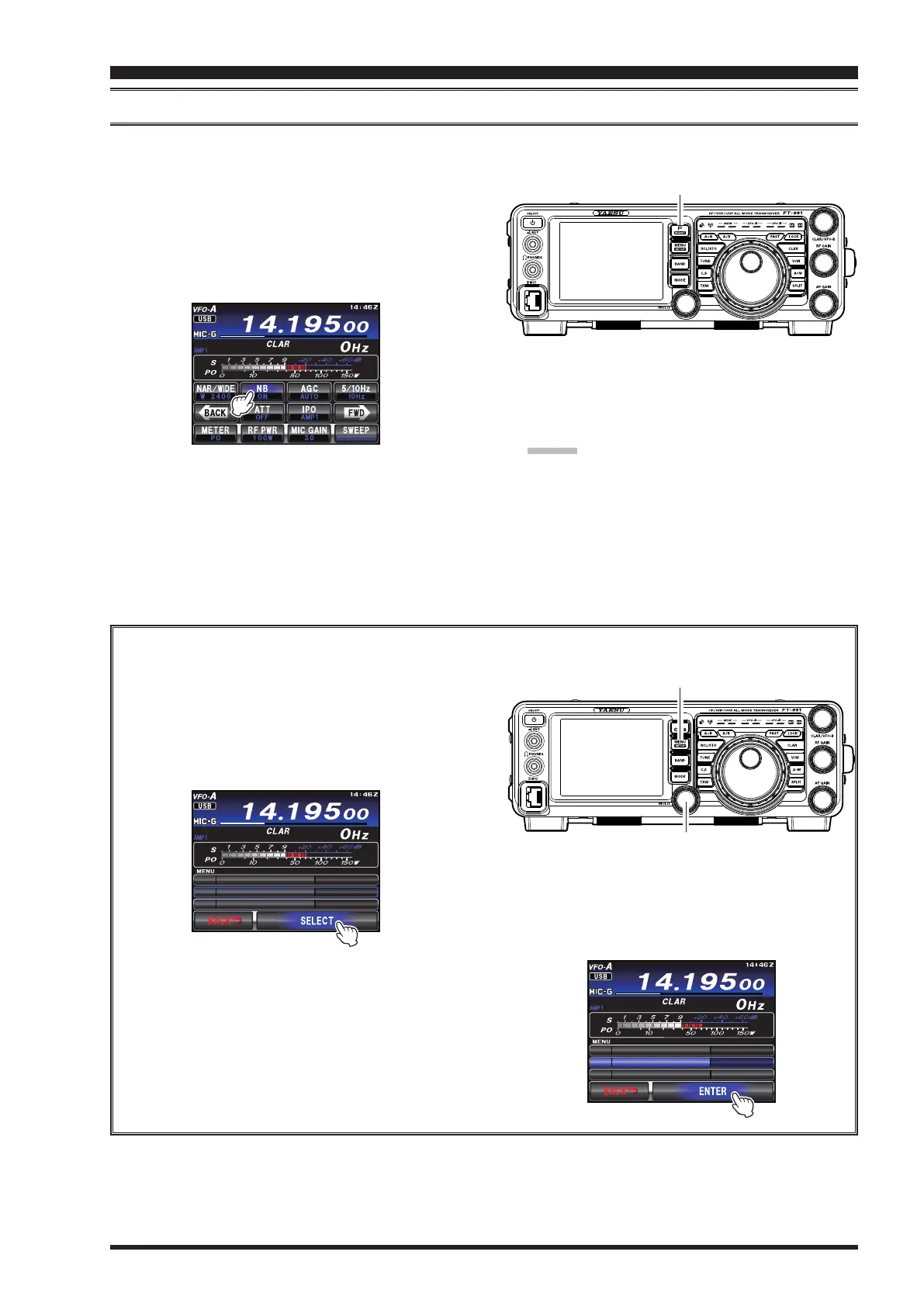
1. Press the
F(M-LIST)
buttonto displaythefunction
menu list. Touch the
[
NB
]
functionicon briefly to
reduce short duration pulse noise like that from
switchingtransients,automobileignitionsandpower
lines.TheNoiseBlankerwillbesetto“
ON
”.
F(M-LIST) Button
2. Ifdesired,theNoiseBlankerlevelmaybeadjusted
via Menu item “
025 NB LEVEL
”tothepointwhere
theoffending noiseisbestreducedoreliminated.
Seeboxbelowfordetails.
Advice:
Thenoiseattenuationcanbeselectedfrom
10dB/30dB/50dBvia Menuitem “
024 NB RE-
JECTION
”.
3. ToendNoiseBlankeroperation,touch
[
NB
]
on the
TFT display once more. The “
OFF
”willappear in
theTFTdisplay,conrmingtheNoiseBlankerisno
longer in operation.
Adjusting the Noise Blanker Level
1. Press the
MENU
buttontoengagetheMenu
mode.
2. Rotatethe
MULTI
knobtoselectMenuitem“
025
NB LEVEL
”.
3. Touch
[
SELECT
]
ontheLCD
MULTI Knob
MENU button
$''2.8'.'
0$ .'8 .'
0$ 4' ',1%6+ 0 F$
4. Rotatethe
MULTI
knobtothe pointwhere the
offendingnoiseisbestreducedoreliminated.
5. Touch
[
ENTER
]
ontheLCD,thenpressthe
MENU
buttonortouch
[
BACK
]
ontheLCDto
lock in the new setting and exit to normal opera-
tion.
$''2.8'.'
0$ .'8 .'
0$ 4' ',1%6+ 0 F$
interference reJection


 To Next Page
 Loading...