Page 63
FT-991 OperaTing Manual
PArAMetric Microphone equAlizer
(
SSb/AM/FM Mode
)
The
FT-991
includes a unique Three-Band Parametric Microphone Equalizer that provides precise, independent con-
trol over the low, mid and treble ranges in the voice waveform. You may utilize one group of settings when the speech
processor is off and use an alternate group of settings when the speech processor is on. The speech processor feature is
described in the next chapter.
quick point:
The Parametric Equalizer is a unique technique for adjusting the signal quality. The three audio ranges may be adjusted
so precisely, it is possible to craft an audio response that provides a natural and pleasant sound that you may not have
ever experienced before. Alternately, the effective “talk power” can be signicantly enhanced.
The conguration aspects that may be adjusted on the Parametric Equalizer are:
Center Frequency: The center frequency of each of the three bands may be adjusted.
Gain: The amount of enhancement (or suppression) within each band may be adjusted.
Q: The bandwidth over which the equalization is applied may be adjusted.
Setup of the Parametric Microphone Equalizer
1. Connect the microphone to the
MIC
jack.
2. Set the RF output power to minimum value.
Advice:
We recommend that you connect a dummy load
to one of the Antenna jacks, and monitor your
signal on a separate receiver, to prevent interfer-
ence to other users.
You will have the best chance of hearing the ef-
fects of adjustments if you wear headphones
(connected to the separate monitor receiver)
while listening to your transmitted signal.
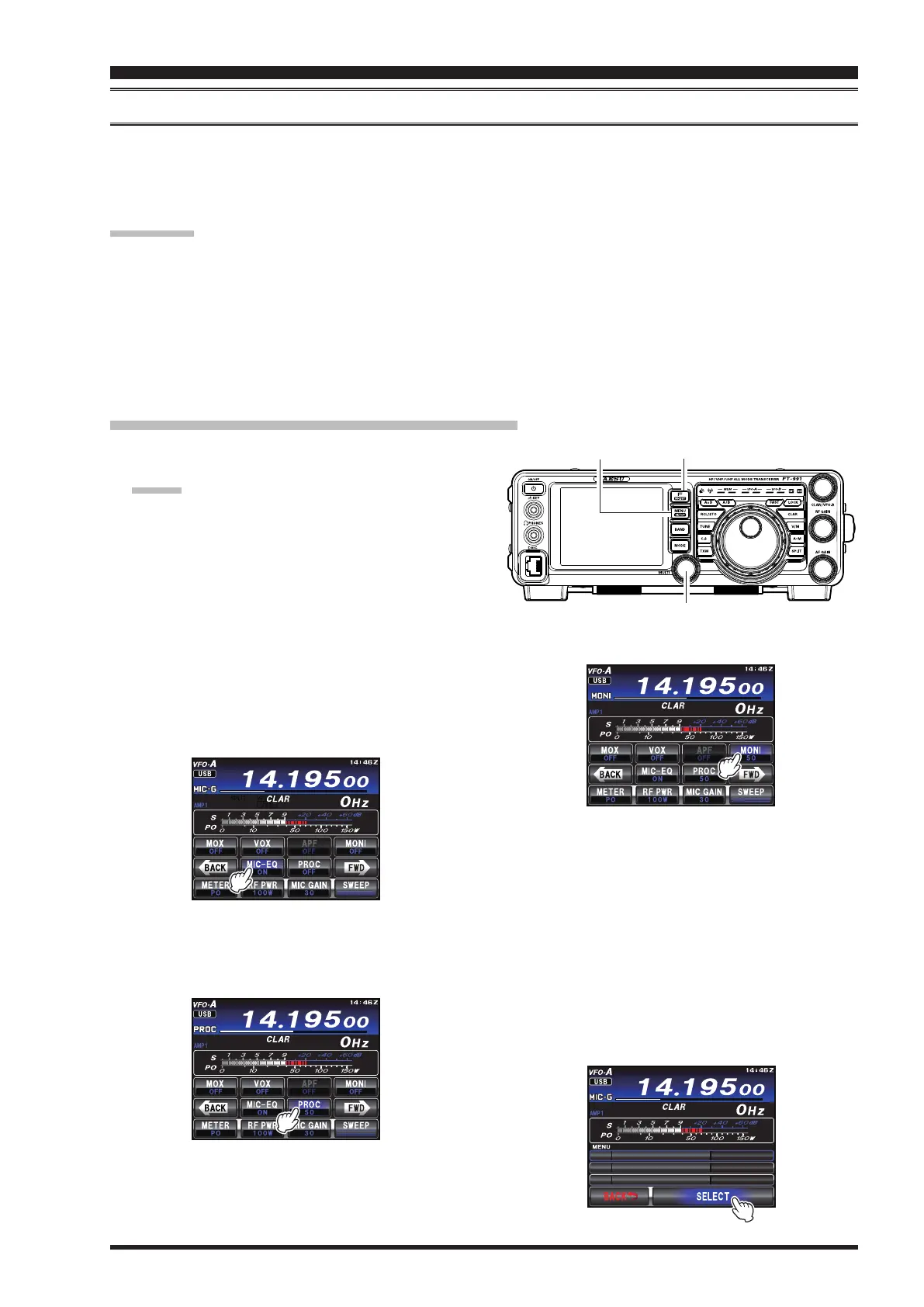
3. To adjust the Parametric Microphone Equalizer
while the speech processor is disabled, press the
F(M-LIST)
button, then touch
[
MIC-EQ
]
to select
“
ON
”.
5. Press the
MENU(SETUP)
button. The Menu list
will appear in the TFT display.
6. Rotate the
MULT
knob to nd the “
EQ
” Menu area,
containing Menu items “
121
” through “
129
”; these
parameters apply to the adjustment of the Parametric
Microphone Equalizer when the speech processor
is disabled. Menu items “
130
” through “
138
” ap-
ply to the adjustment of the Parametric Microphone
Equalizer when the speech processor is engaged.
7. Touch
[
SELECT
]
on the LCD, then rotate the
MULT
knob to adjust a particular Menu item.
24/64% '3 '(4 3
24/64% '3 8.' '.
24/64% '3 6$9 *
1((
enhancinG transMit siGnal QualitY
MULTI Knob
MENU
(SETUP)
Button
F(M-LIST) Button
To adjust the Parametric Microphone Equalizer with
the speech processor engaged, press the
F(M-LIST)
button, then touch
[
PROC
]
to select “
ON
”.
4. Touch
[
MONI
]
, if you want to listen on the
FT-991
internal monitor.


 To Next Page
 Loading...