Page 78
FT-991 OperaTing Manual
cw MoDe operation
uSing the built-in electronic keyer
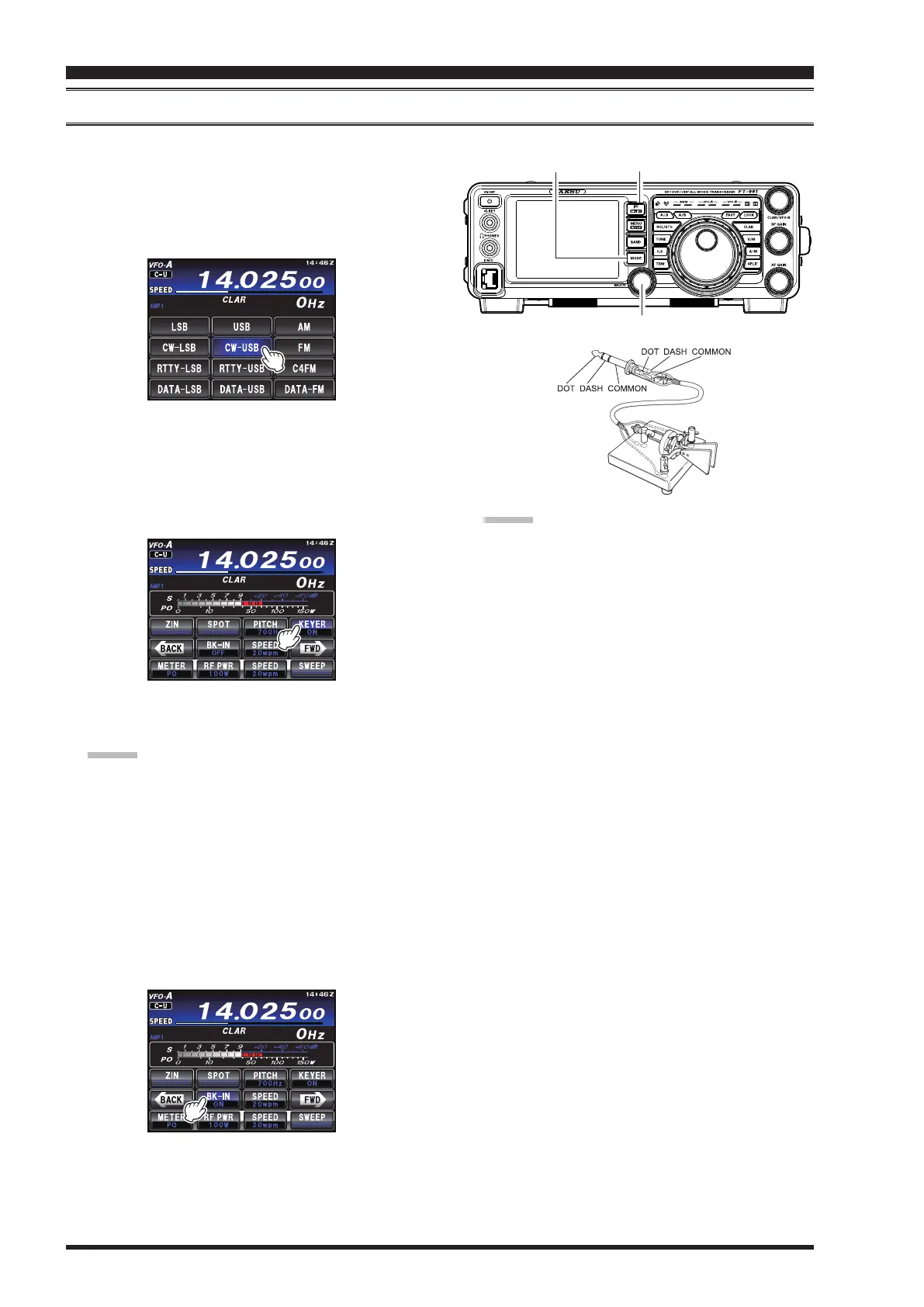
Connect the cable from your keyer paddle to the front panel
KEY
jack.
1. Press the
MODE
button, then touch
[
CW-LSB
]
or
[
CW-USB
]
on the TFT LCD display. The “
C-L
”
or “
C-U
” icon will appear in the display. The CW
monitor is activated.
MULTI Knob
MODE Button
F(M-LIST) Button
2. Rotate the Main Tuning Dial knob to select the de-
sired operating frequency.
3. Press the
F(M-LIST)
button, then touch
[
KEYER
]
on the LCD to select “
ON
” to conrm that the built-
in Electronic Keyer is now active.
4. Touch
[
SPEED
]
on the LCD, then rotate the
MULTI
knob to set the desired sending speed (4 - 60 WPM).
Advice:
Rotate the
MULTI
knob to display the keying
speed (4 - 60 WPM) below the
[
SPEED
]
indica-
tor.
By pressing either the “Dot” or “Dash” side of
the paddle, the CW keying tone will automati-
cally be generated.
5. Touch
[
BK-IN
]
on the TFT display to engage auto-
matic activation of the transmitter when either the
“Dot” or “Dash” side of the paddle is pressed. The
Break-in will be set to “
ON
”.
6. CW operation utilizing the CW paddle may now
commence.
Advice:
When the keyer paddle is pressed, the transmitter
will automatically be activated, and the CW charac-
ters (or a string of dots or dashes) will be transmit-
ted. When the keyer paddle is released, transmission
will cease, and after a brief delay, reception will be
restored. The delay time is user-programmable, per
the discussion on page 83.
The CW sidetone audio level may be set using
“MONITOR” (see page 72).
If [
BK-IN
] is set to “
OFF
”, you may practice sending
CW with the sidetone only, without having the signal
go out over the air. (Press the front panel
F(M-LIST)
button to reveal the functions list on the TFT display ).
If the transmitter power is reduced via [
RF PWR
]
function, the ALC meter reading will increase; this
is normal and does not indicate any problem whatso-
ever (because increased ALC voltage is being used
to lower the power).
The keying operation may also be enabled in LSB/
USB mode to send the CW signal via the Menu item
“
055 CW AUTO MODE
” without switching to CW
mode.
The same frequency may be displayed when switch-
ing between SSB mode and CW mode by setting
Menu item “
059 CW FREQ DISPLAY
”.
By connecting a computer, CW can be operated us-
ing free or commercially available software and set-
ting Menu item “
060 PC KEYING
”.
The electronic keyer operation mode can be changed
via the Menu item “
012 KEYER TYPE
”.


 To Next Page
 Loading...