Page 91
FT-991 OperaTing Manual
fM MoDe operation
bASic operAtion
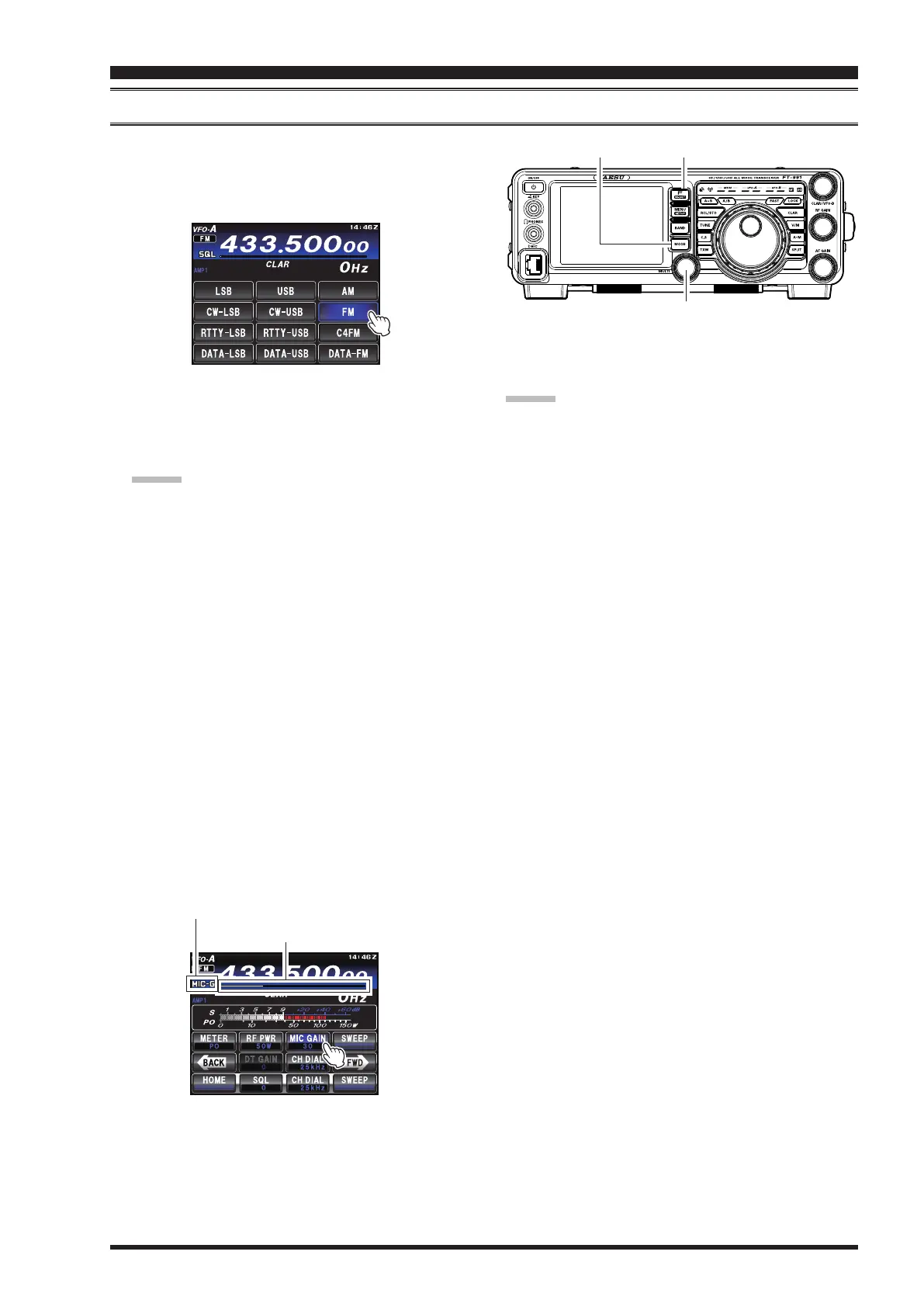
1. Press the
MODE
button, then touch the correspond-
ing key on the LCD to select the FM operating
mode. The “
FM
” icon appears in the display.
MULTI Knob
MODE Button
F(M-LIST) Button
2. Set the transceiver to the desired frequency.
3. Press the microphone
PTT
switch to transmit. Speak
into the microphone in a normal voice level. Release
the
PTT
switch to return to receive.
Advice:
The
MULTI
knob can serve as the frequency setting
knob.
To change the
MULTI
knob frequency step, follow
the below procedure:
Press the
F(M-LIST)
button, then touch
[
CH DIAL
]
on the TFT display. Rotate the
MULTI
knob or touch
[
CH DIAL
] repeatedly to select the frequency steps
in the following order.
You can also switch the frequency steps by touching
[
CH DIAL
]
repeatedly.
“
2.5kHz
”
“
5kHz
”
“
9kHz
”
“
10kHz
”
“
12.5kHz
”
“
25kHz
”
“
2.5kHz
”
4. Adjustment of the microphone gain may be ac-
complished in two ways. At the factory, a default
level has been programmed that should be satisfac-
tory for most situations. To change the microphone
gain, press the
F(M-LIST)
button, then touch
[
MIC
GAIN
]
on the LCD. Rotate the
MULTI
knob func-
tion as the microphone gain adjustment knob. Rotate
the
MULTI
knob to adjust the microphone gain.
MIC GAIN (Microphone Gain) indicator
MIC GAIN (Microphone Gain) level indicator
Advice:
The Transmit Monitor is another helpful way to
verify proper adjustment of the FM MIC Gain. With
[
MONI
]
displayed by pressing the
F(M-LIST)
but-
ton, you will be able to hear the differences in devia-
tion as you make adjustments.
FM is only used in the 28 MHz, 50 MHz, 144 MHz
and 430 MHz Amateur bands covered by the
FT-
991
. Please do not use FM on any other bands.


 To Next Page
 Loading...