3 608 870 A47 Tightening Technology | Bosch Rexroth AG 209/263
Nexo cordless Wi-Fi nutrunner | 3 608 870 A47/2017-05
9.8.4.2 Standard Nexo
Use this menu item to define the configuration of the respective connection (FTP, HTTP or
File Share) for results output. Under NX-SD card, the sub-directory for filing of tightening results on the
NX-SD Micro SD card and the contents of the file are defined.
• FTP (page 209)
•NX-SD card (page 210)
• HTTP (page 210)
• File Share (page 211)
FTP
Settings Data Standard Nexo FTP
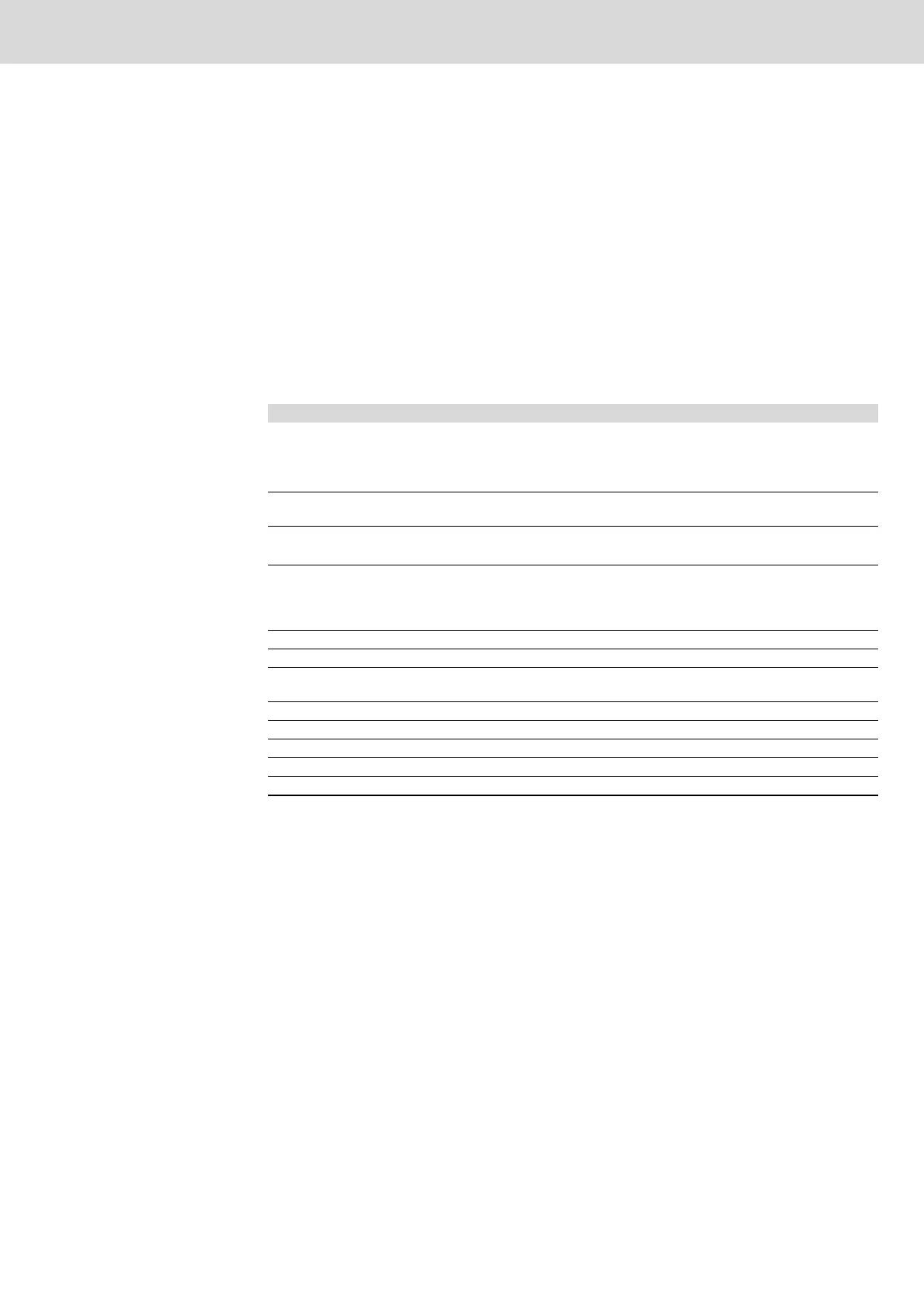
Use this menu item to define the configuration of the FTP connection to the results output.
Table 9–57: FTP tab
Element Description
Active Tick the checkbox to activate data output via FTP.
If results output is disabled, no more results files will be generated. Results
files which have already been generated and are still existing will not be out-
put before FTP output has been reactivated.
IP address / DNS Either directly enter the IP address of the FTP server or the
DNS entry of the FTP server.
Port Selection of the TCP/IP port for data transfer, value range 0 - 65535
Default setting: 21
Users Enter the user name for FTP connection. The user name has to be valid on
the FTP server and has to have write access to the target directory and au-
thorization to create directories. If necessary, ask your system administrator
whether the user has write access.
Password Enter the password for the indicated user name.
Directory
1
Tightening results directory on the FTP server.
1. This refers to the root directory for the registered user. This directory can be located several levels
below the actual root directory of the drive. If no directory has been entered, the root directory for the
indicated user will automatically be used as the storage location.
SSL As of Nexo firmware version 1200: Activate the SSL check box (Secure
Sockets Layer) to transfer the data with SSL encoding.
Save Click Save to save the edited data.
Discard Click Discard to discard the edited data.
Data See Data button (page 212)
Storage See File button (page 216)
Restore defaults All settings in this dialog are reset to the factory setting.


 To Next Page
 Loading...