18
2
Menus
Table of Contents Index
Preparations
Charging the Battery Pack
The camcorder can be powered with a battery pack or directly using the compact power adapter. The first time you use the
camcorder, charge the battery pack.
For approximate charging times and recording/playback times with a fully charged battery pack, refer to
Recording and
Playback Times
(A 160).
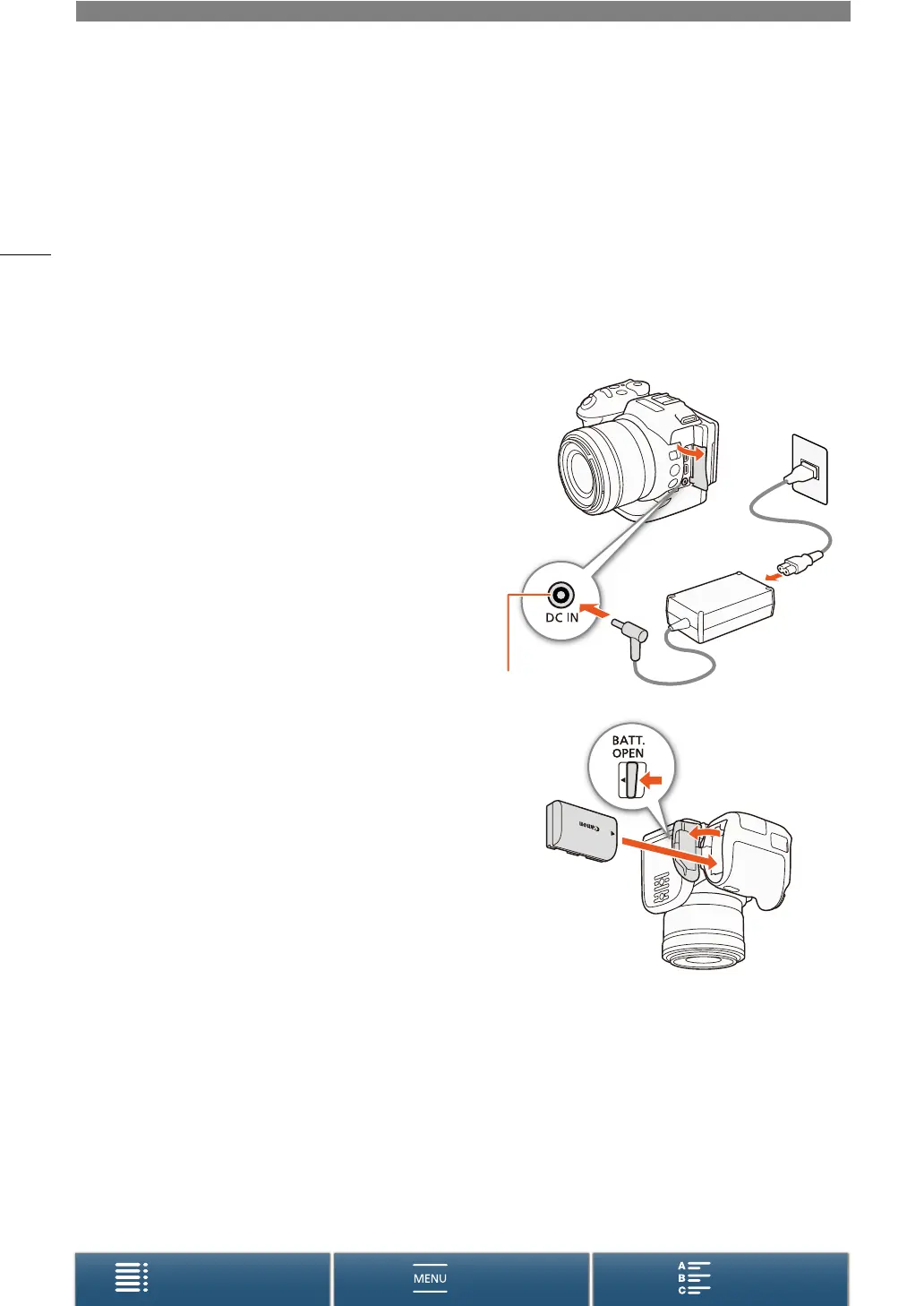
1 Connect the power cord to the compact power adapter.
2 Plug the power cord into a power outlet.
3 Connect the compact power adapter to the camcorder’s
DC IN terminal.
4 Slide the BATT. OPEN switch in the direction of the arrow
and open the battery compartment cover.
5 Insert the battery pack all the way into the compartment as
shown in the illustration.
• Push it all the way in until the battery release latch secures it in
place.
6 Close the battery compartment cover.
• Push the cover until you hear a click. Do not force the cover
closed if the battery pack is not correctly inserted.
햲
햴
햳
DC IN terminal
햳
햲


 To Next Page
 Loading...