Chapter 4 Functions and Operations of the Devices
36
5
Stands (with Focus Knobs)
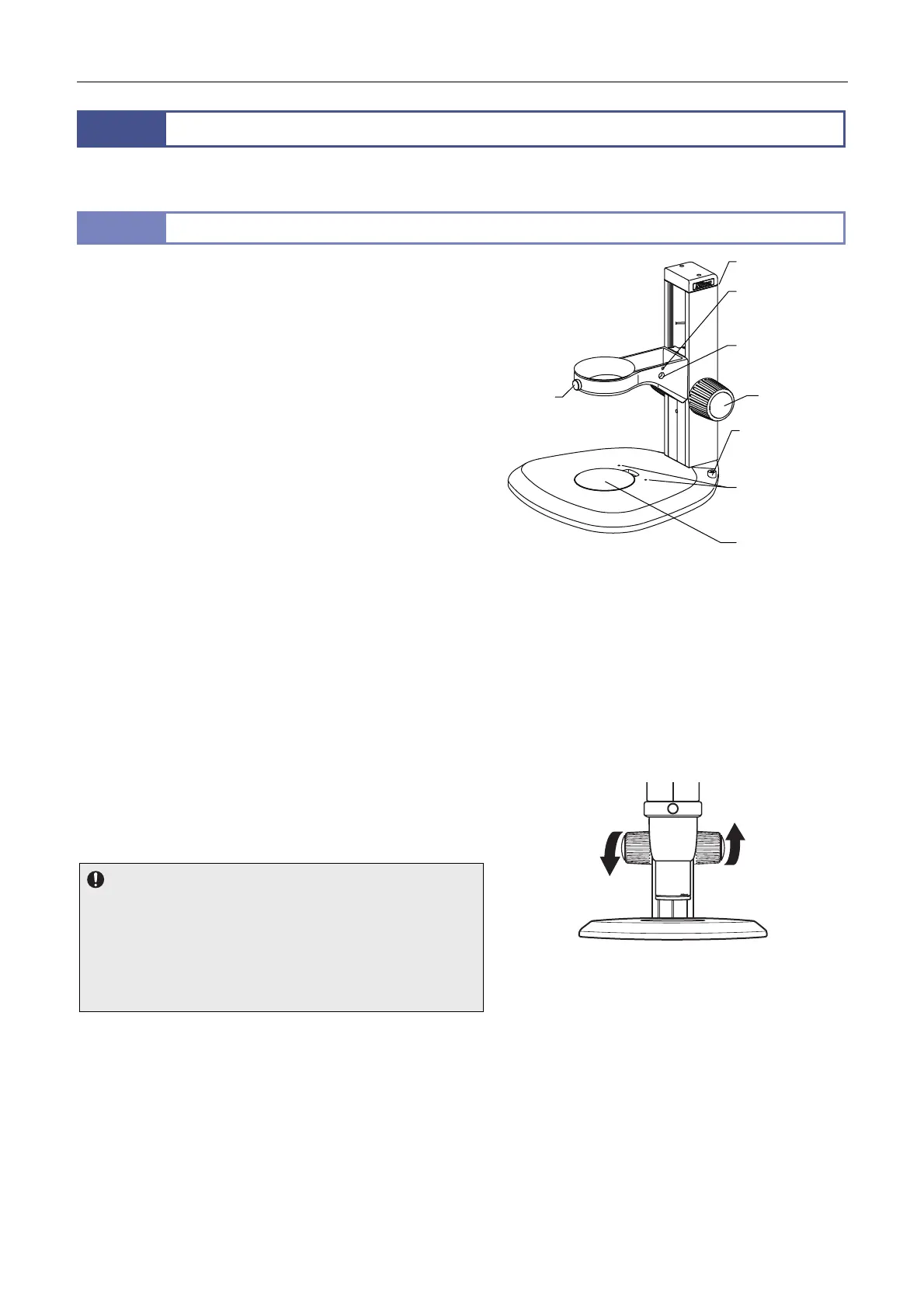
The stand is composed of a base, support pillar and arm.
To focus on the sample, vertically move the zooming body attached to the arm using a focus knob on the support pillar.
5.1
C-PSN/C-PSCN Plain Stand
The C-PSN and C-PSCN are plain stands with specifications
nearly identical.
The only difference is the base size; the C-PSN with a standard
sized base and the space saving C-PSCN with a small base.
ttach a zooming body, and turn the focus knobs on both sides of
the support pillar in the same direction to focus on the sample.
The base has a stage plate with a black surface and a milky white
surface. Select the surface appropriate for the sample.
The stands without the illumination mechanism have screw holes
for attaching optional devices.
The hex wrench (nominal designation: 4) supplied with the stand
and the hex wrench (nominal designation: 2) supplied with the
zooming body can be stored in the tool holder on the rear side of
the support pillar.
Focusing stroke: 100 mm
Stroke per focus knob rotation: 21.7 mm
Stage plate size: 90 mm dia.
Arm position change
The arm can be attached to the position 55 mm lower than the
standard (See Chapter 5, “3.1 Assembly of the Basic System -
[1] Install a stand. - C-PSN/C-PSCN Plain Stand’s arm
position change.”)
C-PSN Plain Stand
Torque adjustment of the focus knobs
To adjust the torque of the focus knobs, turn the right and left
focus knobs in opposite directions. Adjust the torque to an
appropriate level.
Notes on the torque adjustment
When the torque is too low, the zooming body may slide down due
to the various loads it carries, such as its own weight or the load of
the counterbalance spring inside the focus unit. This may result in
injury, such as pinching fingers between the objective and sample,
or cause damage to the sample or objective. Be sure to adjust the
torque to an appropriate level.
Adjusting the torque of the C-PSN focus knobs
(The torque increases by turning the knobs as
shown in the figure.)
Tool holder (rear)
Zooming
bod
fixing
scre
Illuminator
attachment hole
Focus knob
Sample holder
attachment holes
Stage plate
Illuminator
attachment
screw hole
Screw hole for
attaching optional
devices


 To Next Page
 Loading...