Messages Displayed When an Application Site Cannot Be Used
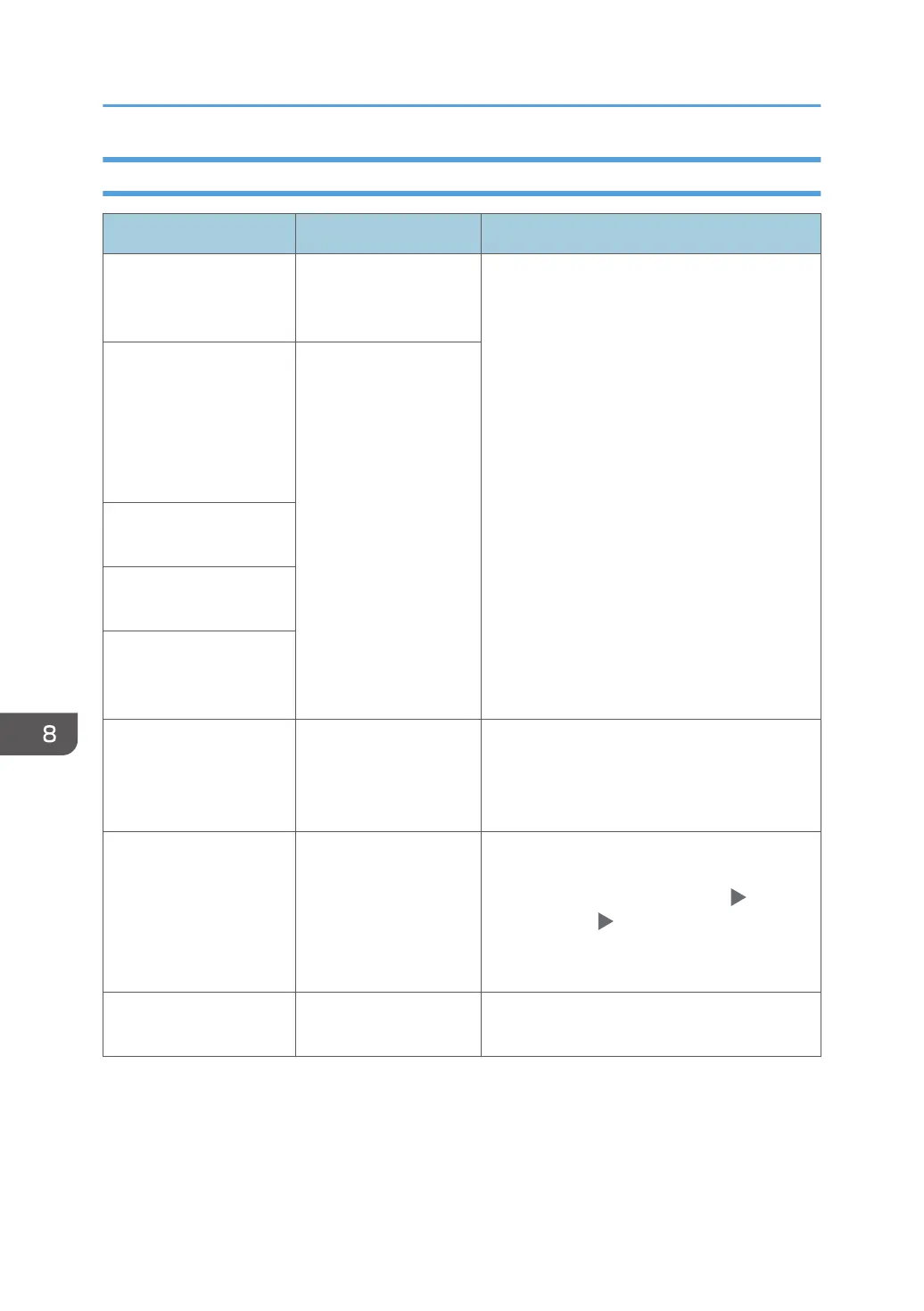
Message Cause Solution and reference
"A server error has
occurred."
An unexpected error
has occurred on the
server.
• See the server maintenance information in
[Information].
• Check whether the network settings
([DNS Configuration], [Proxy Settings])
are correctly configured.
"Cannot connect to
server which installs
applications. Check
maintenance information
on Information screen or
network settings."
Cannot connect to the
installation server.
"Could not update the
firmware."
"Failed to download the
application."
"Failed to install the
application because an
error has occurred."
"Could not restore the
firmware because the
required data does not
exist."
The firmware from
Application Site has not
been updated.
The firmware cannot be recovered.
"JavaTM Platform has not
been started. Install the
application after JavaTM
Platform has been started
from Web Image
Monitor."
JavaVM is not running. Log in to Web Image Monitor in the
administrator mode, and enable "JavaTM
Platform" in [Device Management]
[Configuration] "Extended Feature Settings".
"The specified page
cannot be found."
An error has occurred in
Application Site.
See the server maintenance information in
[Information].
8. Troubleshooting
216


 To Next Page
 Loading...