Understanding Your Phone 16
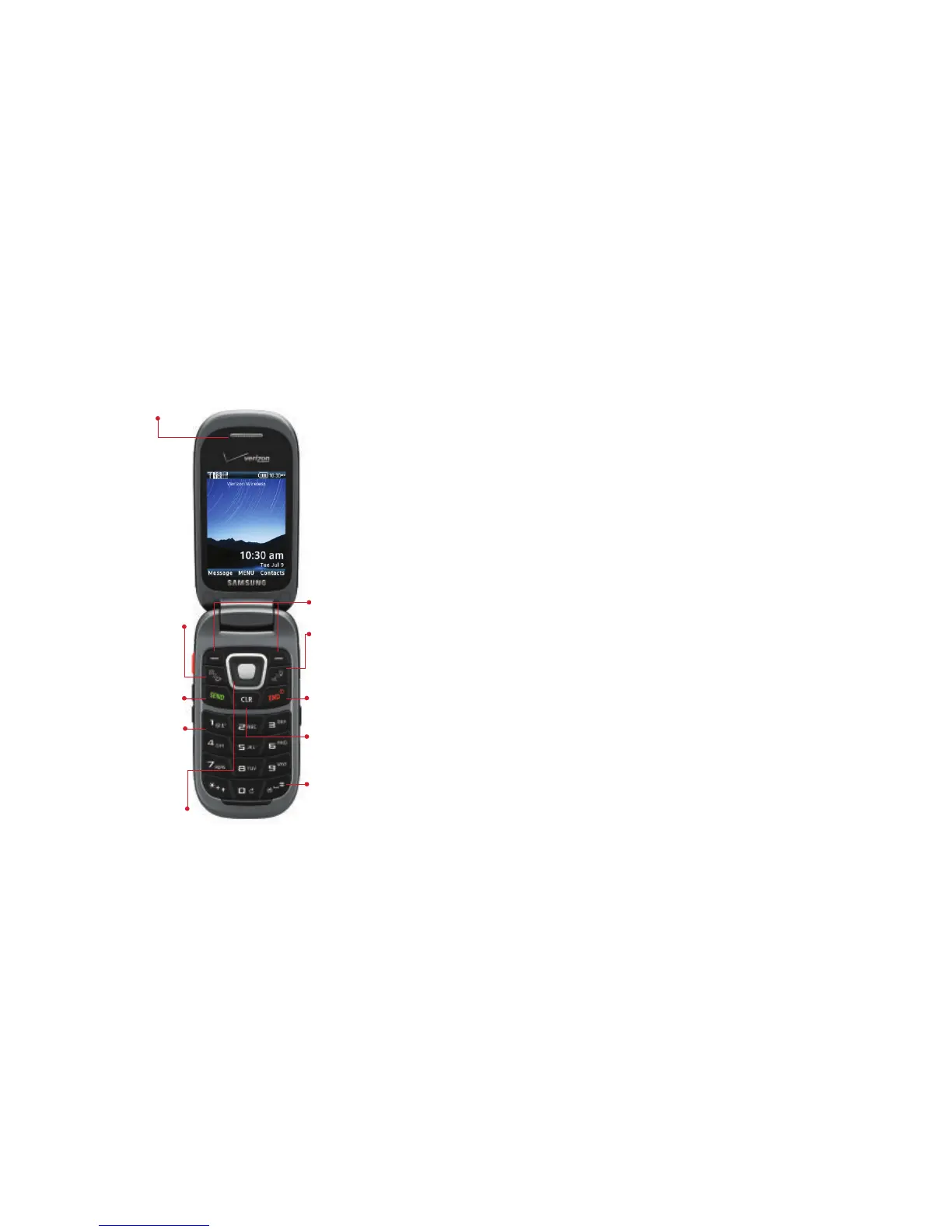
Open View
Features
1.
Earpiece
: Hear call sounds, including the caller.
2.
Camera/Camcorder Key
: Press to launch the camera, or
press and hold to launch the camcorder.
3.
Send Key
: Press to dial a call. From the Home screen,
press to view Recent Calls.
4.
Voicemail Key
: Press and hold to dial voicemail.
5.
Directional Key
: Press to scroll phone menus.
6.
Center Select Key
: Press to select the highlighted item.
7.
Right Soft Key
: Press to select the lower right menu
item on the display.
8.
Left Soft Key
: Press to select the lower left menu item
on the display.
9.
Voice Commands/Flashlight Key
: With the flip open,
press to launch Voice Commands, or press and hold to
turn the Flashlight on or off.
10.
End/Power Key
: Press to end a call. Press and hold to
turn the phone On or Off. Press to send an incoming
call to voicemail.
11.
Clear Key
: Press to delete a character, or go back.
Press and hold to delete the previous word.
12.
Vibrate Key
: With the flip open, press and hold to switch
between Vibrate Mode and Master Volume level.


 To Next Page
 Loading...











