13
GB
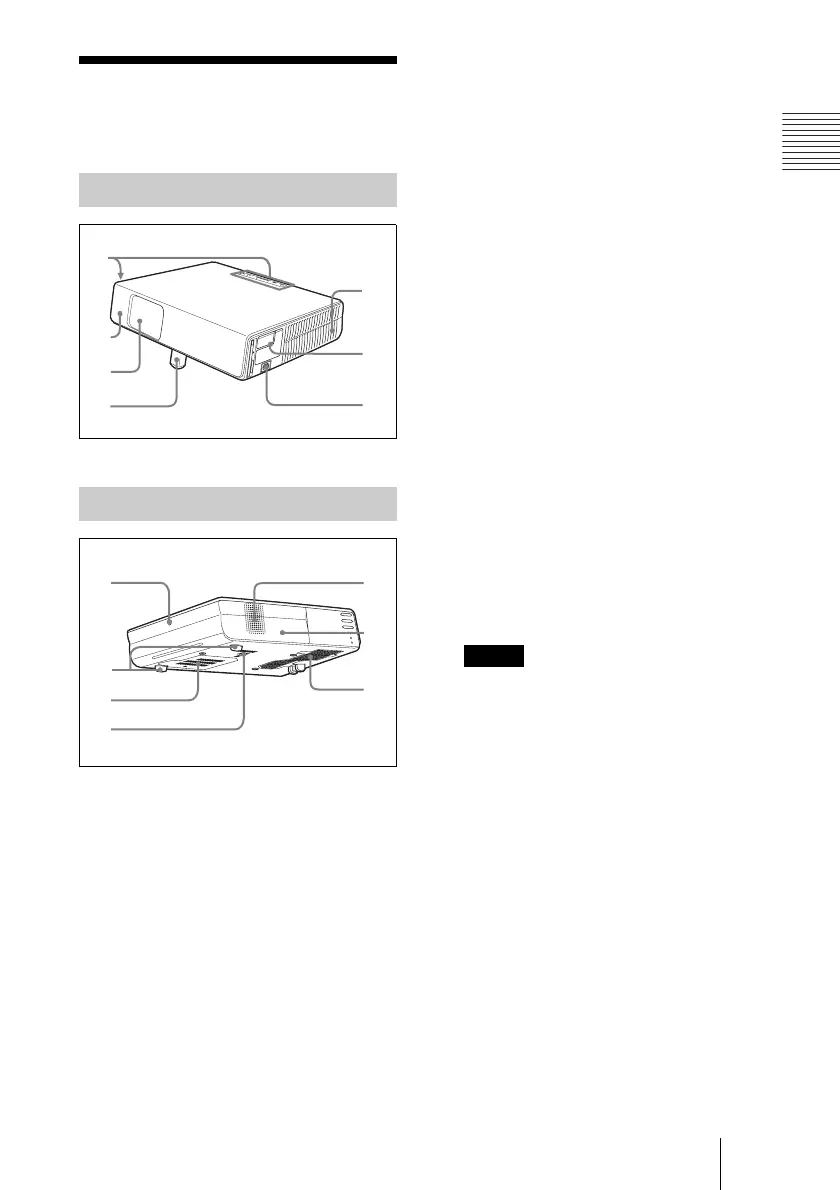
Location and Function of Controls
Overview
Location and
Function of Controls
1 Control panel
For details, see “Control Panel” on
page 14.
2 Front remote control detector
3 Lens protector (lens cover)
The lens protector automatically opens
when the power is turned on.
4 Powered tilt adjuster
5 Ventilation holes (exhaust)
6 Connector Panel
For details, see “Connector Panel” on
page 15.
7 AC IN socket
Connects the supplied AC power cord.
8 Rear remote control detector
9 Adjuster (hind pad)
Turn the adjuster to the right or left for
minor tilt adjustment of the projected
picture.
q; Ventilation holes (intake)/Lamp
cover
qa Ventilation holes (intake)
qs Speaker
qd Security lock
Connects to an optional security cable
(Kensington’s).
Web page address:
http://www.kensington.com/
qf Ventilation holes (intake)/Air
filter cover
• Do not place anything near the
ventilation holes as this may cause
internal heat build-up.
• Do not place your hand or objects
near the ventilation holes as this may
cause a heat build-up.
• To maintain optimal performance, clean
the air filter every 500 hours.
For details, see “Cleaning the Air
Filter” on page 44.
Top/Front/Left Side
Rear/Right Side/Bottom
1
2
3
6
5
7
8
0
a
qd
qs
qf
9
Notes



 To Next Page
 Loading...






