Page 60 FT-2000D OPERATING MANUAL
I
NTERFERENCE
R
EJECTION
(
S
IGNALS
WITHIN
3
KHZ
)
NARROW
(
NAR
)
ONE-TOUCH IF FILTER SELECTION
Main band
(
VFO-A
)
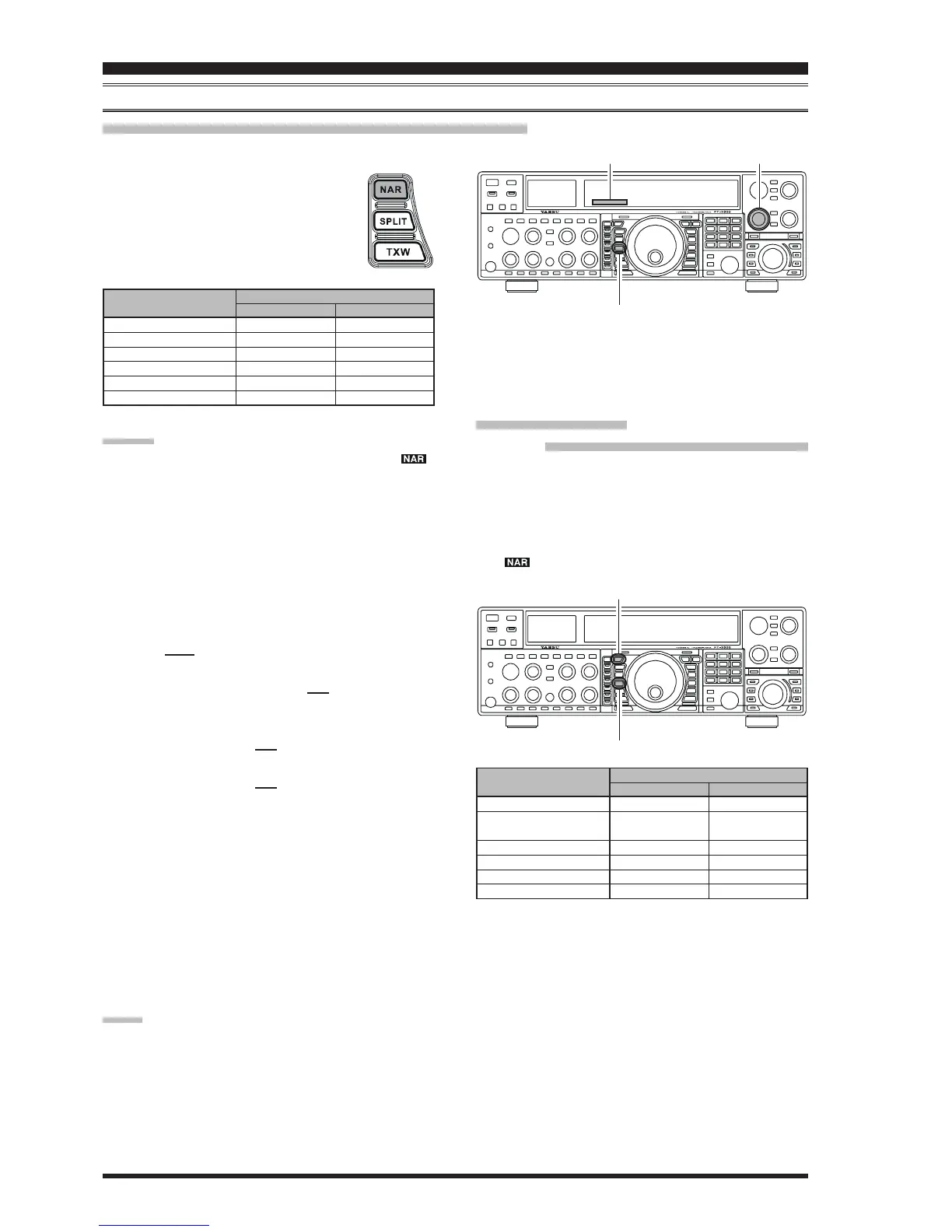
“One-Touch Narrow” Operation
ADVICE:
When the narrow bandwidth is selected, the “ ”
icon will appear in the display and the bandwidth on
the WIDTH indicator in the display will be reduced.
The bandwidth applied when the
[
NAR
]
button is
pressed may be adjusted using the Menu. This allows
you to customize a quick-switch “Narrow” bandwidth
matching your operating needs. The default values for
each mode below are underlined.
SSB mode: Menu item “106 rdsP SSB NAR”
200/400/600/850/1100/1350/1500/1650/
1800/1950/2100/2250 Hz
CW mode: Menu item “097 rdsP CW NARR”
25/50/100/200/300/400/500/800/1200/1400/
1700/2000 Hz
PSK mode: Menu item “100 rdsP PSK NAR”
25/50/100/200/300/400 Hz
RTTY mode: Menu item “103 rdsP RTY NAR”
25/50/100/200/300/400 Hz
When the
[
NAR
]
button has been pushed so as to en-
gage the narrow filter, the
[
WIDTH
]
knob will be dis-
abled, but IF Shift still is operational. For many appli-
cations, you may find that simple adjustment of the
[
WIDTH
]
knob, instead of engaging the Narrow filter,
may be satisfactory for interference reduction.
You may adjust the CW bandwidth using the
[
WIDTH
]
knob, even if the narrow filter is engaged. In this case,
available bandwidth selections are 25 Hz ~ 2 kHz.
When you press the
[
NAR
]
button in the FM mode,
both the transmit and receive bandwidths are narrowed.
NOTE:
When the
[
NAR
]
button is pressed, the
[
WIDTH
]
knob no
longer functions (except the CW mode).
Pressing the
[
NAR
]
button provides one-touch, mode-spe-
cific selection of a narrow IF DSP filter set-
ting that does not depend on the setting of
the
[
WIDTH
]
knob. Pressing the
[
NAR
]
but-
ton once more returns the bandwidth control
to the Width/Shift system. The factory de-
fault bandwidths are:
Ú
: Depends on the
[
WIDTH
]
knob
Sub band
(
VFO-B
)
“One-Touch Narrow” Operation
1. Press the
[
B
]
button.
2. Within five seconds of pressing the
[
B
]
button (while
the imbedded orange LED is blinking), press the
[
NAR
]
button to toggle the bandwidth between “WIDE” and
“Narrow.” When the narrow bandwidth is selected, the
“ ” icon will appear in the display.
[
WIDTH
]
KnobWIDTH Indicator
[
NAR
]
Button
[
B
]
Button
[
NAR
]
Button
Ú: Requires the optional CW Narrow Filter
300 Hz: YF-122CN, 500 Hz: YF-122C
OPERATING MODE
SSB
CW
RTTY/PKT-L/PKT-U
PKT-FM
AM
FM
(
28/50 MHz bands
)
“ON”
1.1 kHz
1.2 kHz
(300 Hz/500 Hz)
Ú
1.2 kHz
9 kHz
6 kHz
9 kHz
“OFF”
2.25 kHz
2.0 kHz
1.2 kHz
16 kHz
9 kHz
16 kHz
[
NAR
]
SWITCH
OPERATING MODE
SSB
CW
RTTY/PKT-L/PKT-U
PKT-FM
AM
FM
(
28/50 MHz Bands
)
“ON”
1.8 kHz
500 Hz
300 Hz
9 kHz
6 kHz
9 kHz
“OFF”
Ú
Ú
Ú
16 kHz
9 kHz
16 kHz
[
NAR
]
SWITCH



 To Next Page
 Loading...