Adjusting the Thread Tension 83
3
Adjusting the Thread Tension
The following procedure describes how to adjust the thread tension if the correct thread tension as described on
page 44 was not used. After adjusting the tension of the bobbin thread, adjust the tension of the upper thread for
each needle bar.
Note
● Be sure to adjust the tension of the bobbin thread before adjusting the tension of the upper thread.
Adjusting the tension of the
bobbin thread
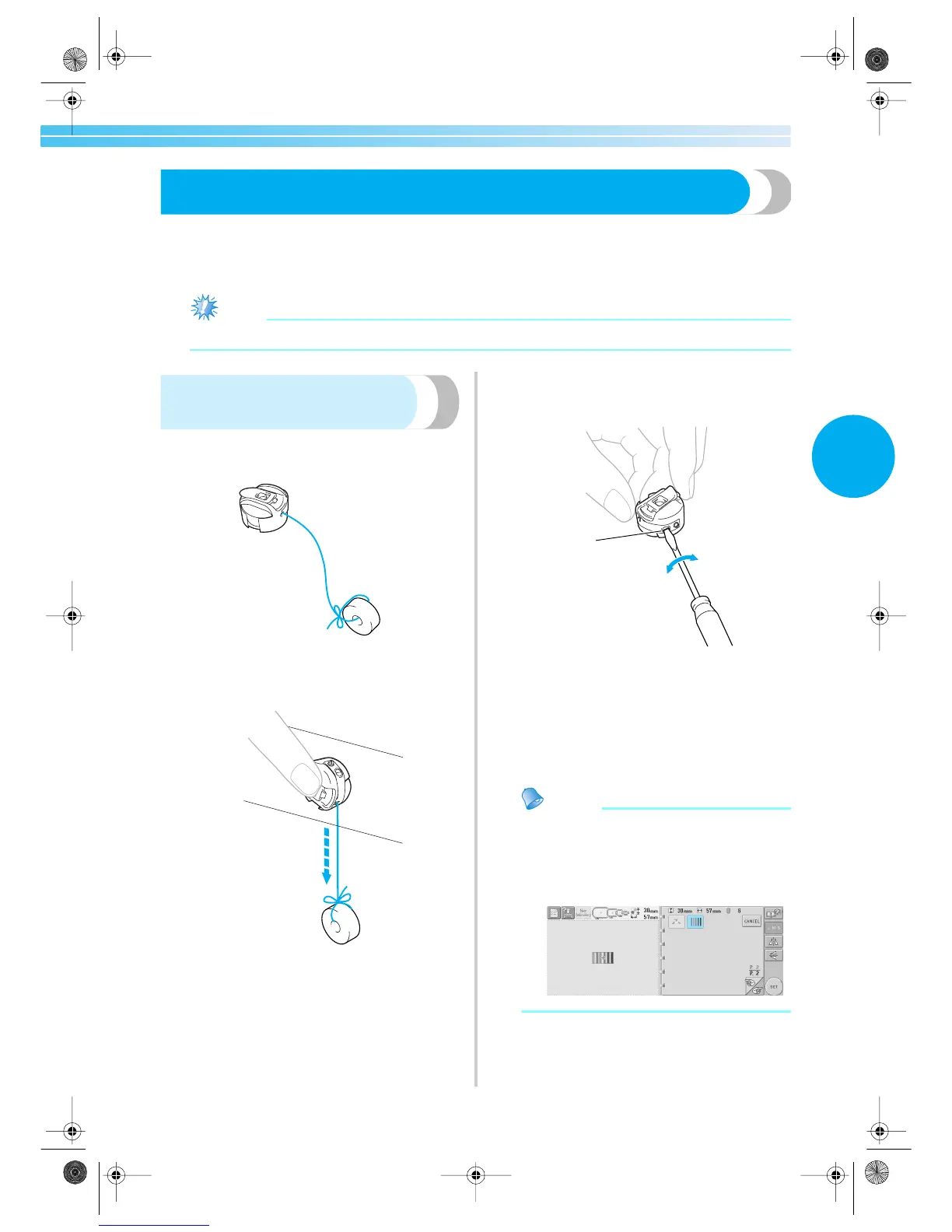
1
Tie the included weight to the end of the
thread extending from the bobbin case.
2
As shown in the illustration, hold the bobbin
case against a smooth vertical surface.
• If the thread with the weight attached is
slowly pulled out, the thread tension is
correct.
3
Use the included standard screwdriver to turn
the tension-adjusting screw and adjust the
thread tension.
1 Tension-adjusting screw
2 Tighter
3 Looser
4
After making the adjustments, try
embroidering with all needle bars to check
the thread tension.
Memo
● In the built-in embroidery patterns, one
pattern is used for checking the thread
tension. By sewing this pattern, the thread
tension can easily be checked. For details,
refer to page 160.
1
3
2
Sapphire.book Page 83 Friday, August 1, 2003 9:12 AM



 To Next Page
 Loading...













