SOI/DT 2002-06 eb 56 599 35 27-25
9 Accessibility to electronic control
9.1 Cover
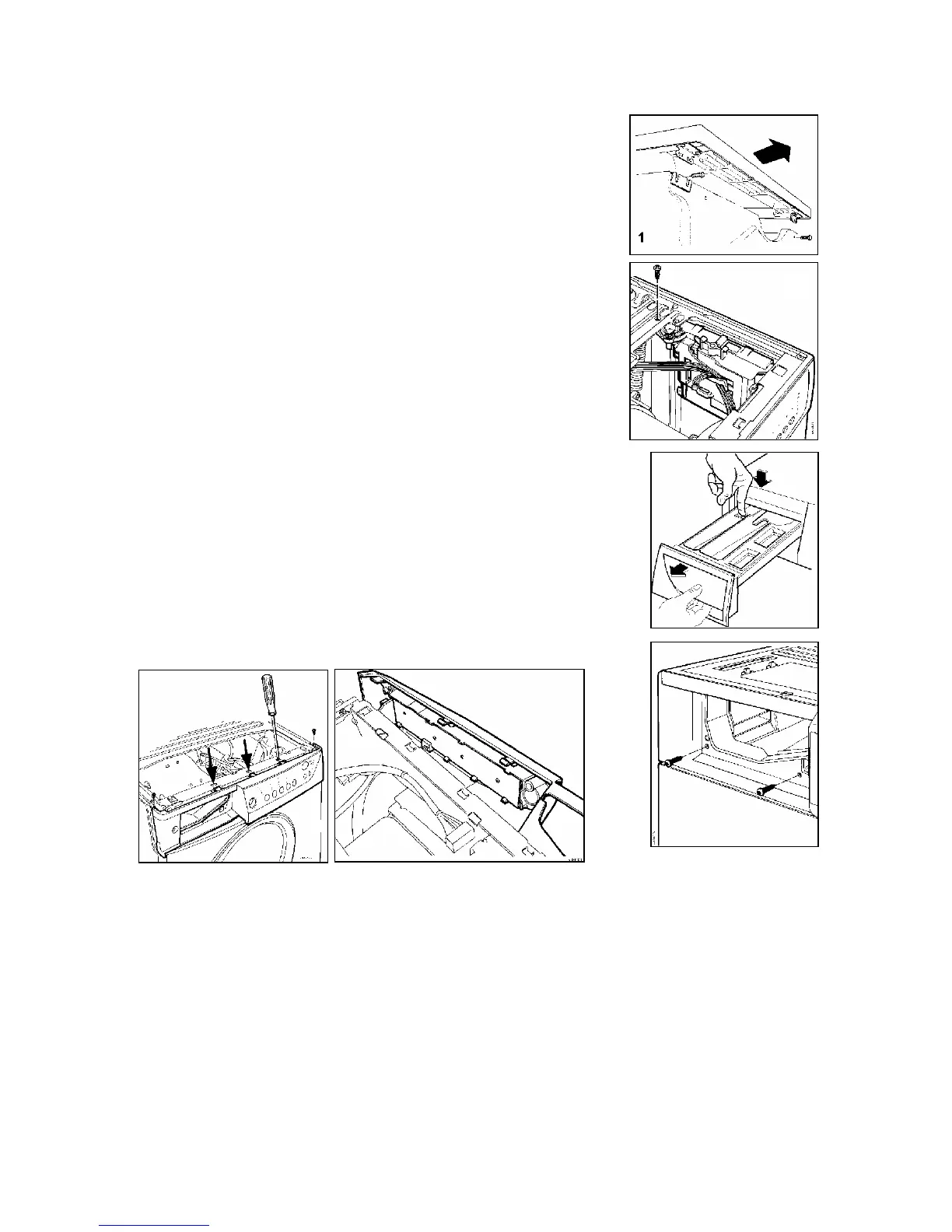
a. Unscrew the two rear screws (1), push backwards and release it from
the cabinet
9.1.1 Main PCB
a. Remove the cover
b. Unscrew the support fixing screw – board housing (2)
c. Release the wiring from the supports
d. Extract the electronic board housing
e. Disconnect the connectors
9.2 Control panel
a. Remove the cover (1)
b. Extract the detergent drawer (3)
c. Unscrew the control panel screws to control support (4)
d. Unscrew the support crossbar screws to control panel and release
the fixing wings (5-6)
e. Disconnect the wiring connector from the display board and remove
the control panel
9.2.1 Control/Display board
a. Remove the control panel
b. Disconnect the wiring from the board
c. Unscrew the fixing screws to electronic board housing-control panel
(7)
d. Extract the board-housing assembly releasing it from the control
panel
3
4
2
5
6



 To Next Page
 Loading...