5. VIDEO PLOTTER OPERATION
5-19
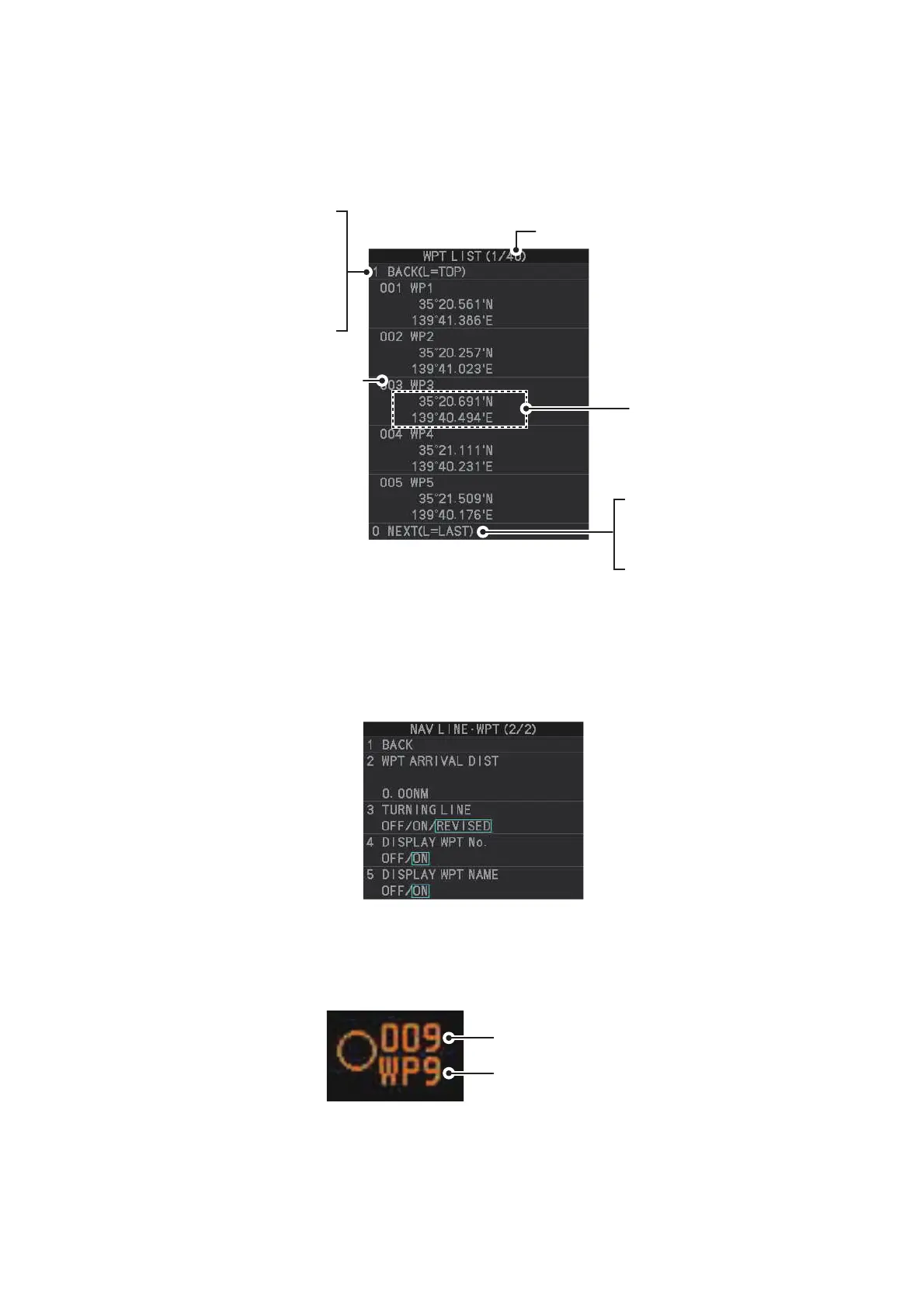
5.9.4 How to display the waypoint list
1. Open the menu.
2. Select [8 NAVLINE•WPT].
3. Select [7 WPT LIST] to show the [WPT LIST].
4. Close the menu.
5.9.5 How to show/hide the waypoint name/number
1. Open the menu.
2. Select [8 NAVLINE•WPT], then select [0 NEXT] to show the next page.
3. Select [4 DISP WPT NO.] or [5 DISP WPT NAME] as appropriate.
4. Select [ON] to show the waypoint name/number, or [OFF] to hide the waypoint
name/number, then left-click. he waypoint number and/or waypoint name appear
to the right of the waypoint mark.
5. Close the menu.
Displayed page/Total no. of pages
- Click while on page No.1
to close the list.
- Click while on page No.2 or
after to go back on page.
- Long-push the left button to
go to page No.1.
WPT No., WPT name
Latitude and
longitude position
of waypoint
- Go to next page.
- Long-push the left button
to go to last page.
Waypoint name
Waypoint number


 To Next Page
 Loading...





