–
51
–
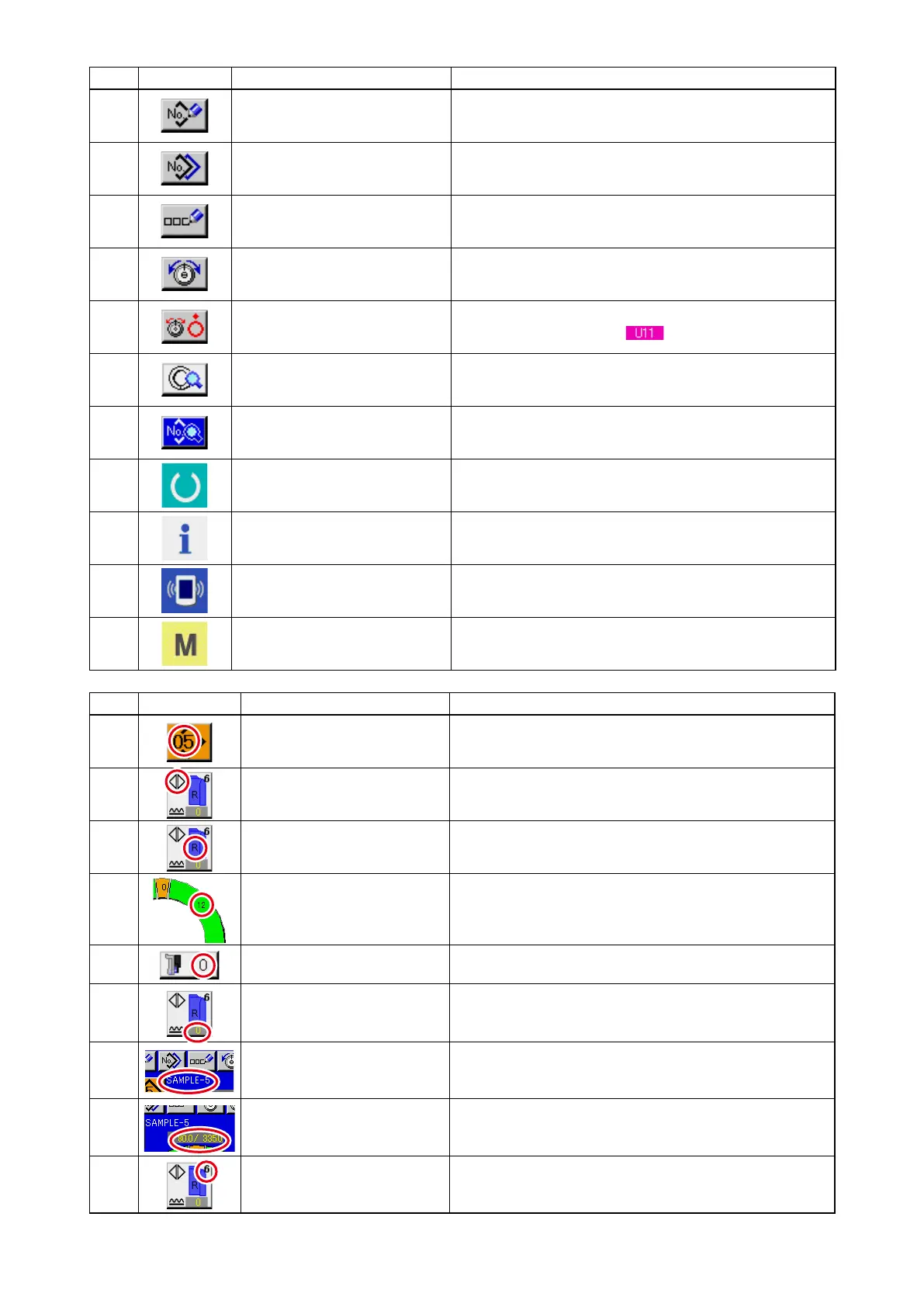
Symbol
Display Name of display Description
A
PATTERN No. display Pattern No. is displayed.
B
ALTERNATE SEWING dis-
play
This is displayed when alternate sewing is selected.
C
LEFT/RIGHT SLEEVE display R display : Program for right sleeve is called.
L display : Program for left sleeve is called.
D
SHIRRING AMOUNT display Shirring amount is displayed.
E
SHIRRING AMOUNT FOR
AUXILIARY FEED display
Shirring amount of auxiliary feed is displayed.
F
SHIRRING AMOUNT IN-
CREASE/DECREASE SET
VALUE display
Shirring amount increase/decrease set value is displayed.
G
PATTERN NAME display Pattern name is displayed.
H
STEP LENGTH/TOTAL
LENGTH display
Step length/total length are displayed.
I
SEWING SIZE display Sewing size is displayed.
No. Button Name of button Description
7
PATTERN NEW REGISTER
button
When the button is pressed, pattern No. new register
screen is displayed.
8
PATTERN COPY button When the button is pressed, sewing data copy screen is
displayed.
9
LETTER INPUT button When the button is pressed, letter input screen is dis-
played.
!0
NEEDLE THREAD TENSION
SETTING
When the button is pressed, needle thread tension
change screen button is displayed.
!1
DISK RISE button
When the button is pressed, thread tension disk No. 1 rises. (Turn
OFF the base tension during waiting.)
!2
STEP DETAILS button
When the button is pressed, list of sewing data corresponding to
the step being selected is displayed.
!3
SEWING DATA DISPLAY but-
ton
List of sewing data corresponding to the pattern No. being
selected is displayed.
!4
READY key Changeover of data input screen and sewing screen is
performed.
!5
INFORMATION key Changeover of data input screen and information screen
is performed.
!6
COMMUNICATION key Changeover of data input screen and communication
screen is performed.
!7
MODE key Changeover of data input screen and mode changeover
screen to perform various details setting is performed.


 To Next Page
 Loading...





