GS14/GS16, Operation
43
4.3 Working with the Memory Device
• Keep the card dry.
• Use it only within the specified temperature range.
•Do not bend the card.
• Protect the card from direct impacts.
Failure to follow these instructions could result in data loss and/or permanent damage
to the card.
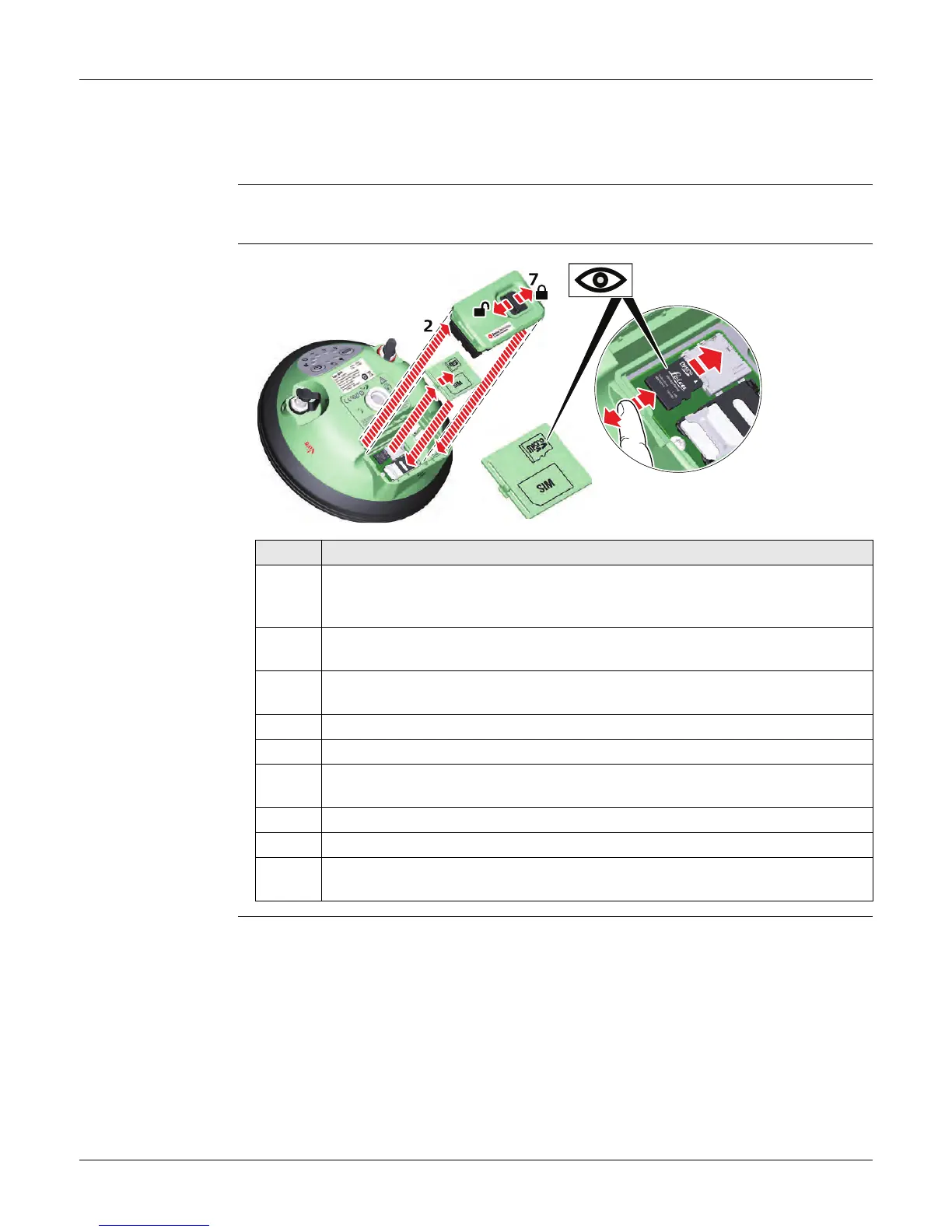
Insert a microSD
card into
GS14/GS16 step-by-
step
Step Description
Removing the microSD card while the GS14/GS16 is turned on can cause loss
of data. Only remove the microSD card or unplug connecting cables when
the GS14/GS16 is switched off.
The microSD card is inserted into a slot inside the battery compartment of
the instrument.
1. Push the slide fastener of the battery compartment in the direction of the
arrow with the open-lock symbol.
2. Remove the cover from the battery compartment.
3. Press the latch of the SIM/microSD card cover and remove the cover.
4. Slide the microSD card with the logo facing upwards firmly into the slot until
it clicks into position.
5. Insert the SIM/microSD card cover to cover slot.
6. Insert the cover over the battery compartment.
7. Push the slide fastener in the direction of the arrow with the close-lock
symbol.
4a
4a


 To Next Page
 Loading...











