EasyManua.ls Logo

Samsung BD-P1600 - Progressive Mode

Samsung BD-P1600
89 pages
Print Icon
To Next Page IconTo Next Page
To Previous Page IconTo Previous Page
Loading...
.:.
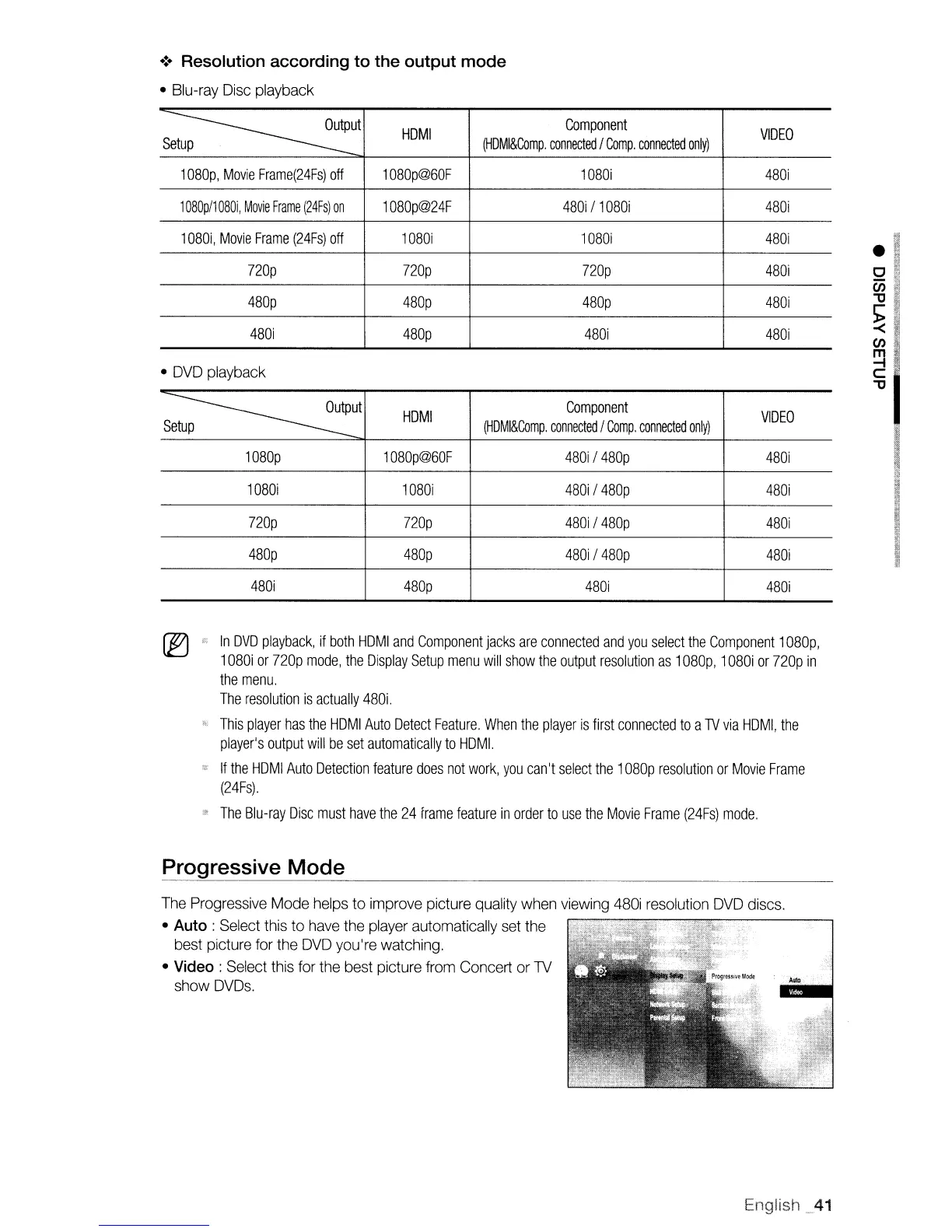
Resolution according to the output mode
Blu-ray
Disc
playback
~ut
HOM
I
Component
VIDEO
Setup
(HDMI&Comp.
connected
I
Compo
connected
only)
1080p,
Movie
Frame(24Fs)
off
1080p@60F
1080i
480i
1080p/1080i,
Movie
Frame
(24Fs)
on
1080p@24F
480i
/
1080i
480i
1080i,
Movie
Frame
(24Fs)
off
1080i 1080i
480i
nop nop nop
480i
480p
480p 480p
480i
480i
480p
480i
480i
DVD
playback
~ut
HOM
I
Component
VIDEO
Setup
(HDMI&Comp.
connected
I
Compo
connected
only)
1080p
1080p@60F
480i
/
480p
480i
1080i 1080i
480i
I
480p
480i
nop nop
480i
I
480p
480i
480p 480p
480i
/480p
480i
480i
480p
4801
480i
In
DVD
playback,
if
both
HOM
I
and
Component
jacks
are
connected
and
you
select
the
Component
1080p,
1
080i
or
nop
mode,
the
Display
Setup
menu
will
show
the
output
resolution
as
1080p,
1
080i
or
nap
in
the
menu.
The
resolution
is
actually
480i.
This
player
has
the
HDMI
Auto
Detect
Feature.
When
the
player
is
first
connected
to
a
lV
via
HDMI,
the
player's
output
will
be
set
automatically
to
HOM!.
If
the
HDMI
Auto
Detection
feature
does
not
work,
you
can't
select
the
1080p
resolution
or
Movie
Frame
(24Fs).
The
Blu-ray
Disc
must
have
the
24
frame
feature
in
order
to
use
the
Movie
Frame
(24Fs)
mode.
Progressive Mode
The
Progressive Mode
helps
to improve picture quality
when
viewing
480i
resolution
DVD
discs.
Auto :
Select
this
to
have
the
player
automatically
set
the
best picture
for
the
DVD
you're watching.
Video
: Select this for the best picture
from
Concert or
TV
show
DVDs.
English.41

Table of Contents

Other manuals for Samsung BD-P1600

Related product manuals