58 Location and Functions of Parts and Controls
Press the MANUAL button and adjust
the focus manually when shooting the
following objects.
• White walls and other objects without
contrast
• Objects behind glass
• Objects with horizontal stripes
• Objects on which bright lights are cast
or reflected
• Nightscapes and other dark objects
with blinking lights
• Lit objects shot with darkened
exposure adjustment or exposure
compensation settings
C DATA SCREEN button
Press this button to display the main
menu. Press it again to turn off the menu.
If you press the button when a lower-
level menu is selected, the display goes
back to a higher-level menu.
Pan/tilt operations are disabled when the
menu is displayed.
D PAN-TILT buttons
Press the arrow buttons to perform
panning and tilting. Press the HOME
button to face the camera back to the front.
When the menu is displayed, use V or v
to select the menu items and B or b to
change the set values. The selected
setting menu is displayed, by pressing
the HOME button when the main menu
is displayed.
E L/R DIRECTION SET button
Hold down this button and press the REV
button to change the direction of the
camera movement opposite to that
indicated by the arrow of the
B
/
b
buttons.
To reset the direction of the camera
movement, press the STD button while
holding down this button.
F POWER switch
Press this button to turn on/off the
camera when the camera is connected to
an AC outlet.
G BACK LIGHT button
Press this button to enable the backlight
compensation. Press it again to disable
the backlight compensation.
H POSITION buttons
Hold down the PRESET button and press
button 1 to 6 to store the current camera
direction, zooming, focus adjustment and
backlight compensation in the memory of
the pressed number button.
To erase the memory contents, hold
down the RESET button and press
button 1 to 6.
I PAN-TILT RESET button
Press this button to reset the pan/tilt
position.
J ZOOM buttons
Use the SLOW button to zoom slowly,
and the FAST button to zoom quickly.
Press the T (telephoto) side of the button
to zoom in, and the W (wide angle) side
to zoom out.
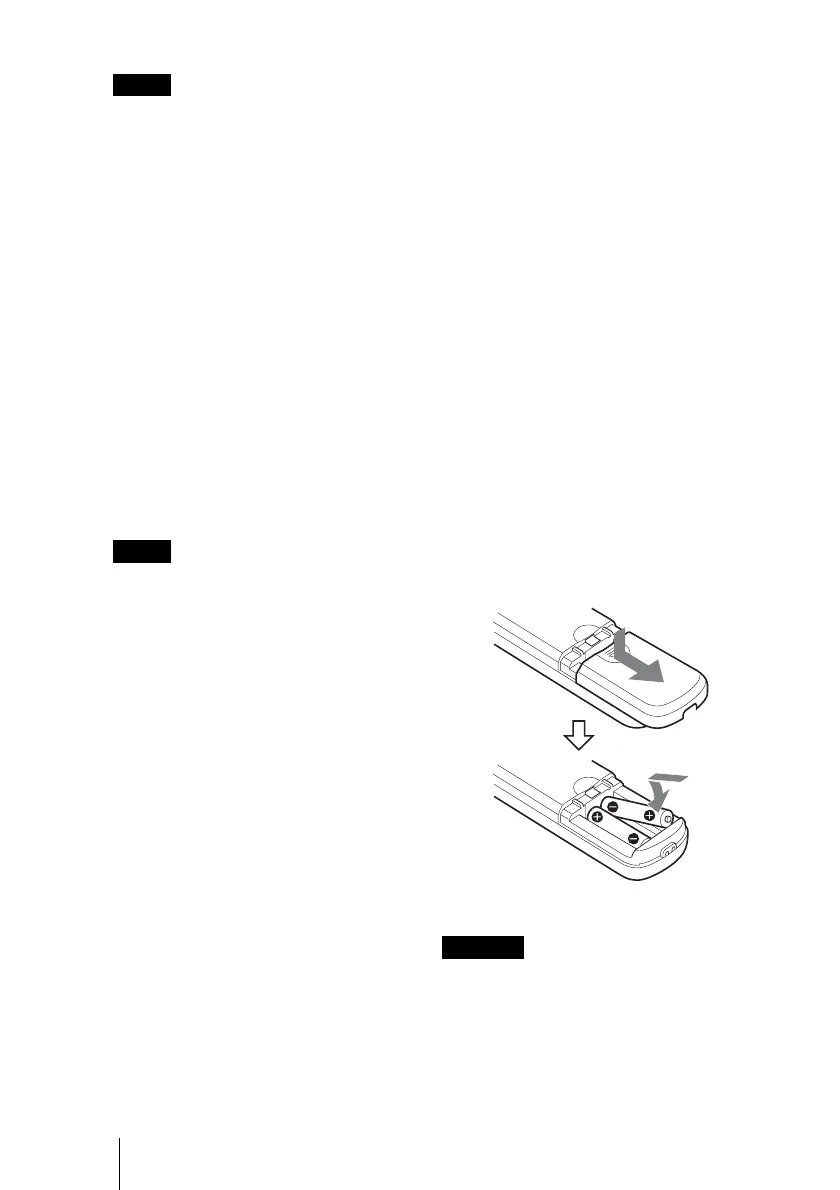
To install batteries
• To avoid risk of explosion, use R6 (size
AA) manganese or alkaline batteries.
• Danger of explosion if battery is incorrectly
replaced.
Replace only with the same or equivalent
type recommended by the manufacturer.
When you dispose of the battery, you must
obey the law in the relative area or country.
Note
Note
CAUTION
Two R6 (size AA) batteries
(not supplied)


 To Next Page
 Loading...