EasyManua.ls Logo

Sony KD-43X720E - How to Enter Self Check

Sony KD-43X720E
211 pages
Print Icon
To Next Page IconTo Next Page
To Previous Page IconTo Previous Page
Loading...
114
03.5 How to enter Self Check
Go to Self diagnosis history through Service Mode
<[
]>
<[ ]>
<[ ]>
<[ ]>
>>
>>
>>
[Home] Exit
Service Mode
Tu Data for Serv
>>
>>
1_IS6S320CNO0101
>>
30
123475
BCD-9876543
Off
Factory
SERIAL NUMBER EDIT
Model Number Setting
TEST RESET
UART Selection
HDD Performance Check
AAA
Status Information
Self diagnosis history
Panel Selection
STATUS 1st Tu Infor
LVDS Spectrum (%)
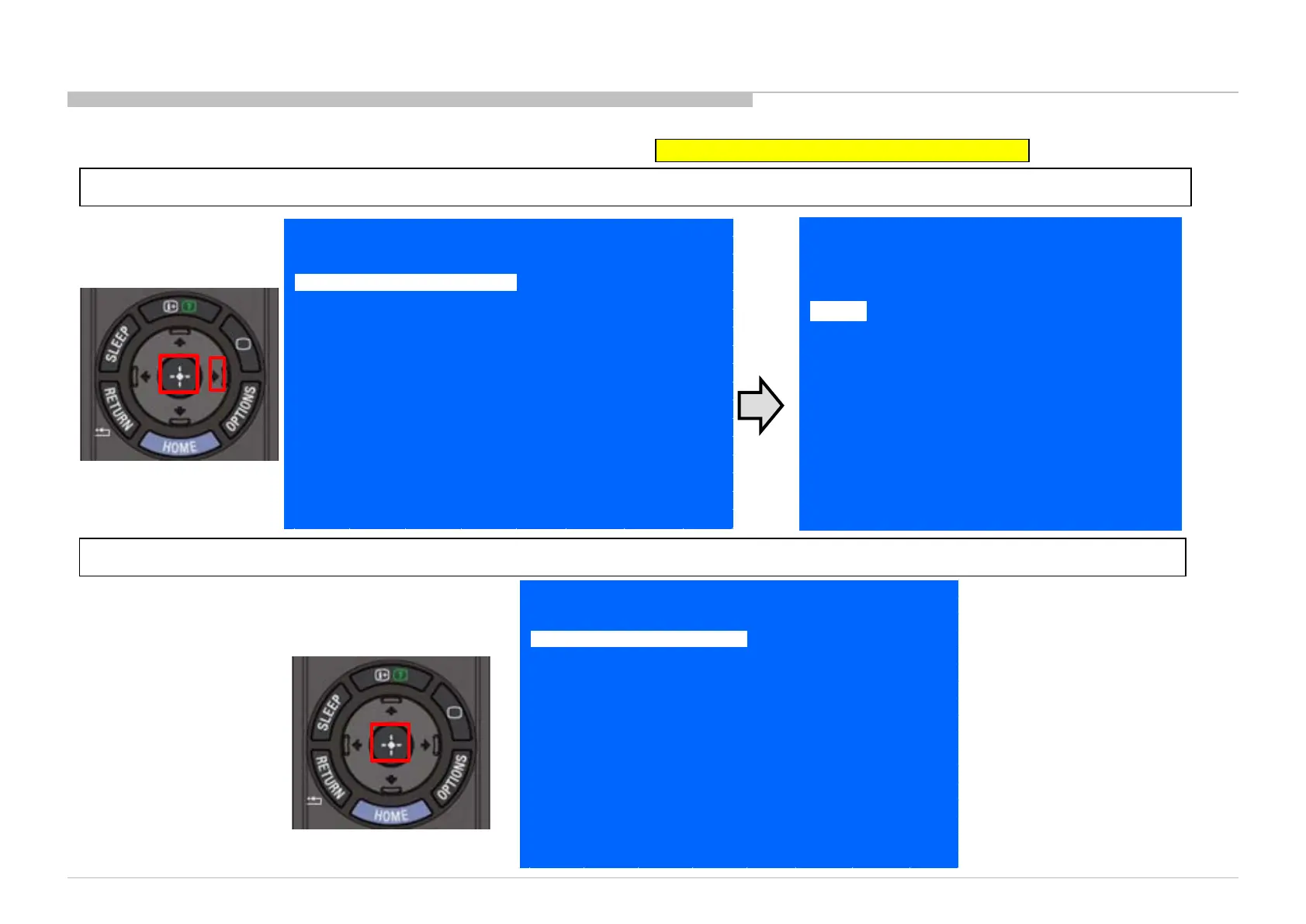
1) In Service Mode, select “Self diagnosis history”, press “Enter” or ” button to enter Self Check.
2) Press “Enter” button to back to Service Mode.
<[ ]>
<[ ]>
<[ ]>
<[ ]>
>>
>>
>>
[Home] Exit
Service Mode
Tu Data for Serv
>>
>>
1_IS6S320CNO0101
>>
30
123475
BCD-9876543
Off
Factory
SERIAL NUMBER EDIT
Model Number Setting
TEST RESET
UART Selection
HDD Performance Check
AAA
Status Information
Self diagnosis history
Panel Selection
STATUS 1st Tu Infor
LVDS Spectrum (%)
SELF CHECK
Back
[Home] Exit
002 MAIN_POWER
003 AUD_ERR
003 AUD_ERR_I2C
004 PANEL_POWER_ERR
005 PANEL_I2C_COMM_ERR
006 BACKLIGHT_ERR
000 TU_DEMOD
00033 00006 00033
000
000
000
000
000
000
000

Table of Contents

Related product manuals