DMU-2000 DATA MANAGEMENT UNITPage 16
HOW TO USE THE WORLD CLOCK
CITY SELECTION
It is possible to enter up to a total of 11 cities in the register. All cities in the register will be displayed on the World
Clock screen.
Advice: The order of the display of the cities can be changed later; for now, please just select one of the supplied city
names.
There may only be one city shown in some countries; however, it is possible to add cities, if desired.
If you wish to add a city to the City List that was programmed at the factory, you will need to supply your own USB or PS/
2 Keyboard. If you utilize one of the pre-loaded cities, a keyboard is not necessary.
1. Press the
[
F3
(
CITY
)]
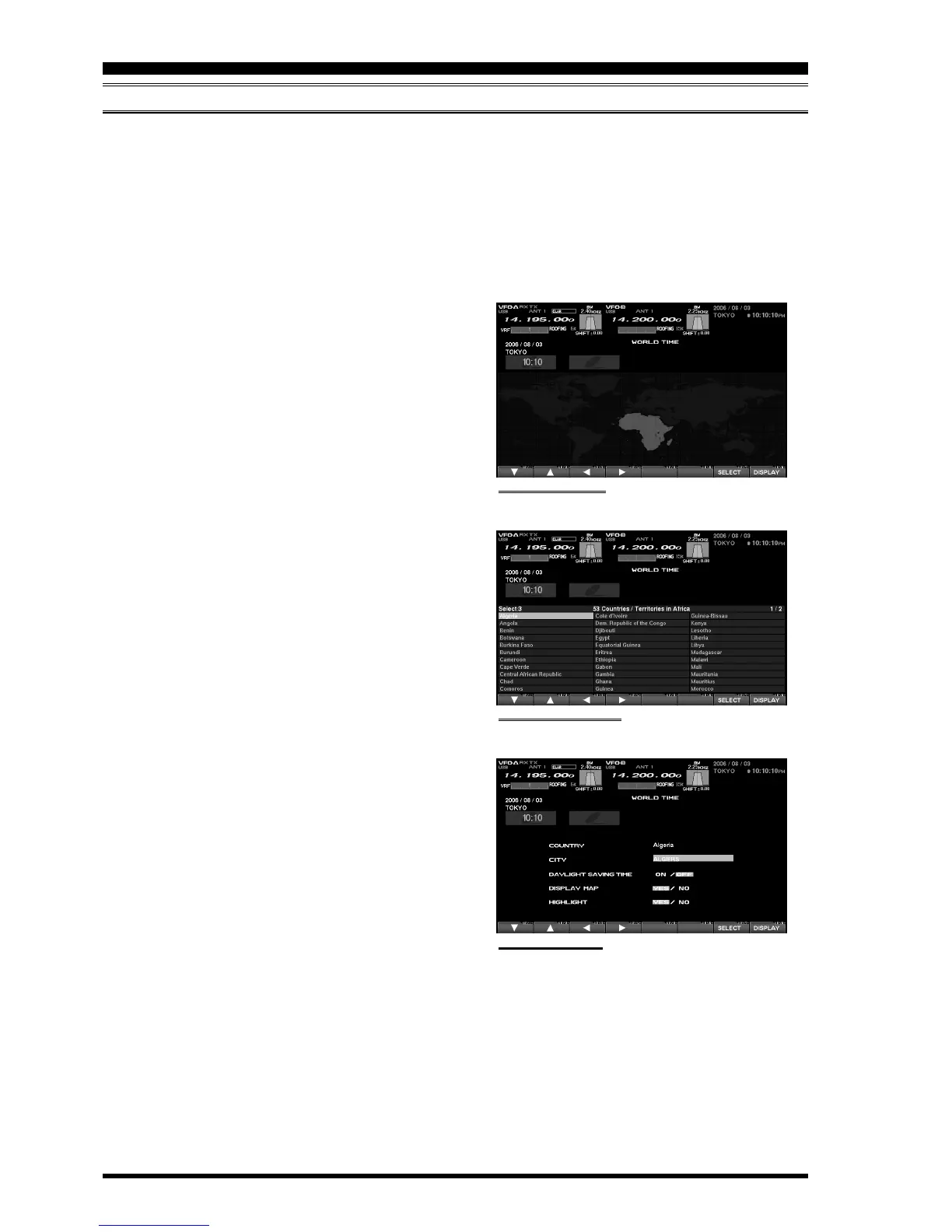
key while the World Map is dis-
played, and the Display will show the “Area Selec-
tion” screen.
2. Press the
[
F1
(
)]
,
[
F2
(
)]
,
[
F3
(
)]
,
[
F4
(
)]
keys
to select the continent in which the desired city is
located.
3. Confirm that the desired area is highlighted, and press
the
[
F7
(
SELECT
)]
key momentarily. Now the coun-
try list for the selected continent will be displayed.
4. Use the
[
F1
(
)]
,
[
F2
(
)]
,
[
F3
(
)]
,
[
F4
(
)]
keys to
select the desired country in this area.
5. Now press the
[
F7
(
SELECT
)]
key momentarily, and
you will see the list of the city names in the country
selected.
6. Press the
[
F1
(
)]
,
[
F2
(
)]
,
[
F3
(
)]
,
[
F4
(
)]
key
to select the desired city. Even if the city displayed
is the only one in the country, select it anyway.
7. Once you have pressed the
[
F7
(
SELECT
)]
key mo-
mentarily, the selected country name and the city name
will be indicated, thanks to the procedure mentioned
above. If you want to input a city name which is not in
the list, press the
[
F7
(
SELECT
)]
key after confirm-
ing that the city name is highlighted. Then, enter the
city name you want.
8. Press the
[
F1
(
)]
,
[
F2
(
)]
,
[
F3
(
)]
,
[
F4
(
)]
key
to set “DAYLIGHT SAVING TIME (Summer Time),”
“DISPLAY MAP” (display or not display city names
on the World Clock screen), or “HIGHLIGHT” (se-
lect highlighted indication (yellow) or normal (white)
indication).
9. When finished, press and hold in the
[
F7
(
SELECT
)]
key for 2 seconds to exit.
“AREA SELECTION” SCREEN
“COUNTRY SELECTION” SCREEN
[
F7
(
SELECT
)]
Key
[
F7
(
SELECT
)]
Key
[
F7
(
SELECT
)]
Key
“CITY SELECTION” SCREEN


 To Next Page
 Loading...