Page 90 FT-450 OPERATION MANUAL
I
NSTALLATION
OF
O
PTIONAL
A
CCESSORIES
AUTOMATIC ANTENNA TUNER FC-30 OPERATION
The FC-30 Automatic Antenna Tuner responds to control commands from the FT-450 Transceiver, providing
microprocessor-based impedance matching on the 160 through 6 meter Amateur bands. On the HF and 50 MHz
bands, the impedance matching range is from 16.5 ohms to 150 ohms (up to 3:1 SWR). Accordingly, the FC-30
should not be expected to match “Long wire” type antennas unless you have taken specific design steps to
ensure that the impedance presented to the FC-30 is within these specifications.
Please see the manual of FC-30 for more detailed information.
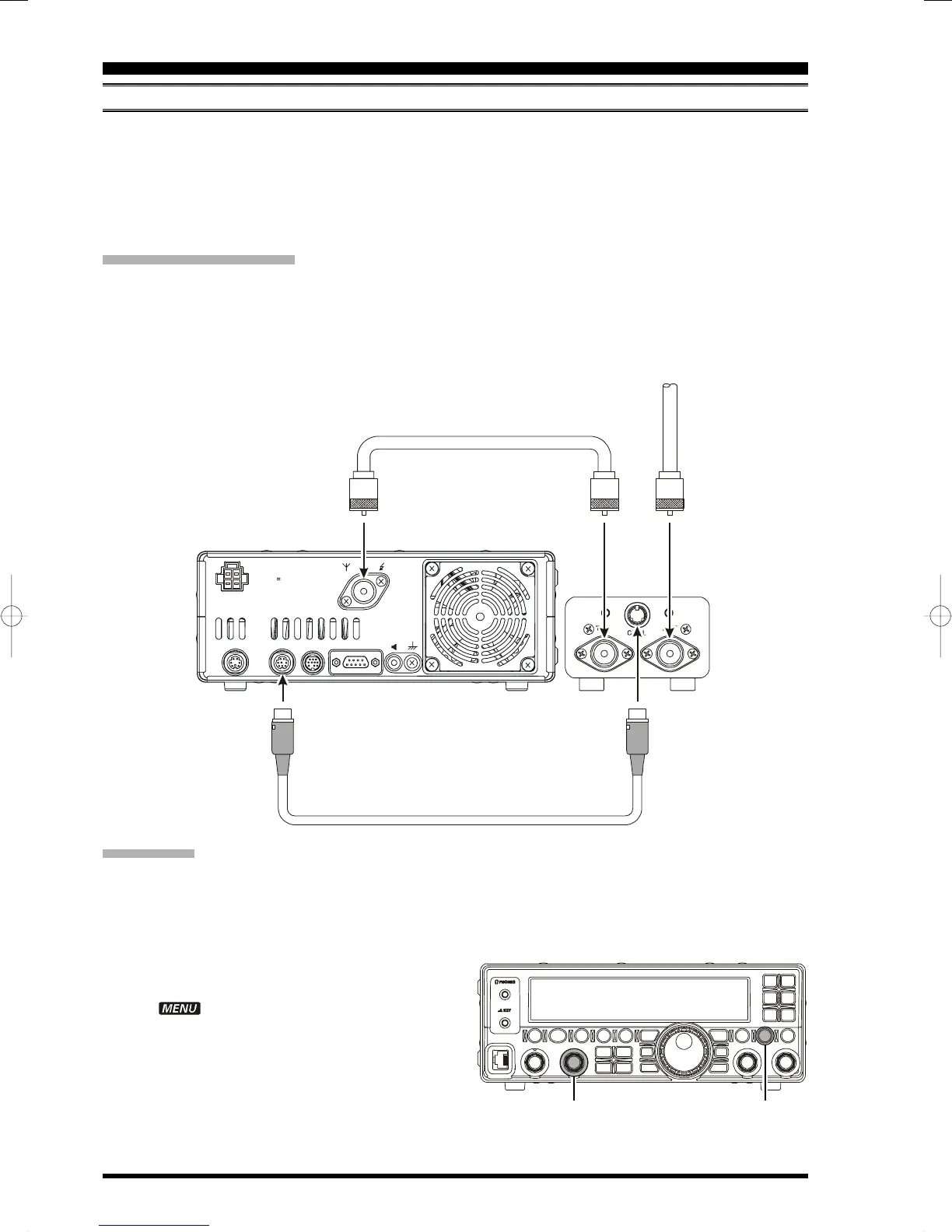
Rear Panel Information
Connect one end of the Interconnecting Control Cable’s miniature DIN connector to the TUNER jack on the rear of
the FT-450. Connect the other end of the Control Cable’s miniature DIN connector to the CNTL jack on the FC-30.
Connect one end of the Antenna Cable’s “M” type connector to the ANT jack on the rear of the FT-450. Connect
the other end of the Antenna Cable’s “M” type connector to the TRX jack on the FC-30.
Connect the Antenna Cable from the Antenna to the ANT jack on the FC-30.
[
DSP/SEL
]
Knob
[
F
]
button
Installation
The optional FC-30 Automatic Antenna Tuner provides automatic tuning of a coaxial line so as to present a
nominal 50-ohm impedance to the FT-450’s, HF/50 MHz antenna port.
Before operation can begin, you must instruct the FT-450’s microprocessor that the FC-30 is being used. This is
done using the Menu Mode:
1. Press and hold the
[
F
]
button for one second to
enter the Menu Mode.
The “ ” icon will appear in the display.
2. Rotate the [DSP/SEL
]
knob to select the Menu
Item “TUNER.”
3. Press the [DSP/SEL
]
knob to enable this selected
Menu Item.
4. Rotate the [DSP/SEL
]
knob to change the setting
to “EXT ATU.”
5. Press and hold the
[
F
]
button for one second to
return to normal operation.
INPUT
DC 13.8V
22A
ANT
GND
EXT
SPKR
CATLINEARTUNERDATA
FT-450
FC-30


 To Next Page
 Loading...