Joystick
and
Joystick
Guide
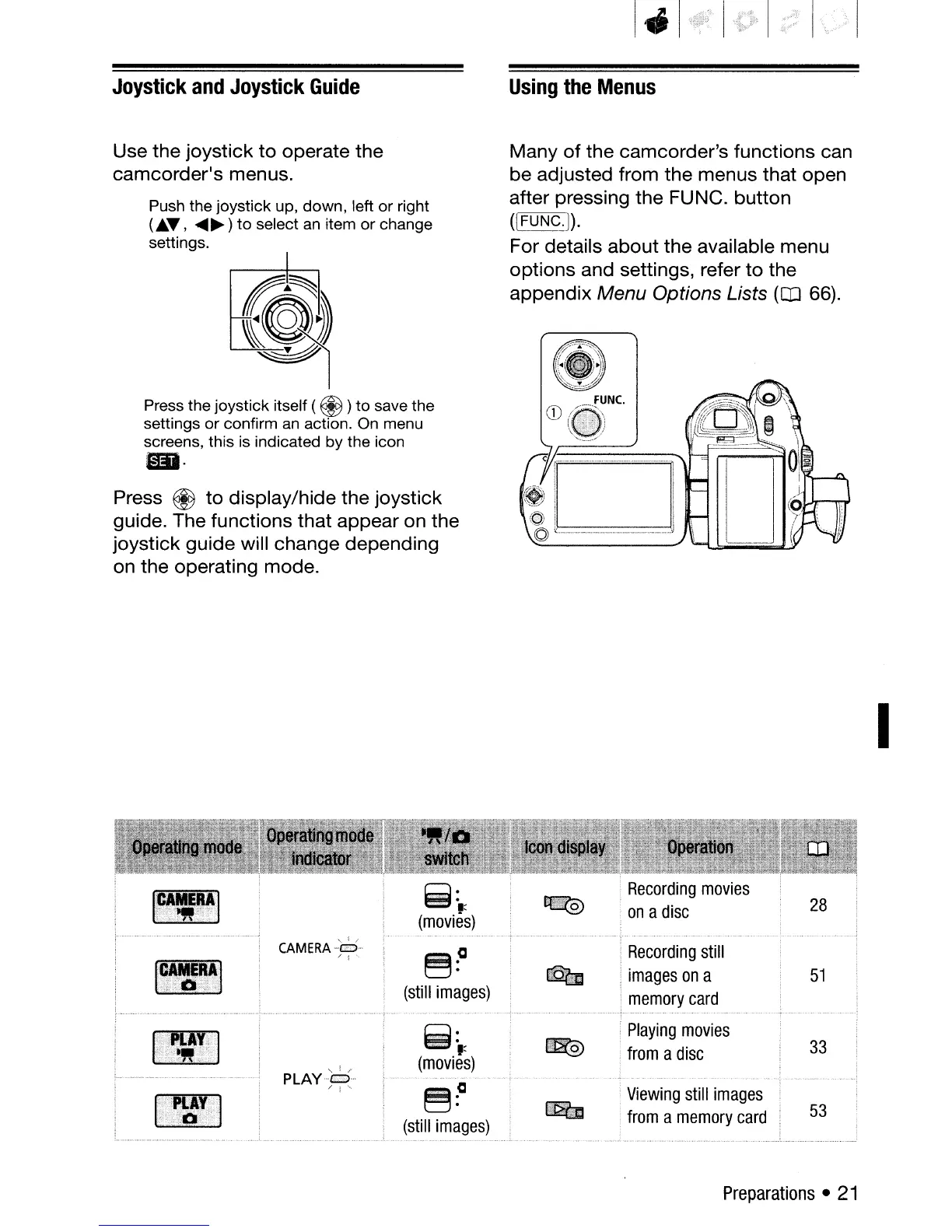
Use the joystick
to
operate the
camcorder's menus.
Push the joystick up, down, left or right
(Jt..~,
....
~)
to
select
an
item
or
change
settings.
~)
~
Press the joystick itself ( @ )
to
save the
settings
or
confirm an action. On menu
screens, this is indicated by the icon
mi·
Press ®
to
display/hide the joystick
guide. The functions that appear on the
joystick guide will change depending
on the operating mode.
Using
the
Menus
Many
of
the camcorder's functions can
be adjusted from the menus that open
after pressing the FUNC. button
([FUNC.j).
For details
about
the available menu
options and settings, refer
to
the
appendix Menu Options Lists
(CD
66).
I
CAM
E
RA-lri:D-
/ I
~:a
(still
images)
~:.:
(movies)
~?
(still
images)
Recording
still
images
on
a
memory
card
Playing
movies
from
a
disc
Viewing
still
images
from
a
memory
card
33
53
Preparations
•
21


 To Next Page
 Loading...








