[DEMO
MODE]:
The demonstration
mode
displays the camcorder's main features. It starts
automatically when the camcorder is powered with the
compact
power
adapter if you
leave it turned on without loading a
disc
or
memory card for more than 5 minutes.
•
To
cancel the
demo
mode
once it started, press any button, turn off the camcorder
or
load a disc.
~
SYSTEM
SETUP
[SPEAKER
VOL.]
oQ>
...m111IIII1J]alt
:
[BEEP]
['iii»)
HIGH
VOLUME],
• •
['iii)
LOW
VOLUME],
[1m
OFF]
[POWER
SAVE]
[mJ
ON],
[1m
OFF]
• •
[QUICK
START]
[1m
OFF],
(Inm
10
min],
• •
[m..
20
min],
[m.
30
min]
,
[IMG
NUMBERS]
[r=J
RESET]
>
[=
CONTINUOUS]
•
...........
"..........
[TV
TYPE]
[9!l
NORMAL
TV]
I
[mlm
WIDE
TV]
•
• • •
..
. .....
..
_......._
......
-
...
-
..........
-"
-_
.
[FIRMWARE]
•
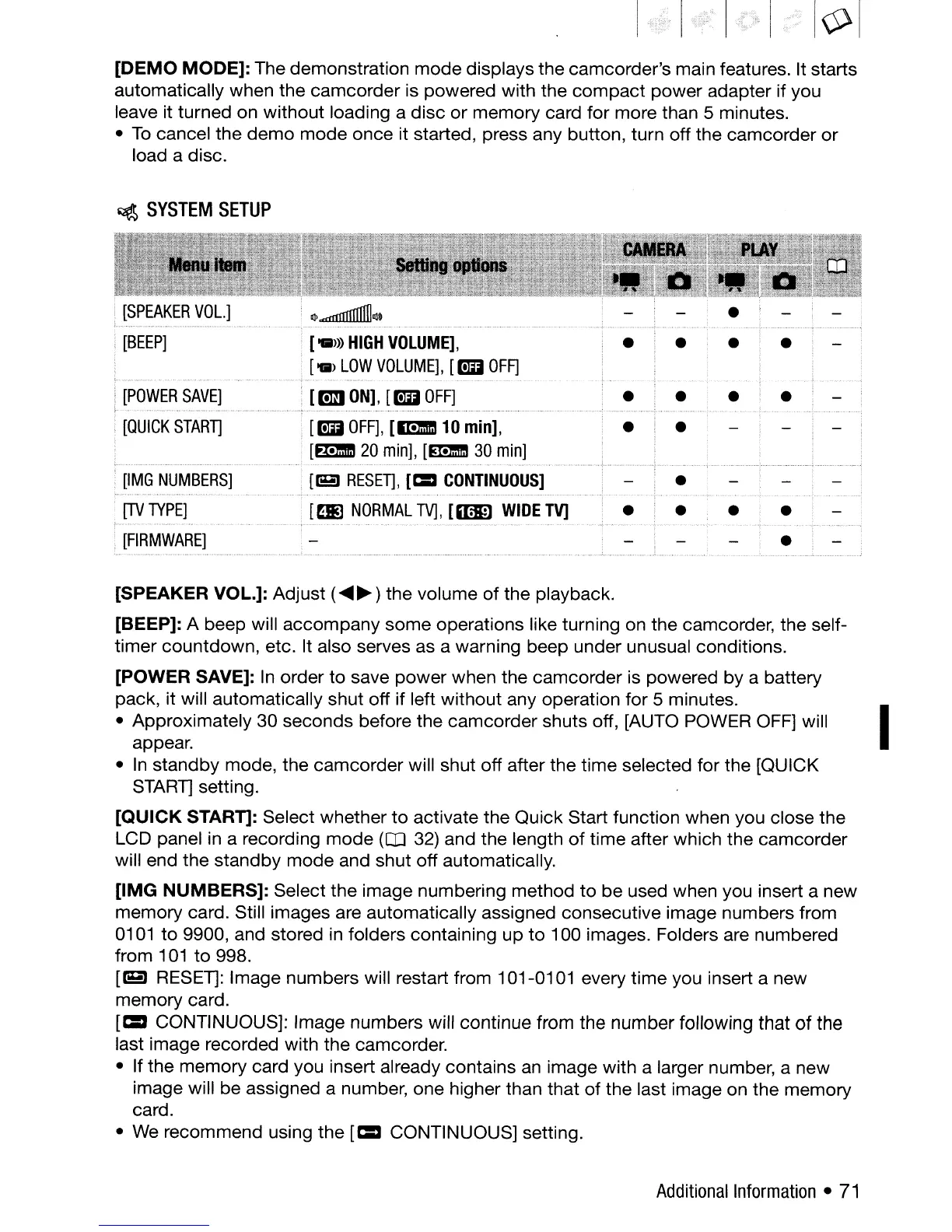
[SPEAKER VOL.]: Adjust (
.....
~)
the volume
of
the playback.
[BEEP]: A beep will
accompany
some
operations like turning on the camcorder, the self-
timer
countdown, etc. It also serves as a warning beep under unusual conditions.
[POWER SAVE]:
In
order to save
power
when the camcorder is powered by a battery
pack, it will automatically shut off if left without any operation for 5 minutes.
I
• Approximately 30 seconds before the camcorder shuts off, [AUTO POWER OFF] will
appear.
•
In
standby mode, the camcorder will shut off after the time selected for the [QUICK
STARll
setting.
[QUICK
START): Select whether
to
activate the Quick Start function when you close the
LCD panel in a recording
mode
(OJ 32) and the length
of
time after which the camcorder
will end the standby
mode
and shut off automatically.
[IMG
NUMBERS]:
Select the image numbering method
to
be
used when you insert a new
memory card. Still images are automatically assigned consecutive image numbers from
0101
to
9900, and stored in folders containing
up
to
100 images. Folders are numbered
from
101
to
998.
[eJ
RESEll:
Image numbers will restart from 101-0101 every
time
you insert a new
memory card.
[=
CONTINUOUS]: Image numbers will continue from the number following that
of
the
last image recorded with the camcorder.
• If the
memory
card you insert already contains
an
image with a larger number, a new
image will be assigned a number, one higher than that
of
the last image on the memory
card.
• We recommend using the
[=
CONTINUOUS] setting.
Additional
Information
•
71


 To Next Page
 Loading...








