1.1
Inserting
the
Disc
I
(OJ 21)
Use only 8 cm
(3
in.) mini DVD discs
marked with the DVD-R
~
logo
(including DVD-R
DL)
or the DVD-RW
~
logo. Refer also
to
Approved
discs (OJ 7).
Before inserting the disc, be sure
to
check that the recording surface is
clean. If necessary, use a soft lens-
cleaning cloth
to
remove any
fingerprints, dirt buildup
or
smudges
from the disc surface.
• This setting does
not
affect the
brightness
of
the recordings.
• Using the bright setting will shorten the
effective usage time
of
the battery pack.
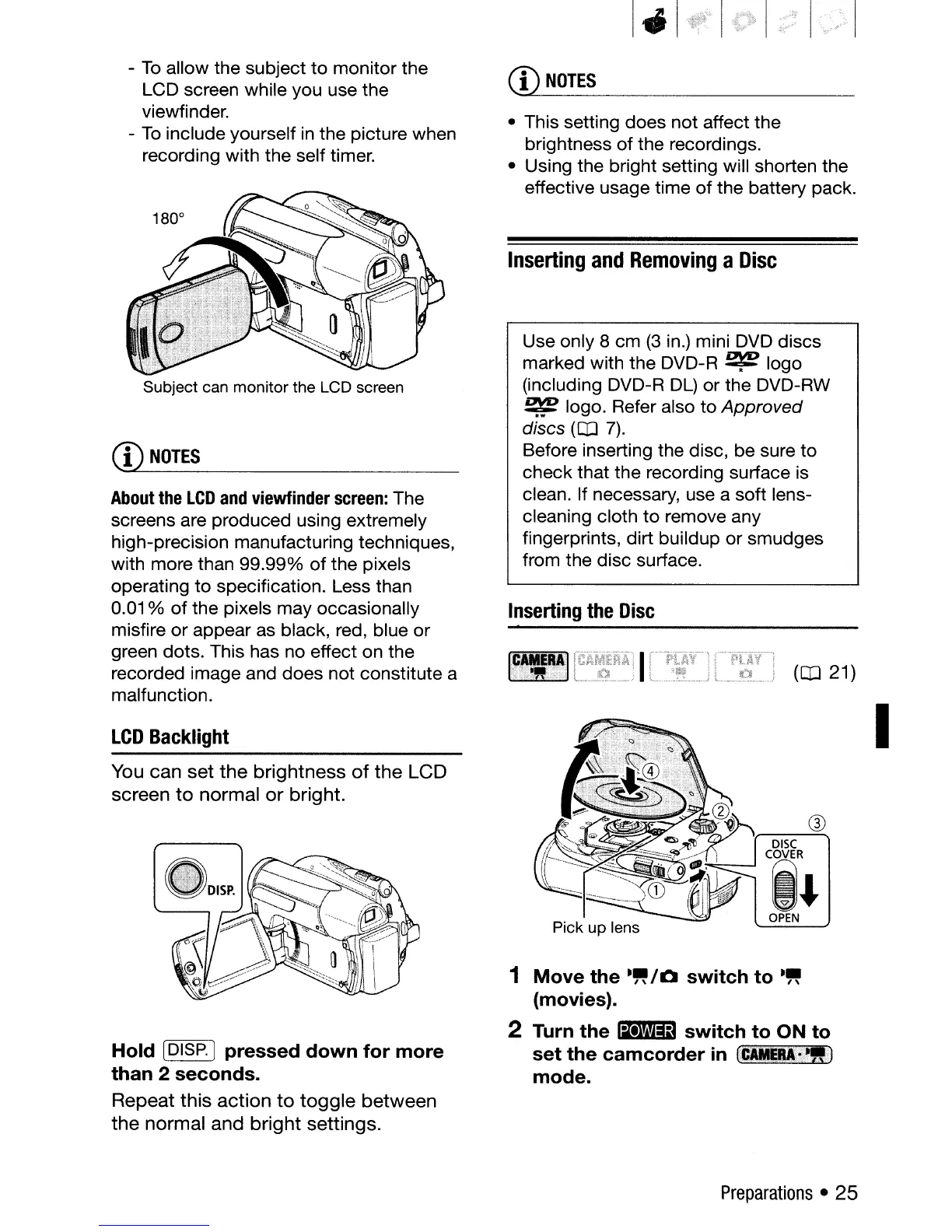
1
Move
the
.~/Q
switch
to
.~
(movies).
2 Turn
the
liI'+lIiD
switch
to
ON
to
set
the
camcorder
in
t_Ui~i!IJ
mode.
Inserting
and
Removing
a
Disc
CD
NOTES
Subject can monitor the LCD screen
-
To
allow the subject
to
monitor the
LCD screen while you use the
viewfinder.
-
To
include yourself in the picture when
recording with the self timer.
You
can
set
the
brightness
of
the
LCD
screen
to
normal
or
bright.
Hold
[DISP.]
pressed
down
for
more
than
2
seconds.
Repeat
this
action
to
toggle
between
the
normal
and
bright
settings.
About
the
LCD
and
viewfinder
screen:
The
screens are produced using extremely
high-precision manufacturing techniques,
with more than 99.99%
of
the pixels
operating to specification. Less than
0.01
%
of
the pixels may occasionally
misfire or appear as black, red, blue or
green dots. This has no effect on the
recorded image and does not constitute a
malfunction.
CD
NOTES
LCD
Backlight
Preparations
• 25


 To Next Page
 Loading...








