1 Slide [DISC COVERIfully toward
OPEN and gently open the disc
cover completely until it stops.
• Do
not
subject
the
camcorder
to
strong
impacts
while
the
DISC
access
indicator
is on
or
flashing.
• Retract
the
grip
belt
under
the
camcorder
so
it
will
not
get
in
the
way
of
the
disc
cover.
• It
may
take
a
moment
after sliding
[DISC COVER]
for
the
disc
cover
to
open.
2 Grab the edge
of
the disc and
gently pull it out.
Be
careful
not
to
touch
the
recording
surface
of
the
disc
or
the
pick
up
lens.
3 Close the disc cover.
o
IMPORTANT
When you slide [DISC COVERIafter making
a recording, important file allocation data
is
updated
on
the disc before the disc
cover opens. While the DISC access
indicator
is
on
or flashing
do
not subject
the camcorder
to
shocks such as
forcefully laying it
on
a table.
Inserting
and
Removing
a
Memory
Card
You can
use
commercially
available
~-
SDHC
(SD High Capacity)
memory
cards,
S~
SD
memory
cards
or
MultiMedia
Cards (MMC)
with
this camcorder.
Make
sure
to
initialize all
memory
cards
before using
them
with
this
camcorder
(CO
57).
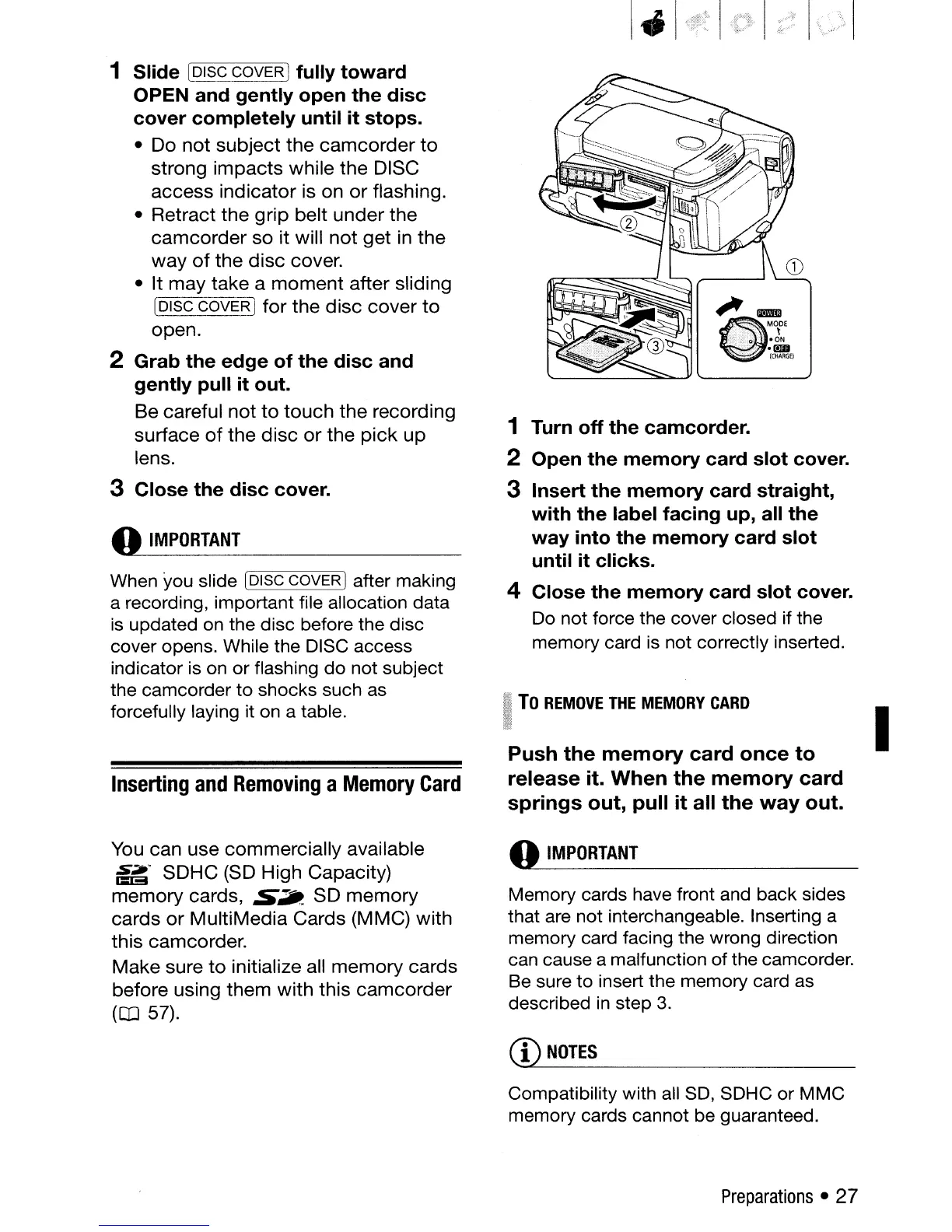
1 Turn off the camcorder.
2 Open the memory card slot cover.
3 Insert the memory card straight,
with the label facing up, all the
way into the memory card slot
until it clicks.
4 Close the memory card slot cover.
Do not force the cover closed if the
memory card
is
not correctly inserted.
To
REMOVE
THE
MEMORY
CARD
Push the memory card once to
release it. When the memory card
springs out, pull it all the
way
out.
o
IMPORTANT
Memory cards have front and back sides
that are not interchangeable. Inserting a
memory card facing the wrong direction
can cause a malfunction of the camcorder.
Be
sure to insert the memory card
as
described
in
step
3.
CD
NOTES
Compatibility with all
SO,
SDHC or MMC
memory cards cannot be guaranteed.
Preparations
•
27
I


 To Next Page
 Loading...








