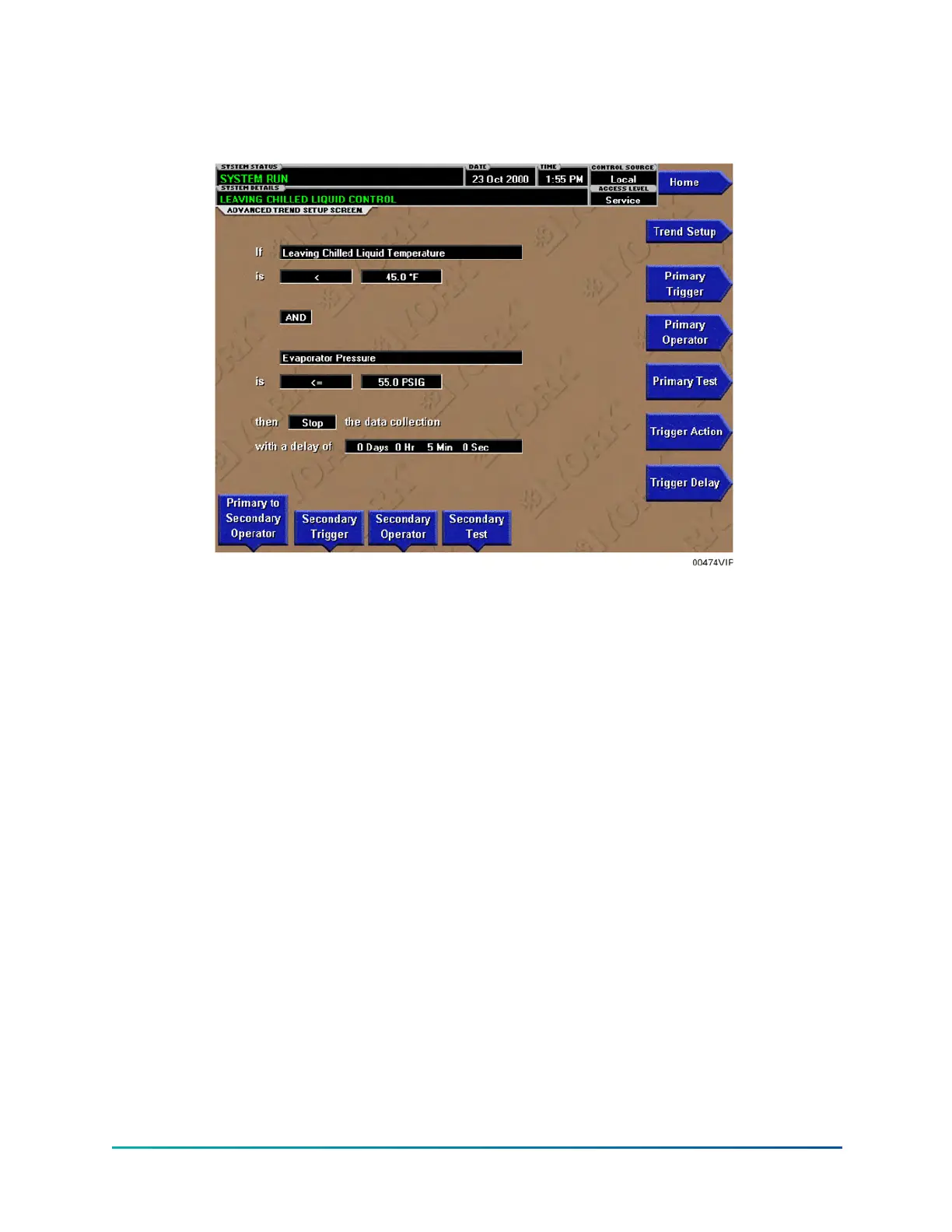
Advanced trend setup screen
Figure 67: Advanced trend setup screen
The desired data collection start/stop triggers are setup on this screen. The trend data collection
can be set to start or stop based upon the status of up to two selected triggers.
The triggers can consist of digital events or analog parameters compared to thresholds. The
triggers can be used individually or in combination. The digital and analog parameters are selected
from the COMMON SLOTS Screen (or Master Slot Numbers List in this manual).
The parameter selected as the Primary Trigger is compared to a value selected as the Primary Test,
using the Primary Operator as a comparator. If it is evaluated as true, then the data collection is
started or stopped (after any selected trigger delay) per the selected Trigger Action.
A Secondary Trigger can be evaluated with the Primary Trigger to start/stop data collection. The
Primary to Secondary Operator is used to define the trigger combinations required to be true to
start/stop data collection. The Secondary Trigger is setup and evaluated the same as the Primary
Trigger.
Entry fields are as follows:
1. Primary Trigger
a. Primary Operator
b. Primary Test
2. Primary to Secondary Operator
3. Secondary Trigger
a. Secondary Operator
b. Secondary Test
181YK-EP Style B Centrifugal Chiller


 To Next Page
 Loading...