Page 1-6 G1000 V8.XX S/W Load and Post Install Checkout – Columbia 350/400
Revision 1 190-00577-04
1.7 G1000 Control Interface
Control and operation of G1000 equipment is through the PFD, MFD or GMA 1347 audio panel. See the
following documents for detailed information regarding control and operation.
• G1000 Pilot’s Guide for Columbia 350/ 400, Garmin P/N 190-00552-00 Revision A or later.
• G1000 Cockpit Reference Guide for the Columbia 400, Garmin P/N 190-00567-00 Revision
A or later.
• Columbia 400 (G1000) Pilot’s Operating Handbook and FAA Approved AFMS, Columbia
P/N RC050005 Revision -- or later.
• Columbia 350 (G1000) Pilot’s Operating Handbook and FAA Approved AFMS, Columbia
P/N RB050005 Revision -- or later.
NOTE
Except where specifically noted, the PFD is the primary control/display to be used
through all procedures. The GDU 1040 PFD buttons are identical to that of the GDU
1042 MFD, except for the AFCS keypad, located on the lower left portion of the bezel.
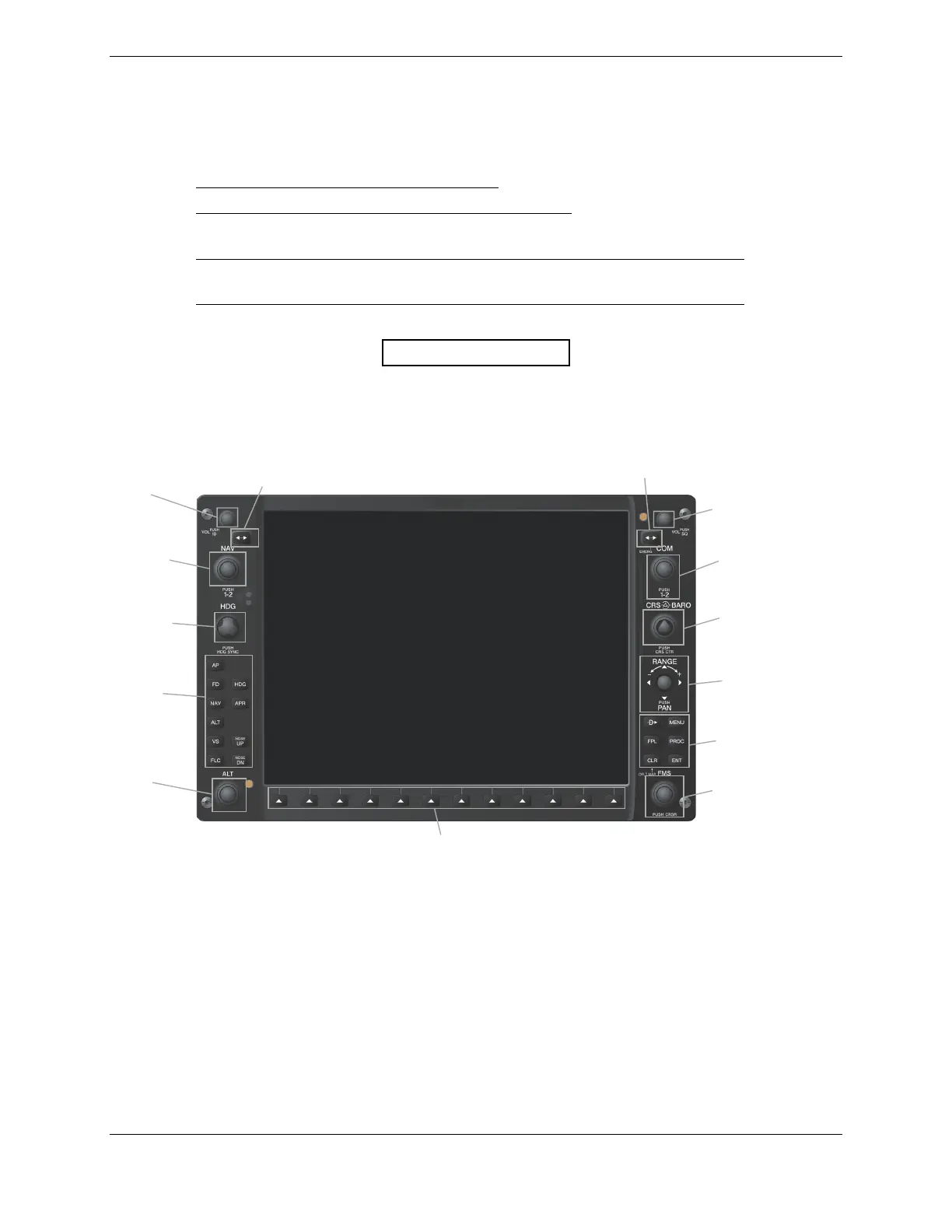
COM Frequency
Toggle Key
COM Frequency
Selector Knob
Course
(Inner)
/Baro
(Oute
Selector Knob
Map Panning/Range
Joystick
Navigation Systems
Controls
Flight Management Syste
(FMS) Knob
Multi-Function Softkeys (Numbered 1-12, left to right)
NAV Frequency
Toggle Key
AV Frequency
uner Knob
Heading Bug
Selector
NAV Volume/Ident
Knob
Altitude Selector
Knob
COM Volume/Squelch
Knob
GFC 700 AFCS
Controls
Figure 1-4. GDU 1040/1042 Control Interface



 To Next Page
 Loading...