– 122 –
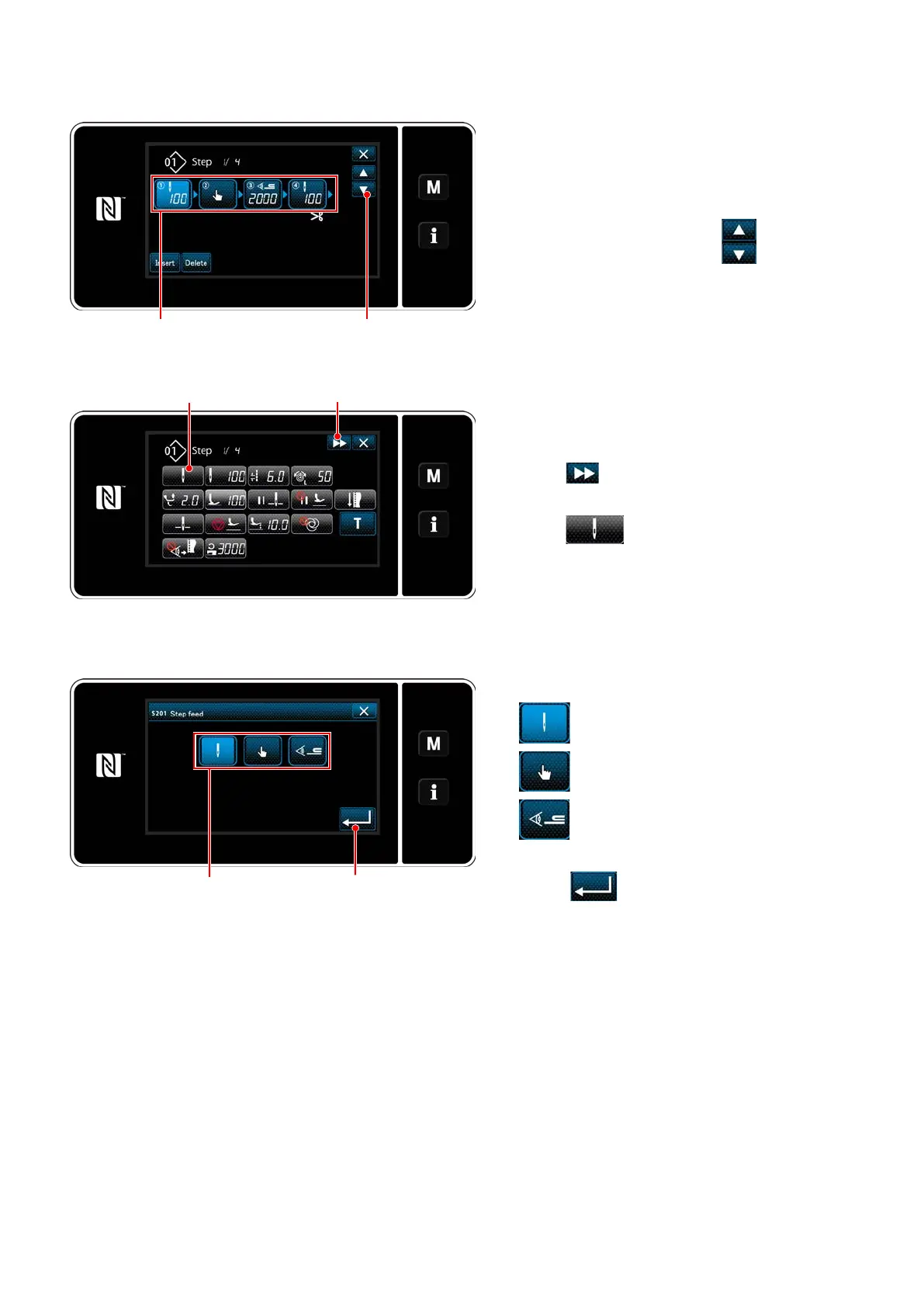
<Polygonal-shape stitching step edit screen>
②
Editing the number of stitches of polygonal shape stitching and the step changeover condition to
be satised by a new step
1) Step changeover condition is displayed in
❷
.
Press
❷
to place the number of stitches in the
selected state.
The screen returns to the previous one or ad-
vances to the next one with
❸
.
❷ ❸
❺ ❹
❻
❼
<Sewing data edit screen>
2) When the selected step is pressed again, the
"sewing data edit screen" is displayed.
When
❹
is pressed, the "sewing data edit
screen" for the next step is displayed.
When
❺
is pressed, the "step change-
over reference selection screen" is displayed.
3) Selecting step changeover reference
❻
.
: Number of stitches
: One-touch changeover
: Multi-layered section detection
4) When
❼
is pressed, the operation is
confirmed. Then, the screen returns to the
"sewing data edit screen".
<Step changeover reference selection screen>


 To Next Page
 Loading...