3-39
Common Operations > Using Various Functions
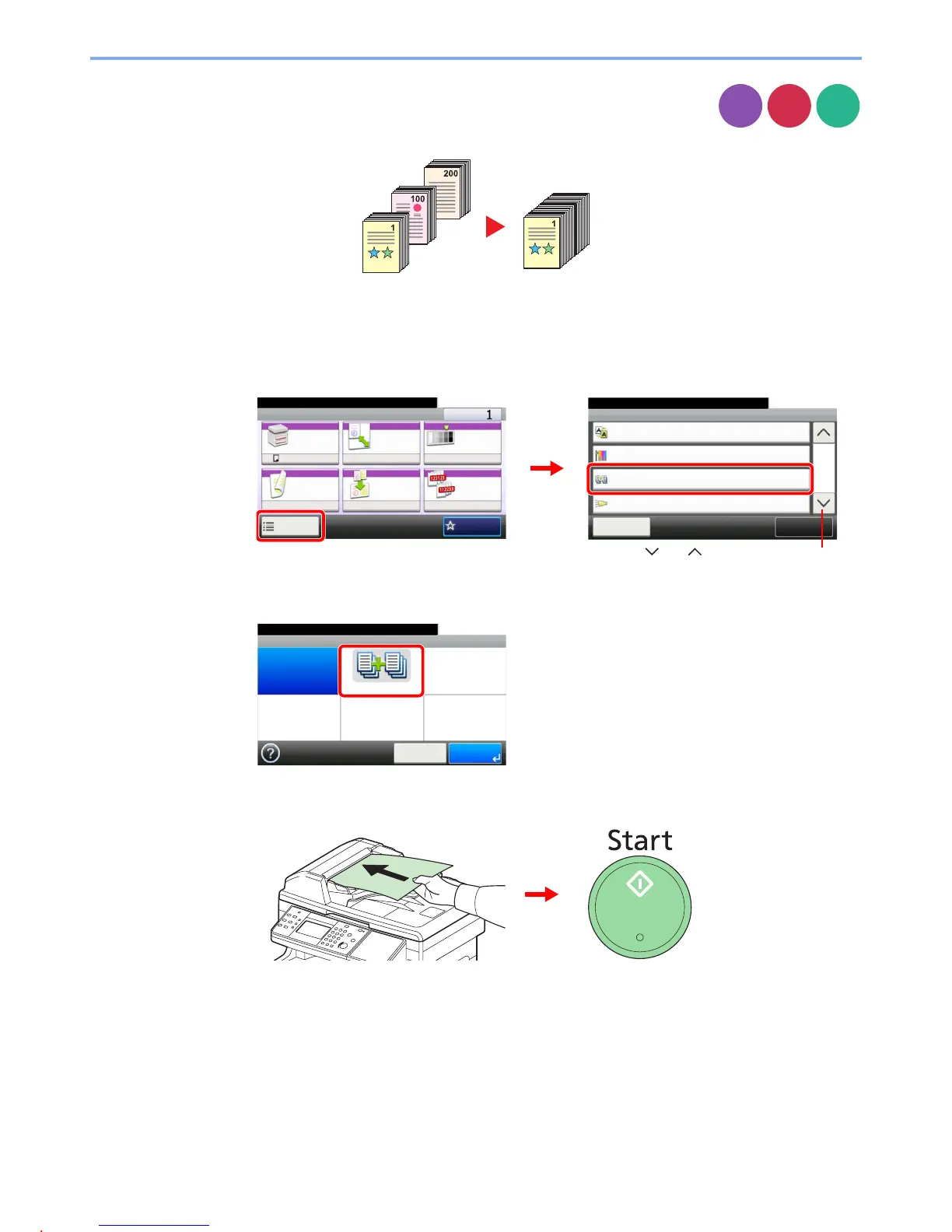
Continuous Scan
Scan a large number of originals in separate batches and then produce as one job. Originals will
be scanned continuously until you press [Finish Scan].
1
Display the screen.
1 Referring to Using Various Functions on page 3-33, display the screen.
2 Press [Functions] and then [Continuous Scan].
2
Select the function.
3
Scan the originals.
Load the original and press the Start key to start scanning.
Once the original has been scanned, load the next original and press the Start key. Use the
same procedure to scan any remaining originals.
Copy
Send
Scan to
USB
Ready to copy. (Full Color)
Functions
Close
10:10
Off
Background Density Adj.
3/4
Add/Edit
Shortcut
Saturation
0
Off
Continuous Scan
Job Finish Notice
Off
Ready to copy. (Full Color)
Copy Copies
Paper
Selection
Zoom Density
Duplex Combine Collate
1-sided>>1-sided
A4 100% Normal 0
OnOff
Functions
10:10
Favorites
GB0001_01
GB0002_02
2
1
Use [ ] or [ ] to scroll up and down.
Ready to copy. (Full Color)
Continuous Scan
Off On
10:10
Cancel OK
GB0043_00


 To Next Page
 Loading...








