3-27
Common Operations > Shortcuts
Editing and Deleting Shortcuts
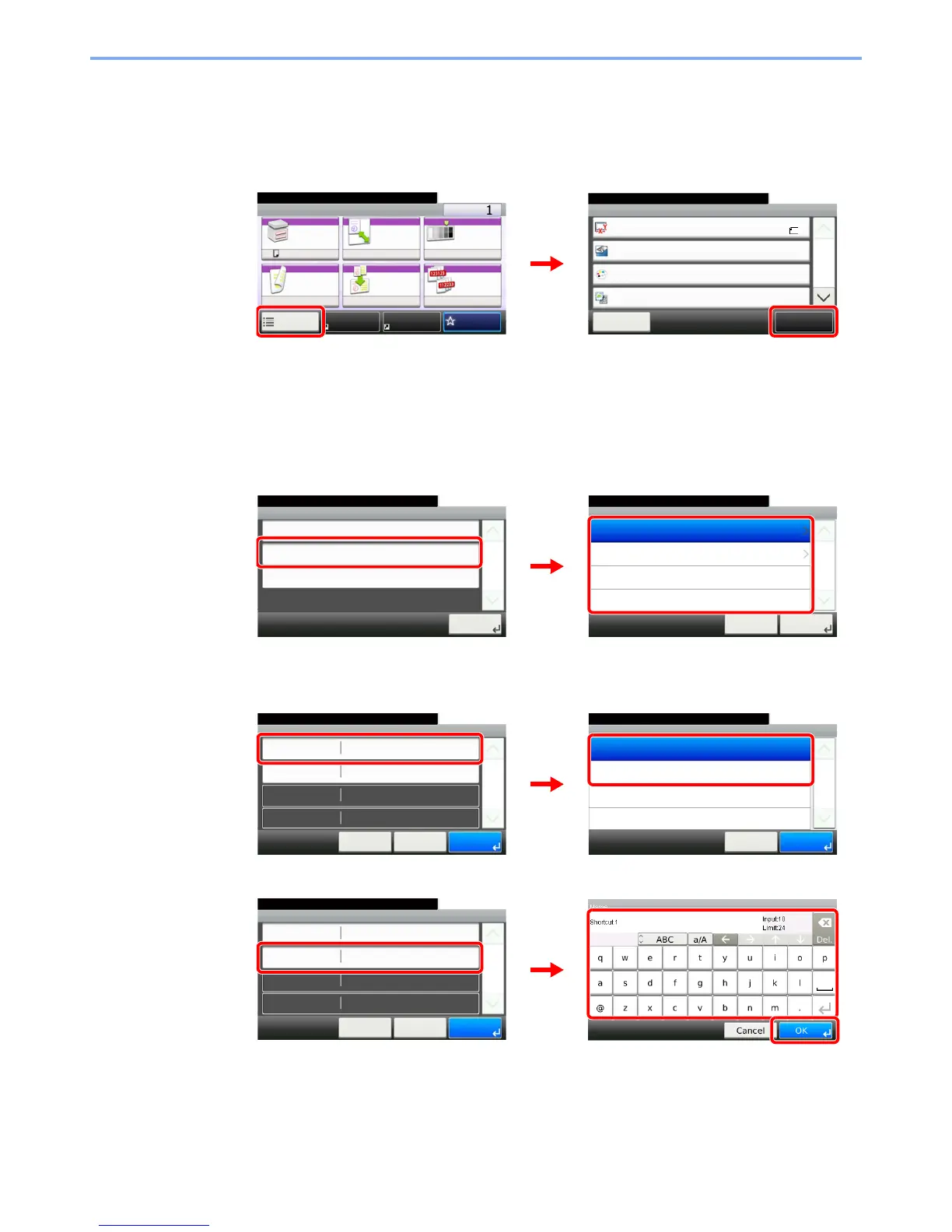
Change shortcut number/name or delete shortcut.
1
Display the screen.
Press [Functions] on the Copy, Send, or Document Box screen and then [Add/Edit Shortcut].
2
Edit or delete a shortcut.
To edit a shortcut
1 Select the shortcut type and number you wish to edit.
2 Edit the shortcut.
[No.]
[Name]
Ready to copy. (Full Color)
Functions
Original Size
Close
10:10
Original Orientation
Text+Photo
Full Color
Original Image
1/4
Add/Edit
Shortcut
Color Selection
A4
Top Edge on Left
Ready to copy. (Full Color)
Copy Copies
Paper
Selection
Zoom Density
Duplex Combine Collate
1-sided>>1-sided
100% Normal 0
OnOff
Functions
10:10
FavoritesShortcut 1 Shortcut 2
A4
GB0001_04
GB0002_00
12
Edit
10:10Ready to copy. (Full Color)
Private Shortcut 2
Private Shortcut 1
Cancel
1/1
Next >
Shared Shortcut 2
Shared Shortcut 1
Add/Edit Shortcut
Add
10:10
Edit
1/1
Close
Delete
GB0790_01
GB0796_00
1
2
Number
10:10Ready to copy. (Full Color)
Shortcut 2
Shortcut 1
Cancel
1/1
OK
Edit - Confirmation
Shortcut 1
10:10
Cancel
Ready to copy. (Full Color)
Name
Functions
Number
< Back
1/1
Save
Zoom
Shortcut 1
GB0797_00
GB0794_00
1
2
Edit - Confirmation
Shortcut 1
10:10
Cancel
Ready to copy. (Full Color)
Name
Functions
Number
< Back
1/1
Save
Zoom
Shortcut 1
3
GB0057_60
GB0797_00
2
1


 To Next Page
 Loading...








