7.Positiontheflexmodulecoverontheflexmodule.Ensurethattherailguidesonthebottomoftheflex
modulecoverengagetherailsontheflexmodule.Then,pushthecovertothefrontoftheflexmodule
untilitsnapsintoposition.
Figure32.Reinstallingtheflexmodulecover
Whattodonext:
•Toworkwithanotherpieceofhardware,gototheappropriatesection.
•Tocompletetheinstallationorreplacement,goto“Completingthepartsreplacement”onpage133.
Cardreader
Toinstallorreplaceacardreaderintheflexmodule,dothefollowing:
1.Prepareyourcomputer.See“Preparingyourcomputerandremovingthecomputercover”onpage61.
2.Removetheflexmodulefromthefrontofthecomputer.See“Deviceintheoptical-drivebay”onpage64.
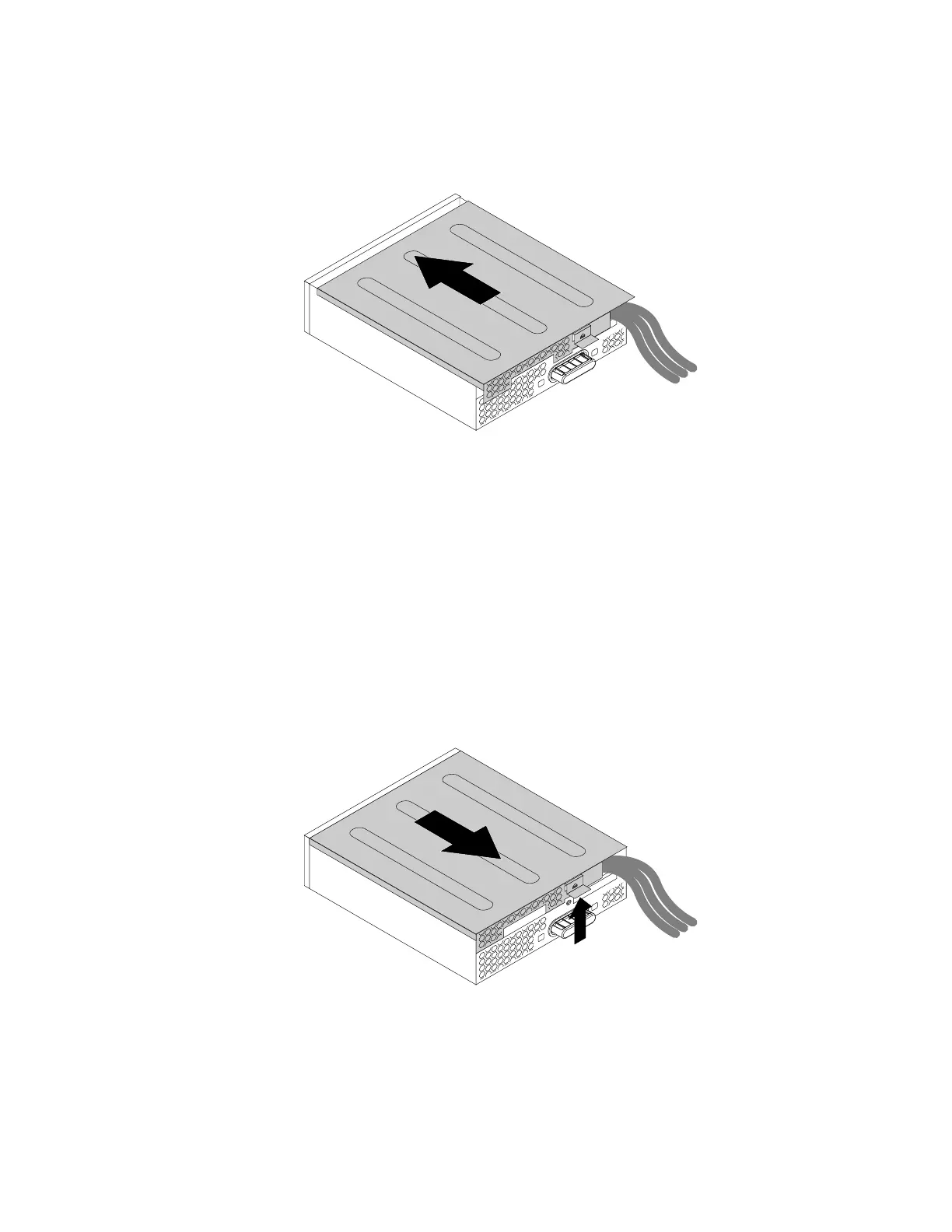
3.Lifttheclipontherearoftheflexmodule.Then,slidetheflexmodulecovertotherearoftheflex
moduletoremovethecover.
Figure33.Removingtheflexmodulecover
4.Ifyouarereplacingacardreader,dothefollowing:
a.Disconnectthecardreadercablefromthesystemboard.See“Partsonthesystemboard”onpage7.
Chapter7.Installingorreplacinghardware75


 To Next Page
 Loading...