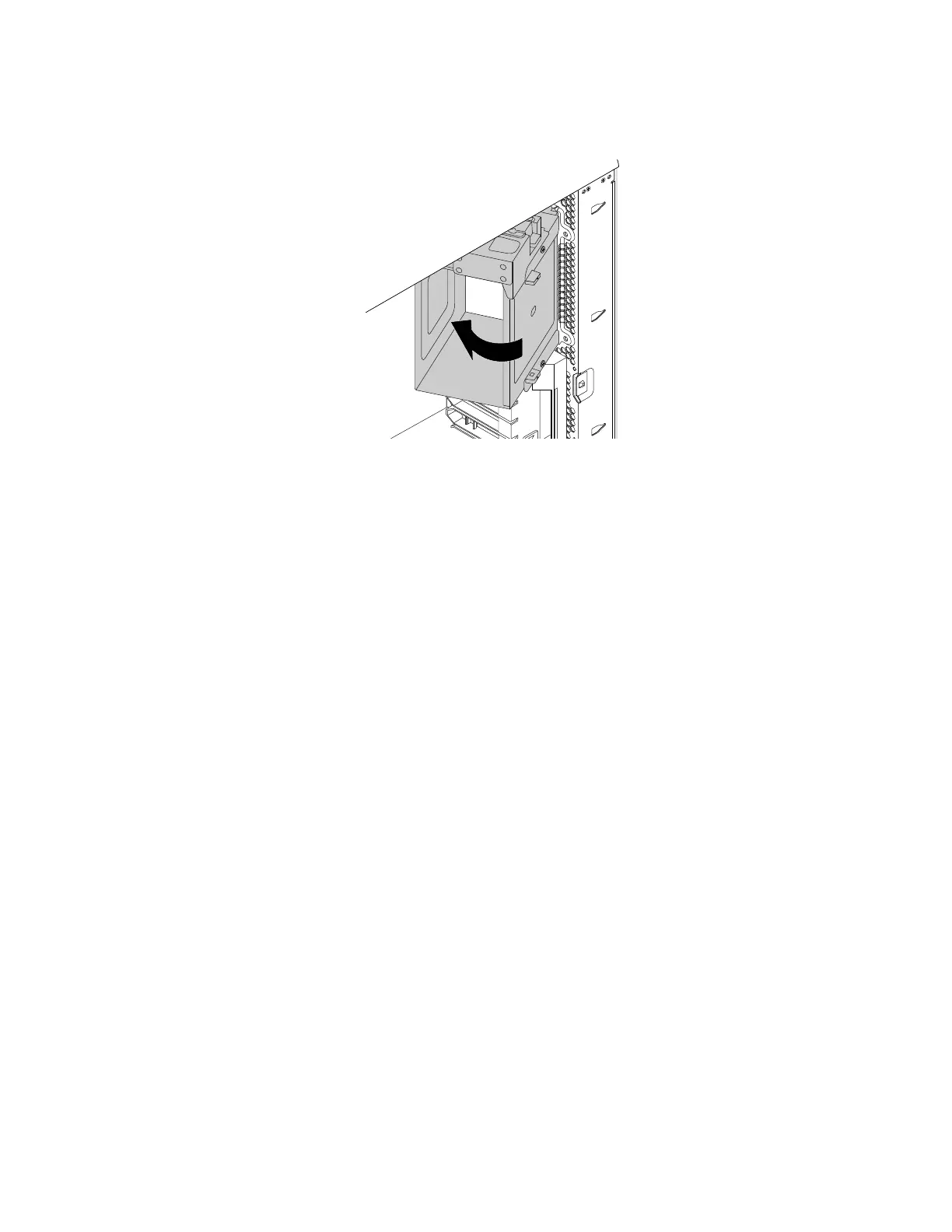
2.Pivottheoptical-drivebracketinwardasshownuntilitsnapsintoposition.
Figure45.Installingtheoptical-drivebracket
3.Reinstallthedirectcoolingairbaffle.See“Directcoolingairbaffle”onpage63.
Whattodonext:
•Toworkwithanotherpieceofhardware,gototheappropriatesection.
•Tocompletetheinstallationorreplacement,goto“Completingthepartsreplacement”onpage133.
Coverpresenceswitch
Attention:Donotopenyourcomputerorattemptanyrepairbeforereadingandunderstandingthe“Read
thisfirst:Importantsafetyinformation”onpagev.
Toreplacethecoverpresenceswitch,dothefollowing:
1.Prepareyourcomputer.See“Preparingyourcomputerandremovingthecomputercover”onpage61.
2.Removethedirectcoolingairbaffle.See“Directcoolingairbaffle”onpage63.
3.Removetheoptical-drivebracket.See“Optical-drivebracket”onpage79.
4.Locatethecoverpresenceswitch.See“Computercomponents”onpage7.
5.Disconnectthecoverpresenceswitchcablefromthesystemboard.See“Partsonthesystemboard”
onpage7.
Chapter7.Installingorreplacinghardware81


 To Next Page
 Loading...